
Plugin
Updated
WP Membership
WP Membership is a WordPress plugin for building and running a membership site. It lets you set up free and paid membership packages, take payments through PayPal or Stripe, and give members their own accounts, profiles and dashboards.
- Version
- 1.6.4
- Released
- Jul 20, 2025
- Type
- WordPress plugin
- Licence
- GPL
- Included in
- Every plan, or $3.99 on its own
- Topics
- Membership Plugins
What’s new in WP Membership 1.6.4
Version 1.6.4 · Jul 20, 2025
Latest
- FixedPatchstack issue fixed
What it does
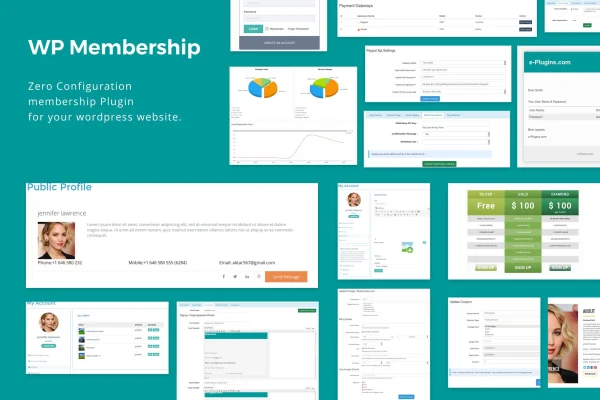
Running a membership site means juggling several jobs at once: deciding who can see what, collecting payments, handling signups and keeping members informed. This plugin brings those jobs into one place inside WordPress. You create membership packages that can be free, paid, free trial or paid trial, present them in pricing tables, and assign user roles based on the package a member chooses. Members can upgrade, downgrade or cancel on their own, and coupon codes are supported for signups.
On the member side, each person gets a personal dashboard, a social profile, privacy settings, password changes and an optional public profile page. Members can also insert and edit posts with custom fields, which suits sites built around user contributions. The interface is responsive and uses Ajax for membership actions. You can override the default templates, control redirects for registration, login, account and profile pages, send automated emails, and add new registrants to a Mailchimp list. It ships with 11 language files.
Best for
- Bloggers and creators offering members-only content
- Clubs and online communities with member profiles
- Educators and businesses selling paid subscription tiers
Features
Flexible membership packages
Create free, paid, free trial and paid trial membership types, then display them with pricing tables and customizable signup styles for each package.
PayPal and Stripe payments
Accept payments through PayPal Express Checkout or synchronized Stripe, with support for one-time, recurring, trial and variable payment setups.
Subscription changes and coupons
Members can upgrade, downgrade or cancel their subscriptions, and you can offer coupon codes and create user roles tied to membership packages.
Member dashboards and profiles
Each member gets a personal dashboard, social profile, privacy settings, password change options and a public profile page with redirect settings.
Member post submission
Members can insert, edit and manage posts with custom fields, which lets you build user-generated content into specific membership tiers.
Templates and page redirects
Override the default templates and set redirects for registration, login, my account and public profile pages to control how members move through the site.
Automated email notifications
Ready-made email templates cover welcome messages, password resets and order confirmations, so members get the right message at each step.
Mailchimp and translations
New registrants' emails can be added to Mailchimp automatically, and 11 language files are included, such as Russian, German, Japanese, Spanish and French.
Questions about WP Membership
Can I offer both free and paid memberships?
Yes. You can set up free, paid, free trial and paid trial membership types, and show them side by side in pricing tables. Each package can have its own signup style and an associated user role.
Which payment methods does it work with?
The plugin supports PayPal Express Checkout and Stripe. Between them you can handle one-time payments, recurring subscriptions, trials and variable payments, and members can use coupon codes when signing up.
Can members manage their own accounts?
Yes. Members get a personal dashboard where they can edit their profile, adjust privacy settings, change their password and upgrade, downgrade or cancel their subscription. Public profile pages are also available.
Does it connect to an email marketing service?
It includes a Mailchimp integration that adds new registrants' email addresses to your list automatically. It also sends its own automated emails for welcome messages, password resets and order confirmations.
Is WP Membership free?
The code of WP Membership is licensed under the GPL, so anyone may use, change and share it. GPL Feast is a paid service: a plan or a single purchase gives you the download and automatic updates. The developer's own support, licence key and online services are not included.
Which version of WP Membership is this?
Version 1.6.4, released Jul 20, 2025. New versions appear here when the developer publishes them, and members get them as automatic updates.
How do I update WP Membership?
Install the free GPL Feast Updater on your site and connect it with your API key. It installs new versions of WP Membership automatically and keeps a backup, so you can roll back.
You might also like






