
Plugin
Updated
WP Switchboard Pro
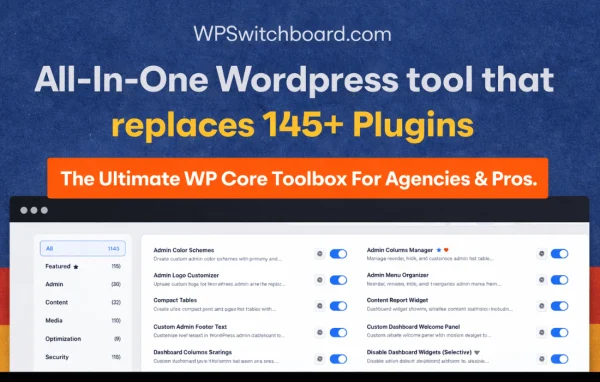
WP Switchboard Pro by WP Switchboard is a WordPress plugin that gathers more than 140 modular tools in one place. You switch on only the features you need, covering admin customization, content management, security, performance and everyday utilities.
- Version
- 1.10.0
- Released
- Jun 12, 2026
- Developer
- WP Switchboard
- Type
- WordPress plugin
- Licence
- GPL
- Included in
- Every plan, or $7.19 a year on its own
What’s new in WP Switchboard Pro 1.10.0
Version 1.10.0 · Jun 12, 2026
Latest
- NewResizable spacers & separators
- ImprovedShow More / Show Less menu
- FixedSoft-hiding broke submenus and added a blank gap
- ImprovedBalanced separator spacing
- FixedSwitchboard menu can no longer be hidden by accident
- FixedTwo-Factor login redirected to the homepage
What it does
Many WordPress sites end up running a long list of small plugins, each handling one task such as a redirect, a maintenance page or a custom login screen. This plugin brings those jobs together as individual modules. Each tool stays off until you enable it, so you only run what your site actually uses. That makes it easier to keep track of what is active and cuts down on the number of separate plugins you have to manage.
Inside the dashboard, a feature search lets you find a module by name and turn it on without hunting through menus. The tools cover admin menus, toolbars, user roles and branding, plus post and media handling, access controls, caching, lazy loading and database cleanup. It suits developers who build sites for clients and site owners who want a tidier backend, and its modular design is meant to work alongside custom themes and plugins.
Best for
- Site owners trying to reduce their number of plugins
- Freelancers and agencies managing client dashboards
- Developers who want modular admin and utility tools
Features
More than 140 modular tools
Pick from over 140 separate tools and enable only the ones your site needs, so unused features stay switched off.
Admin menu and branding controls
Adjust dashboard menus, toolbars and branding to shape the backend for yourself or your clients, including menu spacers and separators.
Content management tools
Handle posts and media with improved editing tools, bulk actions and easier ways to organize content in the dashboard.
Security and access tools
Manage user access, monitor suspicious activity and protect admin areas, with options such as two-factor login.
Performance modules
Turn on caching, lazy loading and database cleanup modules to help keep your WordPress install tidy and running smoothly.
Quick feature search
Search for any tool by name and enable it directly, without clicking through layers of settings menus.
Everyday utilities
Set up quick redirects, put the site into maintenance mode and control the custom login page from the same plugin.
User role management
Fine-tune permissions and access levels so each team member sees and edits only what their role allows.
WP Switchboard Pro older versions
- 1.9.0May 263 new, 2 improvements, 4 fixes
- 1.8.1Apr 3
- 1.7.2Mar 312 new, 1 improvement, 9 fixes, 2 security fixes
- 1.7.0Mar 202 new, 5 improvements, 2 fixes
- 1.6.0Feb 21
- 1.5.0Feb 20
- 1.4.0Feb 13
- 1.3.1Jan 26
Members and buyers of this product can download older versions.
Questions about WP Switchboard Pro
Will all 140+ tools run on my site at once?
No. The plugin is modular, so each tool stays inactive until you enable it. You can turn on a handful of features for a simple site or more for a complex one, and leave the rest switched off.
Can it replace some of the plugins I already use?
It covers many common single-purpose jobs, such as redirects, maintenance mode, custom login pages, caching, lazy loading, database cleanup and admin menu changes. Depending on what you currently run, some of those separate plugins may become unnecessary.
Can I customize the dashboard for clients?
Yes. You can adjust admin menus, toolbars, branding and user roles, which helps when you want clients to see a simpler backend with only the options relevant to them.
Does it include login security options?
It includes tools to manage user access, monitor suspicious activity and protect admin areas. Two-factor login is among the security features available.
Is WP Switchboard Pro free?
The code of WP Switchboard Pro is licensed under the GPL, so anyone may use, change and share it. GPL Feast is a paid service: a plan or a single purchase gives you the download and automatic updates. The developer's own support, licence key and online services are not included.
Which version of WP Switchboard Pro is this?
Version 1.10.0, released Jun 12, 2026. New versions appear here when the developer publishes them, and members get them as automatic updates.
How do I update WP Switchboard Pro?
Install the free GPL Feast Updater on your site and connect it with your API key. It installs new versions of WP Switchboard Pro automatically and keeps a backup, so you can roll back.
You might also like






