
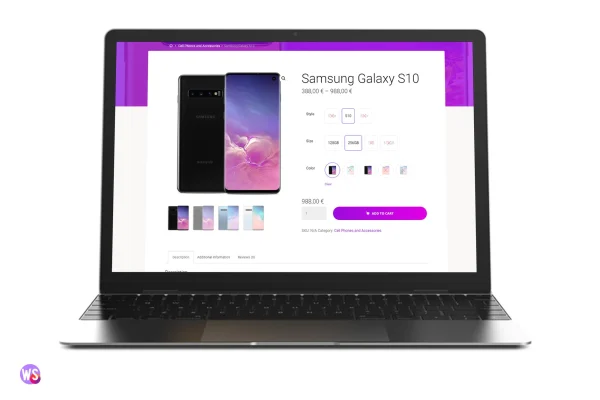
Plugin
Updated
WS - WooCommerce Swatches Pro Plugin
This WooCommerce plugin swaps the standard dropdown menus on variable products for clickable swatches. Shoppers pick colors, sizes and styles from colors, images, labels or multicolor options. Bulk generation and automatic detection help you set up swatches across a large catalog without configuring every product by hand.
- Version
- 1.0
- Released
- Mar 12, 2024
- Type
- WordPress plugin
- Requires
- WooCommerce
- Licence
- GPL
- Included in
- Every plan, or $3.99 on its own
What’s new in WS - WooCommerce Swatches Pro Plugin 1.0
Version 1.0 · Mar 12, 2024
Latest
What it does
Dropdown menus make shoppers read through a list to find the color or size they want, and they give no visual sense of what each option looks like. WS - WooCommerce Swatches Pro Plugin replaces those selectors with swatches, so customers see their choices at a glance. You can use solid colors, multicolor swatches, text labels, the first image of a variation or a custom image. Tooltips appear on hover to explain each option, and the plugin can show only the variation combinations that are actually available.
Setup is built for stores with many products. The plugin can detect your variation attributes and apply swatches to all of them in bulk, or you can set each attribute manually when you want finer control. A live preview shows how your swatches will look while you configure them. You can choose square or circular shapes, and the swatches are responsive and retina ready. The plugin requires WooCommerce and works only on variable products.
Best for
- WooCommerce stores selling products in multiple colors or sizes
- Clothing, footwear and accessory shops with variable products
- Store owners managing large catalogs of product variations
Features
Bulk swatch generation
Create color, multicolor, label, variation first image or custom image swatches in bulk, which cuts down setup time for stores with many variable products.
Several swatch types
Present variations as solid colors, multicolor swatches, text labels or images, and pick the format that suits each attribute in your catalog.
Automatic or manual application
Let the plugin detect and apply swatches for all variation attributes automatically, or customize each attribute yourself when you need precise control.
Tooltips on hover
Show a tooltip when a shopper hovers over a swatch, giving extra detail about the option without adding clutter to the product page.
Available combinations only
Display only in-stock or available variation combinations, so customers are less likely to select an option that cannot be purchased.
Square or circular shapes
Choose between square and circular swatch layouts to match the look of your store's product pages.
Responsive and retina ready
Swatches adapt to different screen sizes and stay sharp on high-resolution displays, from phones to large desktop monitors.
Live preview while configuring
Preview your swatch styles and variations as you set them up, so you can check the presentation before customers see it.
Questions about WS - WooCommerce Swatches Pro Plugin
Does this work on simple products or only variable ones?
It works only on variable products. The swatches replace the dropdown selectors that WooCommerce uses for variation attributes such as color, size or style, so simple products without variations are not affected.
Do I have to set up swatches for every product one at a time?
No. The plugin can automatically detect your variation attributes and apply swatches to all of them, and it supports bulk generation of color, multicolor, label and image swatches. You can still configure individual attributes manually when you want specific results.
Can I use product photos as swatches instead of colors?
Yes. Along with color, multicolor and label swatches, you can use the first image of a variation or a custom image you choose. This helps when a pattern or texture is easier to recognize from a picture than from a color block.
Will shoppers see options that are out of stock?
You can set the plugin to show only in-stock or available variation combinations. This keeps customers from choosing a combination that cannot be ordered and reduces confusion when they reach checkout.
Is WS - WooCommerce Swatches Pro Plugin free?
The code of WS - WooCommerce Swatches Pro Plugin is licensed under the GPL, so anyone may use, change and share it. GPL Feast is a paid service: a plan or a single purchase gives you the download and automatic updates. The developer's own support, licence key and online services are not included.
Which version of WS - WooCommerce Swatches Pro Plugin is this?
Version 1.0, released Mar 12, 2024. New versions appear here when the developer publishes them, and members get them as automatic updates.
How do I update WS - WooCommerce Swatches Pro Plugin?
Install the free GPL Feast Updater on your site and connect it with your API key. It installs new versions of WS - WooCommerce Swatches Pro Plugin automatically and keeps a backup, so you can roll back.
What does WS - WooCommerce Swatches Pro Plugin need?
WS - WooCommerce Swatches Pro Plugin needs WooCommerce installed and active.
You might also like






