
Plugin
Updated
XElementor Layered Heading
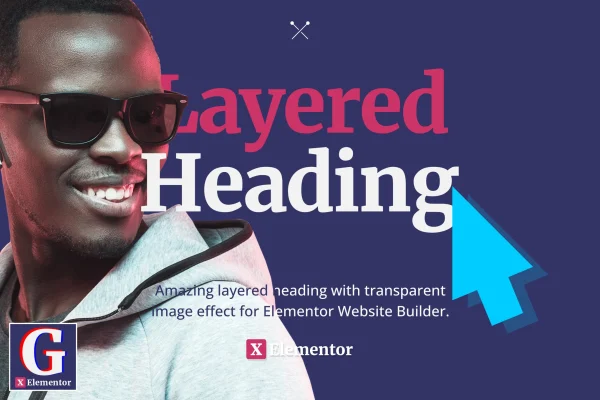
XElementor Layered Heading is a WordPress plugin for Elementor that builds layered headings. It combines transparent PNG images with text so the two overlap, creating the popular look where a subject appears woven into the type.
- Version
- 1.0.0
- Released
- Jun 30, 2022
- Type
- WordPress plugin
- Requires
- Elementor
- Licence
- GPL
- Included in
- Every plan, or $3.99 on its own
What’s new in XElementor Layered Heading 1.0.0
Version 1.0.0 · Jun 30, 2022
Latest
- NewInitial release.
What it does
Big, plain headings can feel flat, and recreating the layered text effect seen on modern design sites usually means editing images by hand or writing custom CSS. This plugin handles that inside Elementor. You place a heading, add a transparent PNG, and set how the image and text overlap so part of the subject sits in front of the letters and part behind. No coding is needed, and the result stays a readable heading.
The plugin is built specifically for the Elementor page builder, so it fits into the editor you already use for the rest of your pages. You can adjust layering styles and overlapping elements to match your brand and theme. Layered headings are responsive and retina ready, so they display sharply on desktops, tablets and phones. It suits hero sections, portfolio intros, campaign pages and any spot where a heading should draw attention to a main message.
Best for
- Web designers building trendy Elementor landing pages
- Portfolio and creative blog sites
- Corporate sites wanting more visual headings
Features
Text and image layering
Overlap transparent PNG images with heading text so the subject appears intertwined with the letters, producing a modern layered typography effect.
Built for Elementor
Works inside the Elementor page builder, letting you set up and customize layered headings visually without writing any code.
Customizable layering effects
Adjust layering styles and how elements overlap so each heading matches your brand's look and the theme of your site.
Responsive display
Layered headings adapt to desktops, tablets and mobile screens, keeping the overlap effect intact across different device sizes.
Retina ready output
Headings are designed to look sharp on high resolution displays, so text and images stay crisp on modern screens.
Readable layered text
The layering is designed to keep heading text clear and easy to read, so your message comes through even with images overlapping it.
Questions about XElementor Layered Heading
Do I need Elementor to use this plugin?
Yes. The plugin is designed specifically for the Elementor page builder and requires Elementor to be active. Layered headings are created and customized from within the Elementor editor.
What kind of images work for the layered effect?
The effect is built around transparent PNG images. A PNG with a cut out subject and a transparent background lets the image overlap the heading text so the subject appears to sit in and around the letters.
Will the layered headings look right on phones?
The layered headings are responsive and retina ready, so they are designed to display sharply on desktops, tablets and mobile screens while keeping the text readable.
Can I match the headings to my site's style?
Yes. You can adjust the layering styles and overlapping elements to fit your brand's aesthetic and your website's theme, all without writing code.
Is XElementor Layered Heading free?
The code of XElementor Layered Heading is licensed under the GPL, so anyone may use, change and share it. GPL Feast is a paid service: a plan or a single purchase gives you the download and automatic updates. The developer's own support, licence key and online services are not included.
Which version of XElementor Layered Heading is this?
Version 1.0.0, released Jun 30, 2022. New versions appear here when the developer publishes them, and members get them as automatic updates.
How do I update XElementor Layered Heading?
Install the free GPL Feast Updater on your site and connect it with your API key. It installs new versions of XElementor Layered Heading automatically and keeps a backup, so you can roll back.
What does XElementor Layered Heading need?
XElementor Layered Heading needs Elementor installed and active.
You might also like






