Plugin
Updated
XT Variation Swatches Pro
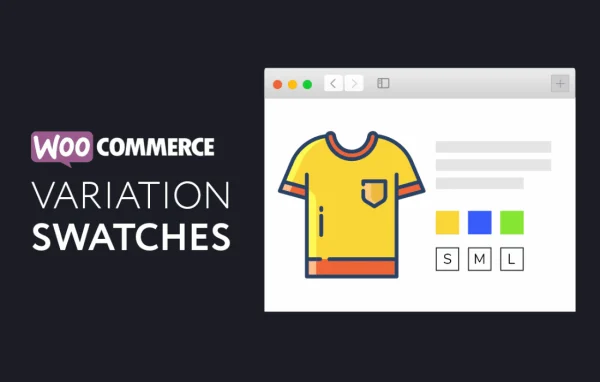
XT Variation Swatches for WooCommerce Pro by XplodedThemes is a WooCommerce plugin that turns variation dropdowns into clickable swatches. Shoppers pick colors, sizes or styles from color, image or label swatches, so they can see the available choices at a glance.
- Version
- 1.9.11
- Released
- Sep 16, 2026
- Developer
- XT Plugins
- Type
- WordPress plugin
- Requires
- WooCommerce
- Licence
- GPL
- Included in
- Every plan, or $3.99 on its own
What’s new in XT Variation Swatches Pro 1.9.11
Version 1.9.11 · Sep 16, 2026
Latest
- ImprovedUpdate XT Framework 2.5.15, preventing the "Follow Us" widget from being injected twice in XT admin pages, restoring the Browse Plugins grid layout on modern WordPress, keeping the grid at three columns on very large screens, and updating the bundled Freemius SDK to v2.13.4
What it does
Standard WooCommerce variation dropdowns make shoppers read through text lists to find a color or size. This plugin replaces those menus with visual swatches in three types: color, image and label. It can convert existing dropdowns into label or image swatches automatically, which cuts down setup work on stores with many variable products. You can also mix swatch types on the same product, for example color swatches for shade and label swatches for size.
Styling is handled through a live preview customizer, so you can adjust shapes such as square, circle and rounded and see the result as you go. Global settings set the default look, and per-product overrides cover items that need something different. Swatches can appear on catalog pages and in quick view modals, including Woo Quick View, and they work in catalog mode for stores that show products without checkout. The plugin requires WooCommerce.
Best for
- WooCommerce stores selling clothing, shoes or products in many colors
- Catalog mode sites displaying variations without checkout
- Agencies building WooCommerce shops with custom product pages
Features
Color, image and label swatches
Three swatch types let you show variations as color chips, product images or text labels, and you can combine them on a single product.
Automatic dropdown conversion
Existing variation dropdowns are converted into label or image swatches automatically, so you do not have to configure every attribute by hand.
Shape options and live preview
Pick square, circle or rounded swatch styles and adjust them in a live preview customizer that shows changes as you make them.
Attribute label controls
Position, hide or show attribute labels and the variation reset link to keep the product options area tidy.
Catalog and quick view display
Show swatches on product catalog pages and inside quick view modals, with support for Woo Quick View and XT Woo Floating Cart.
Customizable tooltips
Add tooltips to swatches and set their background color, text color and image size to give shoppers extra detail on hover.
Global settings with overrides
Set swatch appearance once for the whole store, then override it for individual products that need a different presentation.
Responsive and keyboard friendly
Swatches adapt to different screen sizes and support keyboard navigation, and attributes can be quick edited from the interface.
XT Variation Swatches Pro older versions
- 1.9.10Jul 171 improvement
- 1.9.9Jul 171 new, 1 improvement, 1 fix
- 1.9.8Mar 281 improvement
- 1.9.7Mar 11, 2025
- 1.9.6Nov 9, 2024
- 1.9.3Sep 15, 2024
- 1.9.2Jul 30, 2024
- 1.9.1Feb 2, 2024
- 1.9.0Aug 26, 2023
- 1.8.8Jul 25, 2023
Members and buyers of this product can download older versions.
11 older versions in all. If you need one that is not listed, ask support.
Questions about XT Variation Swatches Pro
Do I have to set up every swatch manually?
No. The plugin can automatically convert standard variation dropdowns into label or image swatches. You can then fine tune the look globally or override settings on specific products where you want a different swatch type or style.
Can one product use different swatch types at the same time?
Yes. You can mix image, color and label swatches on the same product. A common setup is color or image swatches for a shade attribute and label swatches for a size attribute.
Will swatches show on shop pages and in quick view?
Yes. Swatches can be displayed in product catalogs and in quick view modals, including Woo Quick View. The plugin also works with XT Woo Floating Cart and supports catalog mode for stores without checkout.
Can shoppers use the swatches on phones and with a keyboard?
The swatches are responsive, so they adapt to different devices, and they support keyboard navigation. You can also add tooltips with custom colors and image sizes to give more detail about each option.
Is XT Variation Swatches Pro free?
The code of XT Variation Swatches Pro is licensed under the GPL, so anyone may use, change and share it. GPL Feast is a paid service: a plan or a single purchase gives you the download and automatic updates. The developer's own support, licence key and online services are not included.
Which version of XT Variation Swatches Pro is this?
Version 1.9.11, released Sep 16, 2026. New versions appear here when the developer publishes them, and members get them as automatic updates.
How do I update XT Variation Swatches Pro?
Install the free GPL Feast Updater on your site and connect it with your API key. It installs new versions of XT Variation Swatches Pro automatically and keeps a backup, so you can roll back.
What does XT Variation Swatches Pro need?
XT Variation Swatches Pro needs WooCommerce installed and active.
More from XT Plugins