
Plugin
Updated
ZF WordPress Accordion
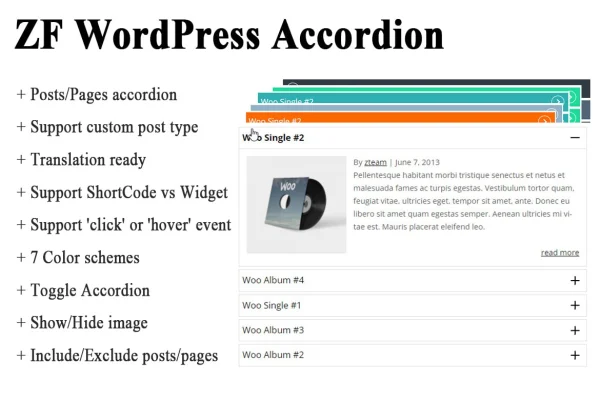
ZF WordPress Accordion is a WordPress plugin that builds collapsible accordions and toggles from your pages, posts and custom post types. It helps you fit FAQs, knowledge bases and long content sections into a compact layout that visitors can open one piece at a time.
- Version
- 1.0.0
- Released
- May 2, 2023
- Type
- WordPress plugin
- Licence
- GPL
- Included in
- Every plan, or $3.99 on its own
What’s new in ZF WordPress Accordion 1.0.0
Version 1.0.0 · May 2, 2023
Latest
What it does
Long pages full of questions, guides or reference content can be hard to scan. This plugin pulls existing WordPress content (posts, pages or custom post types) into collapsible sections, so readers see a tidy list of titles and expand only what they need. You choose which items appear by including or excluding specific posts or pages, and you can cap how many items show in a single accordion to keep things readable.
Each accordion can behave as a classic accordion or as a set of independent toggles, and sections can open on click or on hover. Styling comes from seven built-in color schemes plus arrow alignment settings, so no coding is needed to match your design. You place accordions with a shortcode or a widget, the layout is responsive on mobile screens, and the plugin is translation ready for sites in other languages.
Best for
- Sites with FAQ, Q&A or knowledge base pages
- Bloggers organizing long posts into collapsible sections
- Developers displaying custom post types in compact lists
Features
Works with any content type
Create accordions from posts, pages and custom post types, so existing content can be displayed in collapsible sections without rewriting it.
Accordion or toggle mode
Pick classic accordion behavior, where one section opens at a time, or toggle behavior, where visitors can open sections independently.
Click or hover triggers
Decide whether sections open when a visitor clicks a title or simply hovers over it, depending on how you want navigation to feel.
Seven color schemes
Style accordions quickly with seven preset color schemes, and adjust arrow alignment to suit your layout, all without writing code.
Shortcode and widget placement
Insert an accordion inside page content with a shortcode, or add one to a sidebar or other widget area using the included widget.
Precise content selection
Include or exclude specific posts and pages, and limit the number of items shown so each accordion stays focused and easy to read.
Default open items
Choose which posts or pages are already expanded when the page loads, pointing visitors to the most relevant section first.
Responsive and translation ready
Accordions adapt to mobile screens, and the plugin is translation ready for multilingual websites.
Questions about ZF WordPress Accordion
Can I build an accordion from my existing posts instead of typing content again?
Yes. The plugin creates accordions from posts, pages and custom post types you already have. You can include or exclude specific items and limit how many appear, so you control exactly which content shows up in each accordion.
Where can I place the accordions on my site?
You can add an accordion to page or post content using a shortcode, or place one in a widget area with the included widget. That covers both in-content sections and sidebar style lists.
Do I need to know CSS to make the accordions match my site?
No coding is required for the basic styling. You can pick from seven default color schemes and set the arrow alignment. The layout is also responsive, so accordions adjust to smaller screens on their own.
Can visitors open more than one section at a time?
That depends on the mode you choose. Accordion mode keeps one section open at a time, while toggle mode lets visitors open several sections independently. You can also set sections to open on click or hover, and choose items that start expanded.
Is ZF WordPress Accordion free?
The code of ZF WordPress Accordion is licensed under the GPL, so anyone may use, change and share it. GPL Feast is a paid service: a plan or a single purchase gives you the download and automatic updates. The developer's own support, licence key and online services are not included.
Which version of ZF WordPress Accordion is this?
Version 1.0.0, released May 2, 2023. New versions appear here when the developer publishes them, and members get them as automatic updates.
How do I update ZF WordPress Accordion?
Install the free GPL Feast Updater on your site and connect it with your API key. It installs new versions of ZF WordPress Accordion automatically and keeps a backup, so you can roll back.
You might also like






