Theme
Updated
Entrepreneur Theme
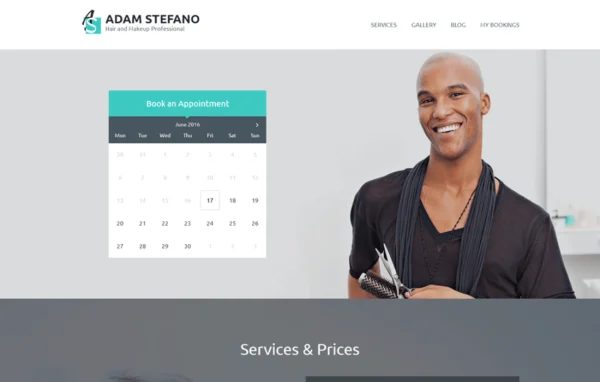
Entrepreneur is a WordPress business theme by MotoPress built for service-driven companies. It comes with an Appointment Booking plugin so clients can schedule visits right on your site, and it gives you Customizer controls and a page builder for shaping the look of every page.
- Version
- 1.3.3
- Released
- Jul 2, 2026
- Developer
- MotoPress
- Type
- WordPress theme
- Licence
- GPL
- Included in
- Every plan, or $4.79 a year on its own
What’s new in Entrepreneur Theme 1.3.3
Version 1.3.3
Latest
- FixedBugfixes and improvements.
What it does
Service businesses usually need two things from a website: a clear place to present what they offer and a way for clients to book time. This theme handles both. The included booking system lets guests schedule appointments with or without registering, and you manage calendars and bookings from the WordPress backend. Payments for appointments can run through WooCommerce, which also covers refunds, so the booking and payment steps stay on your own site.
Design work happens in the WordPress Customizer and in MotoPress Page Builder Pro. In the Customizer you pick colors, upload a logo, set widgets, choose from Google Fonts and reorder or hide front page sections while watching a live preview. The page builder adds drag and drop editing with a range of content elements, so you can build custom layouts without code. It suits consultancies, salons, agencies and businesses with several locations, and the layout is responsive for phones and tablets.
Best for
- Consultancies that take client appointments online
- Salons and other service businesses with booking needs
- Agencies or multi-location businesses presenting services and projects
Features
Built-in appointment booking
An included Appointment Booking plugin lets guests book appointments through your site, with or without creating an account first.
WooCommerce appointment payments
Process appointment payments through WooCommerce, including online transactions and refunds handled directly within your WordPress site.
Backend booking management
Manage appointments, calendars and bookings from the WordPress dashboard using an interface designed for day to day scheduling work.
Drag and drop page builder
MotoPress Page Builder Pro lets you create and edit pages by dragging content elements into place, with no coding required.
Customizer with live preview
Change colors, upload your logo and adjust widgets in the WordPress Customizer, seeing each change in real time before you publish.
Reorderable front page sections
Rearrange, show or hide the default front page sections visually, so the content you care about most appears first.
Ready content blocks
Pre-designed blocks present your services, projects, customer testimonials and location, and each one is easy to update as your business changes.
Google Fonts and color options
Pick typography from the Google Fonts library and set header text, accent and background colors to match your brand.
Entrepreneur Theme older versions
- 1.3.2Dec 6, 20231 fix
Members and buyers of this product can download older versions.
Questions about Entrepreneur Theme
Can clients book appointments without creating an account?
Yes. The included Appointment Booking plugin allows guests to book appointments with or without registration, so you can choose how much information you require before someone schedules a visit.
How are payments for appointments handled?
Appointment payments are processed through WooCommerce integration. That lets you take online payments for bookings and handle refunds within your own site instead of sending clients somewhere else to pay.
Do I need to know code to customize the design?
No. Colors, logo, widgets, fonts and front page sections are all set in the WordPress Customizer with a live preview, and MotoPress Page Builder Pro gives you drag and drop page editing.
Will the site work on phones and tablets?
The theme uses a responsive, mobile-friendly design, so clients can browse your services and book appointments from smartphones and tablets as well as desktop computers.
Is Entrepreneur Theme free?
The code of Entrepreneur Theme is licensed under the GPL, so anyone may use, change and share it. GPL Feast is a paid service: a plan or a single purchase gives you the download and automatic updates. The developer's own support, licence key and online services are not included.
Which version of Entrepreneur Theme is this?
Version 1.3.3, released Jul 2, 2026. New versions appear here when the developer publishes them, and members get them as automatic updates.
How do I update Entrepreneur Theme?
Install the free GPL Feast Updater on your site and connect it with your API key. It installs new versions of Entrepreneur Theme automatically and keeps a backup, so you can roll back.
More from MotoPress