
Plugin
Updated
Advanced Save and Continue
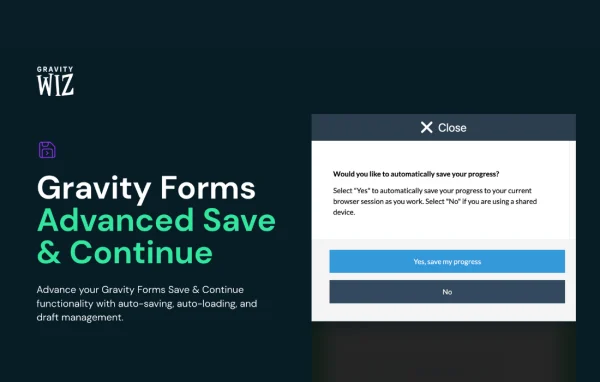
Advanced Save and Continue by Gravity Wiz is a Gravity Perks add-on for Gravity Forms. It saves form data automatically as people fill it in and reloads their last draft when they come back, so long applications, surveys and registrations can be finished across several visits.
- Version
- 1.0.40
- Released
- Sep 17, 2026
- Developer
- Gravity Perks
- Type
- WordPress plugin
- Licence
- GPL
- Included in
- Every plan, or $5.59 a year on its own
What’s new in Advanced Save and Continue 1.0.40
Version 1.0.40 · Sep 17, 2026
Latest
- FixedFixed an issue where draft Nested Form entries could be incorrectly attached to another entry on a Gravity Flow Workflow step.
What it does
Long forms are easy to abandon. Someone starts a job application or a multi-page survey, gets interrupted, closes the tab or hits a session timeout, and their answers are gone. Gravity Forms has a built-in Save and Continue option, but it relies on the user remembering to save. This add-on goes further by saving entries continuously in the background, then repopulating the form with the latest draft when the person returns.
Users can also keep more than one draft, with an interface for viewing, resuming, deleting or starting new ones. A shortcode lets you place a draft list on account pages or customer dashboards. You can hide the default Save and Continue link, show confirmation messages inline, allow draft sharing between users, and use it with Conversational Forms. Developers get PHP and JavaScript filters for adjusting draft titles, markup and auto-save behavior.
Best for
- Sites collecting job applications through Gravity Forms
- Membership and registration sites with long signup forms
- Agencies building multi-page surveys for clients
Features
Automatic progress saving
Form data is saved continuously as users type, so leaving the page or hitting a session timeout does not wipe out their answers.
Draft auto-reload
When a user returns, the form is repopulated with their last saved draft so they can carry on without restoring anything by hand.
Multiple draft management
Users can view, resume, delete or start new drafts through a simple interface, which helps when one form is filled out more than once.
Draft list shortcode
Place a customizable list of drafts anywhere on your site, such as a customer dashboard or account page, so users can find unfinished forms.
Configurable interface options
Hide the default Save and Continue link or show confirmation messages inline to match how your forms and pages are set up.
Shared drafts between users
When enabled, drafts can be shared among users, allowing teams or shared accounts to work on the same form submission together.
Conversational Forms support
Saving and draft features also work with Gravity Forms Conversational Forms, so one-question-at-a-time layouts keep progress too.
Developer filters and hooks
PHP and JavaScript filters let developers customize draft titles, markup, auto-save behavior and other details to fit a specific build.
Advanced Save and Continue older versions
- 1.0.39May 221 fix
- 1.0.38Feb 131 fix
- 1.0.37Feb 61 fix
- 1.0.36Jan 22
- 1.0.35Dec 18, 2025
- 1.0.34Jun 18, 2025
- 1.0.33May 15, 2025
- 1.0.32Apr 24, 2025
- 1.0.31Feb 13, 2025
- 1.0.30Feb 5, 2025
Members and buyers of this product can download older versions.
32 older versions in all. If you need one that is not listed, ask support.
Questions about Advanced Save and Continue
How is this different from the Save and Continue option in Gravity Forms?
The built-in option depends on users choosing to save. This add-on saves form data automatically as people fill it in and reloads the last draft when they return. It also adds multiple draft management, a draft list shortcode and options like hiding the default Save and Continue link.
Can users keep more than one draft of the same form?
Yes. Users can view their drafts, resume any of them, delete ones they no longer need or start a fresh draft. You can also display a draft list on pages like a customer dashboard using the included shortcode.
Can several people work on one form submission?
When draft sharing is enabled, drafts can be shared among users. That makes it possible for a team, or several people using a shared account, to collaborate on completing the same form.
Does it work with Conversational Forms?
Yes. Auto-saving and draft loading are supported in Gravity Forms Conversational Forms, so forms that present one question at a time keep user progress the same way standard forms do.
Is Advanced Save and Continue free?
The code of Advanced Save and Continue is licensed under the GPL, so anyone may use, change and share it. GPL Feast is a paid service: a plan or a single purchase gives you the download and automatic updates. The developer's own support, licence key and online services are not included.
Which version of Advanced Save and Continue is this?
Version 1.0.40, released Sep 17, 2026. New versions appear here when the developer publishes them, and members get them as automatic updates.
How do I update Advanced Save and Continue?
Install the free GPL Feast Updater on your site and connect it with your API key. It installs new versions of Advanced Save and Continue automatically and keeps a backup, so you can roll back.
More from Gravity Perks






