Plugin
Updated
Alert Bars
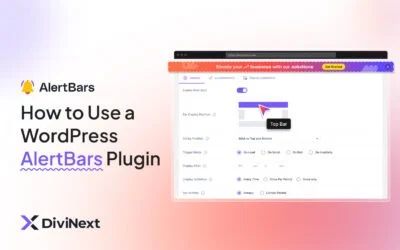
Alert Bars by Divi Next is a WordPress plugin for adding notification bars to your site. It lets you announce promotions, share updates or point visitors to a call to action, with styling, scheduling and targeting controls that work alongside Divi.
- Version
- 2.1.0
- Released
- Jul 2, 2026
- Developer
- Divi Next
- Type
- WordPress plugin
- Licence
- GPL
- Included in
- Every plan, or $3.99 on its own
What’s new in Alert Bars 2.1.0
Version 2.1.0
Latest
- NewFull support for Divi 5
- NewAlert Bars Demos tab now available in the Layout Modal
- NewVertical top and transform options for left/right positioned alert bars
- NewClose button border styling controls
- FixedAlert bar styling on custom post type (CPT) pages
- FixedDivi WooCommerce plugin compatibility class redeclaration fatal error on Divi 5 alert bar edit page
- ImprovedReset icon alignment in Customization tab
What it does
Most sites need a simple way to tell visitors about a sale, an event or a change in hours without building a new page or editing a theme file. This plugin gives you a dedicated place to create alert bars, style them to match your brand and decide when they appear. You can adjust colors, fonts and layouts, add more than one call-to-action button, and preview your changes in real time as you edit, with no coding needed.
Beyond styling, you get control over who sees each bar and when. Alerts can be scheduled for time-sensitive promotions or announcements, and targeted by page, user role or referral source. Bars can be sticky or dismissible, and they can sit at the top of the page or be positioned on the left or right with vertical and transform options. It supports Divi 5, and a demos tab in the Layout Modal gives you starting points to work from.
Best for
- Divi sites announcing sales, events or limited-time offers
- Agencies managing branded notices across client Divi builds
- Site owners promoting newsletter sign-ups without coding
Features
Custom colors, fonts and layouts
Adjust the colors, fonts and layout of each alert bar so it matches your site's branding and fits in with the rest of your design.
Multiple call-to-action buttons
Add more than one call-to-action button to a bar, so you can send visitors to an offer, a sign-up form or another page.
Scheduled display
Set time-based display controls to show alerts only during a promotion, event or announcement period, then have them stop appearing afterward.
Page, role and referral targeting
Show specific alerts on chosen pages, to certain user roles, or to visitors arriving from particular referral sources for more relevant messaging.
Sticky and dismissible options
Choose whether a bar stays fixed in view as visitors scroll or can be closed, with border styling controls for the close button.
Side positioning controls
Place alert bars on the left or right of the screen, using vertical top and transform options to fine-tune where they sit.
Real-time preview
See your edits as you make them, so you can check colors, text and layout before the bar goes live on your site.
Demo layouts in Divi
Open the Alert Bars Demos tab in the Divi Layout Modal to start from a ready-made design instead of building from scratch.
Alert Bars older versions
- 1.1.2Nov 28, 20256 fixes
Members and buyers of this product can download older versions.
Questions about Alert Bars
Does Alert Bars work with Divi 5?
Yes. The plugin includes full support for Divi 5, and it also adds an Alert Bars Demos tab to the Layout Modal so you can pick a starting design from inside Divi.
Can I show different alerts to different visitors?
Yes. You can target alerts by page, by user role or by referral source. That lets you show one message to logged-in members, another on a product page, and another to people coming from a specific site.
Can visitors close the alert bar?
You can make a bar dismissible so visitors can close it, or make it sticky so it stays visible while they scroll. There are also styling controls for the close button's border.
Do I need to write code to set up an alert?
No coding is required. You design bars through the plugin's interface, adjusting colors, fonts, layouts and buttons, and a real-time preview shows the result as you work.
Is Alert Bars free?
The code of Alert Bars is licensed under the GPL, so anyone may use, change and share it. GPL Feast is a paid service: a plan or a single purchase gives you the download and automatic updates. The developer's own support, licence key and online services are not included.
Which version of Alert Bars is this?
Version 2.1.0, released Jul 2, 2026. New versions appear here when the developer publishes them, and members get them as automatic updates.
How do I update Alert Bars?
Install the free GPL Feast Updater on your site and connect it with your API key. It installs new versions of Alert Bars automatically and keeps a backup, so you can roll back.
More from Divi Next