Plugin
Updated
VariSwatch
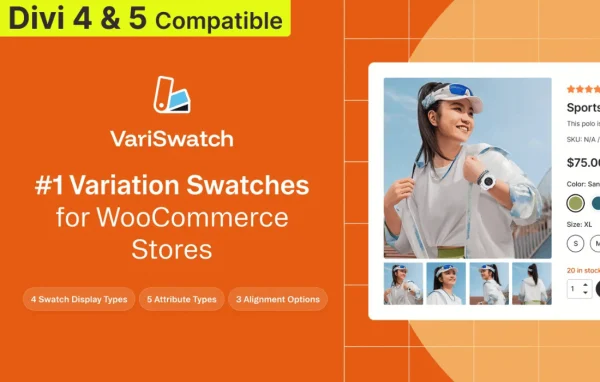
VariSwatch is a WooCommerce plugin that replaces the standard variation dropdown menus on product pages with clickable swatches. Shoppers pick colors, images, labels or buttons instead of scrolling through a list, which makes choosing a size, color or style clearer at a glance.
- Version
- 1.3.0
- Released
- Jun 22, 2026
- Developer
- Divi Next
- Type
- WordPress plugin
- Licence
- GPL
- Included in
- Every plan, or $3.99 on its own
What’s new in VariSwatch 1.3.0
Version 1.3.0 · Jun 22, 2026
Latest
- NewImage variation swatches.
- NewDual color variation swatches.
- NewProduct-based swatch customization (override display type, image size, and per-term type from each product).
- NewPer-display-type customization options.
- NewShow remaining stock quantity for attribute variations.
What it does
Default WooCommerce variable products show options in dropdown menus, which can hide what a shopper is actually choosing between. This plugin swaps those menus for visual swatches. A color attribute can show as color circles, a pattern as an image, and a size as a set of labels or buttons. It works with color, pattern, size, style and any custom attributes you assign to products, so stores selling apparel, accessories, electronics or other varied goods can present options in a way that fits each attribute.
Swatches are managed from a settings panel, and you can adjust their shapes, sizes, borders and spacing to match your store design. Each display type has its own customization options, and individual products can override the display type, image size and per-term type when one item needs different treatment. The plugin supports dual color swatches for two-tone items, can show remaining stock quantity for attribute variations, and is built to work with Divi and other WordPress themes on desktop, tablet and phone screens.
Best for
- WooCommerce stores selling products with color or size options
- Divi users building WooCommerce shops
- Fashion and accessories stores with patterned or two-tone items
Features
Four swatch styles
Display variations as color, image, label or button swatches in place of the default WooCommerce dropdown menus on product pages.
Dual color swatches
Show two colors in a single swatch, which suits two-tone products such as apparel or accessories that mix colors in one variation.
Custom swatch styling
Adjust swatch shapes, sizes, borders and spacing so the swatches line up with your store branding and the rest of your theme.
Per-product overrides
Override the display type, image size and per-term type from each product when a single item needs a different swatch setup.
Remaining stock display
Show the remaining stock quantity for attribute variations, so shoppers can see how many units of an option are left.
Any attribute type
Use swatches for color, pattern, size, style and any custom attributes you assign to your WooCommerce products.
Responsive swatches
Swatches adapt to different screen sizes, so variation selection works on desktops, tablets and smartphones.
Questions about VariSwatch
Does VariSwatch work with Divi?
Yes. The plugin supports Divi and is also built to work with other WordPress themes, so the swatches display on your WooCommerce product pages whichever theme you use.
Can I use product photos as swatches?
Yes. Image swatches let you show a picture for each variation, which is useful for patterns or textures. You can also set the image size, including per product when one item needs a different size.
Can different products use different swatch types?
Yes. Product-based customization lets you override the display type, image size and per-term type from each product, so one item can use buttons while another uses color or image swatches.
Does it work for attributes other than color?
It does. Swatches can be used for color, pattern, size, style and any custom attributes you create, with label and button styles suited to text-based options like sizes.
Is VariSwatch free?
The code of VariSwatch is licensed under the GPL, so anyone may use, change and share it. GPL Feast is a paid service: a plan or a single purchase gives you the download and automatic updates. The developer's own support, licence key and online services are not included.
Which version of VariSwatch is this?
Version 1.3.0, released Jun 22, 2026. New versions appear here when the developer publishes them, and members get them as automatic updates.
How do I update VariSwatch?
Install the free GPL Feast Updater on your site and connect it with your API key. It installs new versions of VariSwatch automatically and keeps a backup, so you can roll back.
More from Divi Next