Plugin
Updated
License Manager
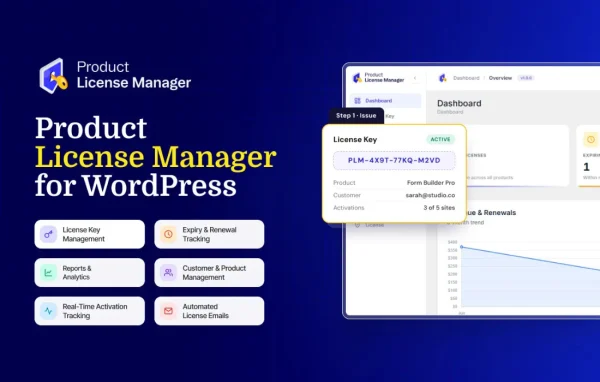
License Manager is a WordPress plugin for developers and businesses that sell plugins, themes and other software from their own sites. It generates license keys, sets activation limits and controls validity, all from the WordPress dashboard and alongside WooCommerce.
- Version
- 1.0.0
- Released
- Jun 15, 2026
- Developer
- Divi Next
- Type
- WordPress plugin
- Licence
- GPL
- Included in
- Every plan, or $3.99 on its own
What’s new in License Manager 1.0.0
Version 1.0.0 · Jun 15, 2026
Latest
- NewInitial release.
What it does
Selling digital software means keeping track of who is allowed to use it. License Manager gives you a licensing system inside WordPress. You generate unique license keys for your products, link them to customers and decide how each key behaves once it is in use.
Control comes through activation limits and validity periods. You can cap how many times a key can be activated and set an expiration date or subscription time. It works with WooCommerce orders and is compatible with sites running the Divi Next theme framework. A dashboard shows licenses that are active, expired or pending, so you can review them in one place.
Best for
- Developers selling WordPress plugins or themes
- Businesses distributing licensed digital software
- WooCommerce stores on the Divi Next framework
Features
WooCommerce integration
Create license keys and assign them to products that customers buy through WooCommerce, so licensing sits next to your existing store setup.
Custom license generation
Generate unique software license keys for your digital products, so each customer receives a key tied to their purchase.
Activation limits
Set how many times a single license key can be activated, which helps you control usage and limit misuse of your software.
License validity control
Define expiration dates or subscription times for licenses, so access can end or renew on the schedule you choose.
License dashboard
Review active, expired and pending licenses from one dashboard inside WordPress, with detailed information about each entry.
Customer-based tracking
Link licenses to specific customers so you can monitor who holds which key and handle customer questions more easily.
Developer-friendly API
Integrate and automate license verification within your custom workflows or third-party applications using the plugin's API.
Automated key delivery and logs
License keys are sent to customers automatically after purchase, and logs record license activations and expirations for review.
Questions about License Manager
Does License Manager work with WooCommerce?
Yes. It is designed to work with WooCommerce, so you can create license keys and assign them to products that customers purchase through your WooCommerce store.
Can I limit how many times a license key is activated?
Yes. You set an activation limit for each license key. This controls how many times a key can be activated, which helps prevent misuse of your software.
Can licenses expire or renew?
Yes. You can define expiration dates or subscription times for licenses. The dashboard shows which licenses are active, expired or pending, so you can follow their status.
Can I connect license checks to my own software?
The plugin includes a developer-friendly API. You can use it to integrate and automate license verification within custom workflows or third-party applications.
Is License Manager free?
The code of License Manager is licensed under the GPL, so anyone may use, change and share it. GPL Feast is a paid service: a plan or a single purchase gives you the download and automatic updates. The developer's own support, licence key and online services are not included.
Which version of License Manager is this?
Version 1.0.0, released Jun 15, 2026. New versions appear here when the developer publishes them, and members get them as automatic updates.
How do I update License Manager?
Install the free GPL Feast Updater on your site and connect it with your API key. It installs new versions of License Manager automatically and keeps a backup, so you can roll back.
More from Divi Next