Plugin
Updated
EaseAccess
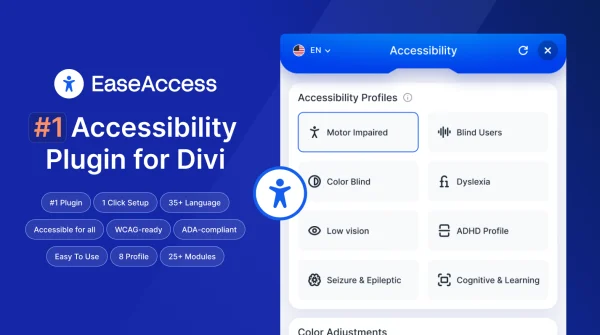
EaseAccess is a WordPress plugin that adds accessibility tools to websites built with Divi Next. It gives visitors options like text-to-speech, dyslexia-friendly fonts and adjustable color contrast, and it helps site owners find and fix accessibility issues on their pages.
- Version
- 2.1.0
- Released
- Jul 2, 2026
- Developer
- Divi Next
- Type
- WordPress plugin
- Licence
- GPL
- Included in
- Every plan, or $3.99 on its own
What’s new in EaseAccess 2.1.0
Version 2.1.0
Latest
- ImprovedAI-assisted fix flow: per-provider API key storage, masked read-only key inputs, validate/save/reset/active controls.
- ImprovedSaved AI fixes are now per-page OR site-wide (tick "Apply on every page" for shared header/footer elements).
- ImprovedColor-contrast fixes are style-only — the original element's content is never modified, only the inline style attribute.
- FixedPost-fix contrast verification — if the AI's suggested color still fails WCAG AA, the fix is automatically reverted with a clear toast.
- ImprovedAdmin bar quick actions: "Scan this page" and "Clear AI fixes for this page".
- ImprovedREST namespace migrated to easeaccess/v1 (with zn7/v1 kept as a back-compat alias for one major release).
- ImprovedAI endpoints (/ai/fix-issue, /ai/generate-alt, /ai/settings*) hardened with current_user_can('edit_posts') + nonce.
- ImprovedAuto cleanup of broken saved AI fixes from earlier versions.
What it does
Many websites look good but are hard to use for people with visual impairments, reading difficulties or motor disabilities. This plugin addresses that by adding a set of accessibility options to your Divi Next site. Visitors can listen to page text, switch to fonts designed for people with dyslexia and adjust color contrast to suit their eyesight. The plugin also supports keyboard navigation and works with screen readers, and it includes tools meant to help your site move toward guidelines such as WCAG and ADA.
On the admin side, you manage the options from a control panel inside Divi Next, so you can set things up without writing code. The plugin can scan a page from the admin bar and offers an AI-assisted fix flow using your own provider API key. Contrast fixes change only the inline style of an element, never its content, and a suggested color that still fails WCAG AA is reverted automatically. Saved fixes can apply to one page or to every page, which helps with shared headers and footers.
Best for
- Websites built with Divi Next
- Site owners working toward WCAG and ADA guidelines
- Agencies improving accessibility on client Divi sites
Features
Text-to-speech audio
Converts website text into audio so visitors with visual impairments or reading difficulties can listen to your content instead of reading it.
Dyslexia-friendly font options
Offers specialized fonts that make reading easier for people with dyslexia, giving visitors a more comfortable way to take in your pages.
Adjustable color contrast
Lets visitors change color contrast to match their visual needs, improving clarity and reducing eye strain while they browse your site.
Keyboard and screen reader support
Supports navigating the site with only a keyboard and works with popular screen readers to provide content descriptions and navigation cues.
AI-assisted contrast fixes
Suggests color fixes with an AI provider using your stored API key. Fixes change only inline styles, and colors that still fail WCAG AA are reverted.
Per-page or site-wide fixes
Saved fixes can apply to a single page or to every page, which is useful for shared elements like headers and footers.
Admin bar quick actions
Scan the current page or clear its AI fixes directly from the WordPress admin bar while you review your site.
Control panel in Divi Next
Site administrators can customize the accessibility options from a control panel inside Divi Next without needing technical expertise.
EaseAccess older versions
- 1.1.4Apr 6
- 1.1.2Nov 28, 2025
Members and buyers of this product can download older versions.
Questions about EaseAccess
Does this work with any WordPress theme?
The plugin is designed specifically for WordPress websites using Divi Next, and its control panel sits inside Divi Next. If your site runs on a different theme or builder, it is not described as being built for that setup.
Will the AI fixes change my page content?
No. Color-contrast fixes only modify the inline style attribute of an element, and the original content is left as it is. If a suggested color still fails WCAG AA, the fix is reverted automatically and you see a notice.
Can I apply one fix across my whole site?
Yes. When saving an AI fix you can tick the option to apply it on every page. This is handy for elements that repeat across the site, such as the header and footer. You can also keep fixes limited to a single page.
Does it help visitors who use screen readers or keyboards?
It does. The plugin supports full keyboard navigation for people with motor disabilities and works with popular screen readers, providing content descriptions and navigation cues for visitors with visual impairments.
Is EaseAccess free?
The code of EaseAccess is licensed under the GPL, so anyone may use, change and share it. GPL Feast is a paid service: a plan or a single purchase gives you the download and automatic updates. The developer's own support, licence key and online services are not included.
Which version of EaseAccess is this?
Version 2.1.0, released Jul 2, 2026. New versions appear here when the developer publishes them, and members get them as automatic updates.
How do I update EaseAccess?
Install the free GPL Feast Updater on your site and connect it with your API key. It installs new versions of EaseAccess automatically and keeps a backup, so you can roll back.
More from Divi Next