Plugin
Updated
Divi Animation
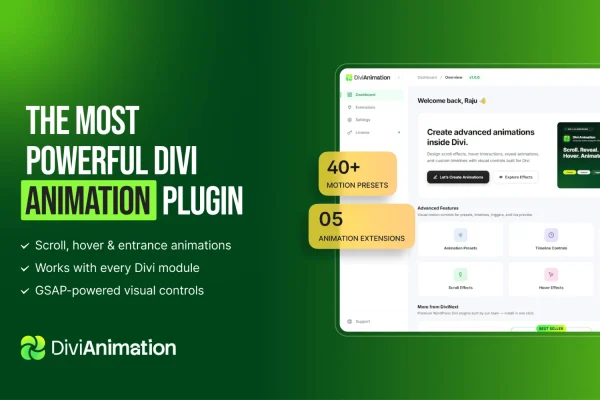
Divi Animation is a plugin for the Divi theme that lets you add motion effects to your pages without writing code. It works inside the Divi Visual Builder, so you can animate text, images, SVG graphics and whole modules while you design.
- Version
- 2.0.0
- Released
- Jul 14, 2026
- Developer
- Divi Next
- Type
- WordPress plugin
- Licence
- GPL
- Included in
- Every plan, or $3.99 on its own
What’s new in Divi Animation 2.0.0
Version 2.0.0
Latest
- NewMajor update — Divi Animation grows from 5 extensions to 20+ adding scroll, mouse, sticky, hover, background and text motion to every Divi 5 module.
- NewScroll & Motion — Scroll Effects — Horizontal Scroll, Vertical Scroll, Card Stack and Card Deck, with progress bar, panel gap, reveal (fade / blur / tilt) and per-device controls.
- NewParallax — element-level scroll drift, rotate, zoom and fade on any module.
- NewPin & Sticky — pin any element while scrolling, or make it sticky with a smart-header offset.
- NewScroll Video — Apple-style scroll-scrubbed HTML5 video, with Hero and Background modes, colour/gradient overlay, brightness/contrast/saturation/blur filters, fallback image and per-device behaviour.
- NewScroll Progress — reading-progress bar driven by page scroll.
- NewSmooth Scroll — inertia / smooth scrolling powered by GSAP ScrollSmoother.
- NewMotion Path — move a module along a custom SVG path as the visitor scrolls.
What it does
Adding motion to a Divi site usually means custom CSS or JavaScript, which slows down designers who would rather stay in the builder. This plugin brings animation controls into the Divi Visual Builder itself. You can trigger effects on scroll, react to hover and mouse movement, animate headings and images, and bring SVG graphics to life. A live preview shows each change as you make it, so you can adjust timing and style on the spot.
Beyond basic entrance effects, it covers scroll-driven layouts such as horizontal and vertical scroll sections, card stacks and card decks, plus parallax drift, rotation, zoom and fade on any module. You can pin or stick elements while scrolling, scrub HTML5 video with the scroll position, add a reading progress bar, and move a module along a custom SVG path. A timeline editor manages sequences and durations, and per-device controls let you tune behavior for mobile, tablet and desktop.
Best for
- Web designers building animated Divi sites
- Agencies delivering interactive Divi projects for clients
- Portfolio and landing pages that use scroll storytelling
Features
Scroll-triggered animations
Start motion effects as visitors scroll, including horizontal scroll, vertical scroll, card stack and card deck layouts with progress bars, panel gaps and fade, blur or tilt reveals.
Text, image and SVG effects
Animate headings, paragraphs and images with pre-built or customized effects, and animate vector SVG graphics directly from the builder.
Hover and mouse interactions
Create effects that respond when visitors hover over or move the mouse near elements, adding interactive motion to buttons, images and other modules.
Parallax on any module
Apply element-level scroll drift, rotation, zoom and fade to any Divi module to build layered depth as the page moves.
Pin and sticky elements
Pin any element in place while the page scrolls, or make it sticky with an offset that accounts for a sticky header.
Scroll-scrubbed video
Play HTML5 video in step with scrolling in Hero or Background mode, with color or gradient overlays, image filters, a fallback image and per-device behavior.
Timeline editor
Control animation sequences and durations precisely through a timeline, so multiple effects play in the order and pace you choose.
Motion path and smooth scroll
Move a module along a custom SVG path as visitors scroll, and add inertia-style smooth scrolling powered by GSAP ScrollSmoother.
Divi Animation older versions
- 1.0.0Jul 22 new
Members and buyers of this product can download older versions.
Questions about Divi Animation
Do I need to know code to create animations?
No. Everything is set up through the Divi Visual Builder interface. You choose effects, adjust settings and see a live preview while editing, so designers can build scroll, hover and timeline animations without writing CSS or JavaScript.
Does it work with the Divi theme only?
Yes, it is designed specifically for Divi and works inside the Divi Visual Builder. Its motion options apply to Divi modules, including scroll, mouse, sticky, hover, background and text effects.
Can I adjust animations for mobile devices?
Yes. Animations adapt across mobile, tablet and desktop views, and many features, such as scroll effects and scroll video, include per-device controls so you can change or limit behavior on smaller screens.
Can I create Apple-style scrolling video sections?
Yes. The scroll video feature scrubs HTML5 video in time with the page scroll. It offers Hero and Background modes, color or gradient overlays, brightness, contrast, saturation and blur filters, and a fallback image.
Is Divi Animation free?
The code of Divi Animation is licensed under the GPL, so anyone may use, change and share it. GPL Feast is a paid service: a plan or a single purchase gives you the download and automatic updates. The developer's own support, licence key and online services are not included.
Which version of Divi Animation is this?
Version 2.0.0, released Jul 14, 2026. New versions appear here when the developer publishes them, and members get them as automatic updates.
How do I update Divi Animation?
Install the free GPL Feast Updater on your site and connect it with your API key. It installs new versions of Divi Animation automatically and keeps a backup, so you can roll back.
More from Divi Next