Plugin
Updated
Chat for Skype Pro
Chat for Skype Pro is a WordPress plugin that places a Skype chat widget on your website. Visitors can start a Skype conversation with your team straight from the page they are on, which gives them a direct way to ask questions and get help in real time.
- Version
- 1.1.2
- Released
- Aug 27, 2026
- Type
- WordPress plugin
- Requires
- Elementor
- Licence
- GPL
- Included in
- Every plan, or $3.99 on its own
What’s new in Chat for Skype Pro 1.1.2
Version 1.1.2 · Aug 27, 2026
Latest
What it does
Many visitors have a quick question before they buy or sign up, and a contact form can feel slow. This plugin connects your site to Skype, a messaging platform many people already use, so visitors can open a chat with your support team without hunting for contact details. Because the conversation happens in Skype, your team can answer from a tool they likely know well, keeping support in one familiar place.
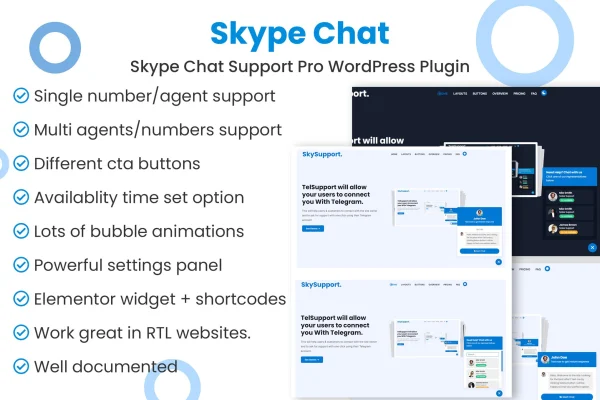
Setup is done through the plugin settings and does not call for coding. You can style the chat widget to match your brand colors and site design, write automatic welcome messages that greet new visitors, and set up chat buttons for more than one agent. The widget is responsive, so it works on desktops, tablets and phones. The plugin requires Elementor, and documentation is included to help you configure it.
Best for
- Small businesses offering live customer support
- Service providers who already use Skype with clients
- Online stores wanting real-time help for shoppers
Features
Skype chat on your site
Adds a Skype chat widget to your WordPress pages so visitors can start a conversation with your team through Skype directly from your website.
Customizable chat widget
Adjust the look of the chat box to fit your brand colors, style and overall site design so it feels like part of your pages.
Automatic welcome messages
Set personalized greetings that appear for new visitors, giving them helpful information or pointing them toward your support resources.
Multiple agent management
Support more than one agent, so visitors can reach different members of your team through customizable chat buttons.
Setup without code
Configure the chat widget through the plugin settings and have it running on your site without writing any code.
Responsive on all devices
The chat widget adapts to desktops, tablets and smartphones, so visitors can reach you from whatever device they are browsing on.
Included documentation
Guides come with the plugin to walk you through its features and help you answer common setup questions on your own.
Questions about Chat for Skype Pro
Do my visitors need Skype to chat with me?
The plugin connects visitors to your team through Skype, so conversations take place on that platform. Visitors who already use Skype can start chatting right away from the widget on your site, using an app they are familiar with.
Can I make the chat widget match my site's design?
Yes. You can customize the chat box appearance, including colors and style, so it fits your brand and the rest of your website. You can also write custom welcome messages that greet visitors in your own voice.
Can more than one team member handle chats?
Yes. The plugin supports multiple agent management with customizable chat buttons, so you can give visitors a way to reach different people on your support team through Skype.
Does this plugin need any other plugins?
Yes, it requires Elementor to be active on your WordPress site. Once that is in place, you can configure the Skype chat widget through the plugin settings without any coding.
Is Chat for Skype Pro free?
The code of Chat for Skype Pro is licensed under the GPL, so anyone may use, change and share it. GPL Feast is a paid service: a plan or a single purchase gives you the download and automatic updates. The developer's own support, licence key and online services are not included.
Which version of Chat for Skype Pro is this?
Version 1.1.2, released Aug 27, 2026. New versions appear here when the developer publishes them, and members get them as automatic updates.
How do I update Chat for Skype Pro?
Install the free GPL Feast Updater on your site and connect it with your API key. It installs new versions of Chat for Skype Pro automatically and keeps a backup, so you can roll back.
What does Chat for Skype Pro need?
Chat for Skype Pro needs Elementor installed and active.
You might also like






