Plugin
Updated
Coming Soon and Maintenance Mode
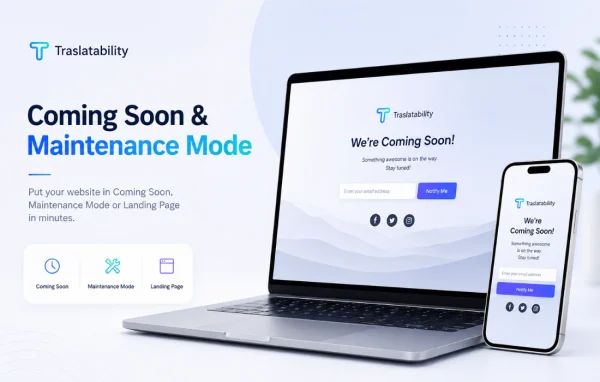
This is a WordPress plugin by Traslatability that puts a coming-soon or maintenance page in front of your site while you build or work on it. It offers ready-made designs, countdown timers and email collection, and it needs no page builder to set up.
- Version
- 1.10.0
- Released
- Oct 5, 2026
- Developer
- Traslatability
- Type
- WordPress plugin
- Licence
- GPL
- Included in
- Every plan, or $3.19 a year on its own
What’s new in Coming Soon and Maintenance Mode 1.10.0
Version 1.10.0
Latest
- NewA Sign in link for the people you let in by role. Access → User Roles has a new switch, Show a Sign in link on the page, off until you turn it on.
- NewSays when your sign-in page has been moved. If a plugin such as Login Security or WPS Hide Login has moved your sign-in page, the Access screen names the address under the new switch, because the link shows it to everyone who sees your page.
- FixedA page left open under Excluded addresses shows that page, and nothing else, however the address asks. While your site was closed, ?pagename=&s= on a page you left open, in its address or in a form sent to it, listed every post, page and product, because WordPress reads a word with nothing after the = as a search for everything. With your front page left open and a page chosen as your front page, adding ?order=asc or ?year= to its address showed your latest posts. Those now get your closed page; your front page, a campaign tag and a page number show as before.
- FixedPage caches are emptied only as far as a change needs. With LiteSpeed Cache, a change to what visitors get, such as switching the page on or off, pressed its Purge All, which also deletes its combined CSS and JS files, empties the object cache and PHP's code cache, clears Cloudflare where LiteSpeed is set to, and leaves "Purged all caches successfully." on your next screen. It now empties LiteSpeed's cached pages only. On a network, WP Super Cache is emptied for this site alone, where it emptied every site's.
What it does
Launching a new site or doing maintenance on a live one means visitors may land on unfinished or broken pages. This plugin replaces your public site with a clean holding page until you are ready. You pick a ready-made design, add your logo, colors, fonts and background, and switch the mode on from a simple setting. Admins and chosen user roles can still reach the real site, so work continues behind the closed page.
During maintenance, the plugin sends a 503 status code with a Retry-After header, which tells search engines the site is temporarily offline and when to come back. You can add a countdown timer to show when the site will open and an email form to collect addresses from interested visitors. You can also leave specific addresses open while the rest stays closed, and the templates adapt to phones, tablets and desktops.
Best for
- New WordPress sites preparing for launch
- Live sites going through planned maintenance
- Developers who need to work on a site privately
Features
Ready-made page designs
Choose from several prebuilt coming-soon and maintenance templates, then adjust them to fit your site without using a page builder or writing code.
Countdown timer
Show visitors a countdown to the moment your site or a new section goes live, so they know exactly when to return.
Email collection form
Place a sign-up form on the holding page to gather visitor email addresses while your site is closed or under construction.
503 and Retry-After headers
Maintenance pages return a 503 status code and a Retry-After header, signaling to search engines that the downtime is temporary.
Role-based access
Let admins and selected user roles bypass the closed page, with an optional sign-in link shown on the page for those users.
Custom branding
Add your logo and set colors, fonts and backgrounds so the holding page matches the look of your brand.
Excluded addresses
Keep chosen pages open to the public while the rest of the site stays behind the coming-soon or maintenance page.
Responsive, multilingual layouts
Templates display properly on desktops, tablets and phones, and the plugin works with multilingual plugins for sites in several languages.
Coming Soon and Maintenance Mode older versions
- 1.1.23Aug 282 improvements
- 1.1.20Aug 271 improvement
- 1.1.14Aug 261 fix
- 1.1.13Aug 25
- 1.1.11Aug 25
Members and buyers of this product can download older versions.
Questions about Coming Soon and Maintenance Mode
Will my site lose search visibility while maintenance mode is on?
The plugin sends a 503 status code with a Retry-After header during maintenance. This is the standard way to tell search engines that a site is temporarily unavailable and when they should check back, rather than treating the holding page as your real content.
Can I keep working on the site while visitors see the holding page?
Yes. Admins and specific user roles you choose can bypass the page and use the site normally. You can also turn on a sign-in link on the holding page so those users can log in easily.
Do I need a page builder to design the page?
No. You start from one of the ready-made designs and customize it with your logo, colors, fonts and background directly in the plugin settings, with no page builder or coding required.
Can I leave some pages visible while the rest of the site is closed?
Yes. The Excluded addresses setting lets you keep chosen pages open to the public. Only those pages are shown, and everything else on the site stays behind your coming-soon or maintenance page.
Is Coming Soon and Maintenance Mode free?
The code of Coming Soon and Maintenance Mode is licensed under the GPL, so anyone may use, change and share it. GPL Feast is a paid service: a plan or a single purchase gives you the download and automatic updates. The developer's own support, licence key and online services are not included.
Which version of Coming Soon and Maintenance Mode is this?
Version 1.10.0, released Oct 5, 2026. New versions appear here when the developer publishes them, and members get them as automatic updates.
How do I update Coming Soon and Maintenance Mode?
Install the free GPL Feast Updater on your site and connect it with your API key. It installs new versions of Coming Soon and Maintenance Mode automatically and keeps a backup, so you can roll back.
You might also like






