Plugin
Updated
Dark Mode by Traslatability
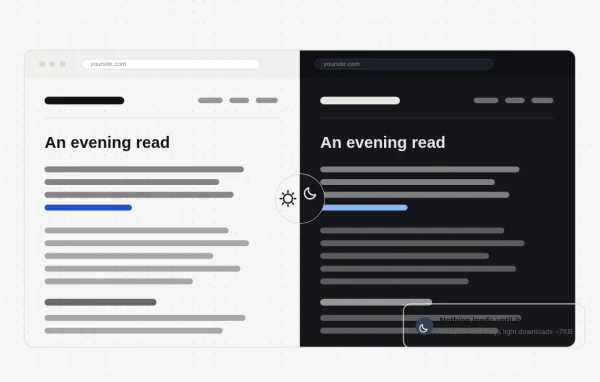
This is a WordPress plugin that adds a responsive dark mode to your site without a theme redesign. It adapts your existing styles, offers ready-made color palettes and gives visitors a toggle to switch between light and dark views.
- Version
- 1.6.2
- Released
- Oct 5, 2026
- Developer
- Traslatability
- Type
- WordPress plugin
- Licence
- GPL
- Included in
- Every plan, or $3.19 a year on its own
What’s new in Dark Mode by Traslatability 1.6.2
Version 1.6.2
Latest
- FixedSwitching the plugin off for a whole network no longer runs out of time. It emptied every site's page cache one after another before WordPress could note it as off, so on a network of a few hundred sites the plugin stayed on. It now takes a few seconds, and each site still empties its cached pages on its first visit after you switch it back on.
- FixedLiteSpeed Cache is asked to empty its pages only. With LiteSpeed Cache, saving a change, the first visit after an update and switching the plugin off pressed its Purge All, which also deletes its combined CSS and JS files, empties the object cache and PHP's code cache, clears Cloudflare where LiteSpeed is set to, and leaves "Purged all caches successfully." on your next screen. It now empties LiteSpeed's cached pages only.
What it does
Many visitors browse at night or simply prefer darker screens, but building a dark version of a theme by hand means writing and maintaining a second set of styles. This plugin handles that job for you. It reads your current site styles and converts them into a dark look automatically, so your content stays consistent while becoming easier on the eyes in low light. You can pick from several ready-made palettes or adjust colors to match your brand.
On the visitor side, a toggle switch lets people move between light and dark modes. The dark mode engine loads only when someone turns it on, and the plugin prevents the white flash that can appear when a dark page reloads during navigation. The dark view is responsive, so it works on desktops and phones. It also plays well with page caching: with LiteSpeed Cache, it clears only cached pages when needed, and it handles multisite networks when switched off network-wide.
Best for
- Blogs and content sites read often at night
- Site owners wanting dark mode without theme redesign
- Agencies managing WordPress multisite networks
Features
Automatic style adaptation
Converts your existing site styles into a dark version, so you get a dark mode without redesigning your theme or writing a separate stylesheet.
Ready-made color palettes
Choose from multiple prepared dark palettes to suit different site looks, or customize the colors to fit your brand identity.
Visitor toggle switch
Gives visitors a simple switch for moving between light and dark modes, letting each person browse the way they find comfortable.
On-demand engine loading
The dark mode engine loads only when a visitor enables it, which keeps the extra code off pages for people who stay in light mode.
White flash prevention
Stops the bright white flash that can appear between page loads when dark mode is on, so navigation stays dark from page to page.
Responsive dark mode
The dark view adapts across screen sizes, from desktop monitors down to smartphones, so mobile visitors get the same experience.
Cache-aware behavior
With LiteSpeed Cache, the plugin empties only cached pages after changes instead of purging every cache, and it handles multisite network deactivation cleanly.
Dark Mode by Traslatability older versions
- 1.6.0Sep 282 new, 1 improvement
- 1.3.18Sep 211 improvement, 3 fixes
- 1.2.17Sep 121 improvement, 3 fixes
- 1.2.1Sep 10
- 1.1.6Aug 28
- 1.1.3Aug 27
- 1.0.7Aug 26
- 1.0.6Aug 26
- 1.0.2Aug 26
Members and buyers of this product can download older versions.
Questions about Dark Mode by Traslatability
Do I have to redesign my theme to get a dark mode?
No. The plugin adapts your existing styles automatically and produces a dark version of your site. You can start from one of the ready-made color palettes and customize colors to match your brand if you want a specific look.
Will visitors who prefer light mode load extra code?
The dark mode engine loads only when a visitor enables dark mode. People who stay in light mode browse your site without that engine running, and the plugin is built to be lightweight.
Does it work with LiteSpeed Cache?
Yes. When you save a change, after an update or when you switch the plugin off, it asks LiteSpeed Cache to empty its cached pages only. It no longer triggers a full purge that would also clear combined CSS and JS files or the object cache.
Can I use it on a WordPress multisite network?
Yes. Switching the plugin off for a whole network takes only a few seconds, even on large networks. Each site empties its cached pages on its first visit after you switch the plugin back on.
Is Dark Mode by Traslatability free?
The code of Dark Mode by Traslatability is licensed under the GPL, so anyone may use, change and share it. GPL Feast is a paid service: a plan or a single purchase gives you the download and automatic updates. The developer's own support, licence key and online services are not included.
Which version of Dark Mode by Traslatability is this?
Version 1.6.2, released Oct 5, 2026. New versions appear here when the developer publishes them, and members get them as automatic updates.
How do I update Dark Mode by Traslatability?
Install the free GPL Feast Updater on your site and connect it with your API key. It installs new versions of Dark Mode by Traslatability automatically and keeps a backup, so you can roll back.
You might also like






