
Plugin
Updated
GP Address Autocomplete
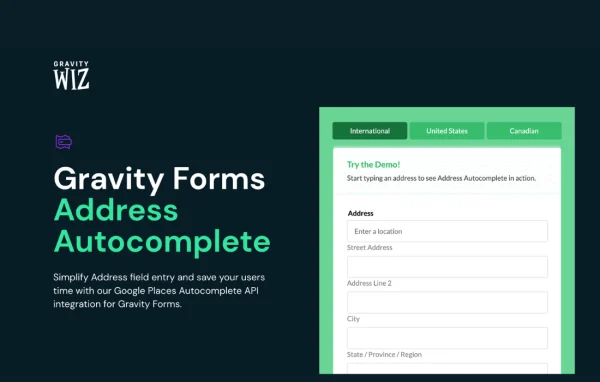
GP Address Autocomplete by Gravity Wiz is a WordPress plugin that adds address autocomplete to Gravity Forms. As visitors type into an address field, it suggests matching addresses from the Google Places Autocomplete API and fills in the field, so people spend less time typing and make fewer mistakes.
- Version
- 2.0.3
- Released
- Oct 7, 2026
- Developer
- Gravity Perks
- Type
- WordPress plugin
- Licence
- GPL
- Included in
- Every plan, or $5.59 a year on its own
What’s new in GP Address Autocomplete 2.0.3
Version 2.0.3 · Oct 7, 2026
Latest
- NewAdded gpaa_suggestions_debounce_ms and gpaa_suggestions_min_chars JS filters for customizing when address suggestions are requested from Google.
What it does
Typing a full address into a form is slow, and manual entry often leads to typos, missing postal codes or mismatched cities. This plugin works with Gravity Forms to cut down that effort. It connects your address fields to the Google Places Autocomplete API, so suggestions appear as a visitor types and the chosen address fills the field. It works on desktop and mobile, which makes it a good fit for registrations, order forms, checkouts and any other form that asks where someone lives or where something should go.
Setup is short: add a Google API key, then tick a checkbox on the address field you want to use. The plugin handles United States, Canadian and international address formats, and you can limit suggestions to specific countries if you only serve certain regions. You can also display a map with a marker for the entered address so visitors can confirm the location. Developers get PHP and JavaScript filters for adjusting behavior, including filters that control how many characters must be typed and how long to wait before suggestions are requested. It also works alongside other Gravity Perks plugins and add-ons such as Gravity Flow and Conversational Forms.
Best for
- Gravity Forms sites that collect mailing or shipping addresses
- Businesses serving customers in specific countries or regions
- Developers who want to customize address lookup behavior
Features
Checkbox to enable autocomplete
Turn on Google-powered address suggestions for any Gravity Forms address field by ticking a single checkbox in the field settings, after adding your Google API key.
US, Canadian and international formats
Autocomplete works with address fields set up for the United States, Canada or international addresses, so suggestions match the format your form uses.
Country restriction
Limit address suggestions to the countries you choose, which helps businesses that only serve or ship to specific regions keep entries relevant.
Map with address marker
Show a Google Map with a marker beside the completed address, giving visitors a visual way to confirm that the location they picked is correct.
PHP and JavaScript filters
Developers can adjust autocomplete behavior through PHP and JavaScript filters, including settings for minimum typed characters and the delay before Google suggestions are requested.
Works on desktop and mobile
Address suggestions are designed to work on both desktop and mobile devices, so visitors filling out forms on phones get the same help.
Compatible with related add-ons
Built to run alongside other Gravity Perks plugins and third-party add-ons such as Gravity Flow and Conversational Forms.
GP Address Autocomplete older versions
- 2.0.2Oct 11 fix
- 2.0.1Sep 102 improvements, 1 fix
- 2.0Sep 21 new, 1 improvement
- 1.2.30May 28
- 1.2.29Aug 15, 2025
- 1.2.28May 15, 2025
- 1.2.27Mar 13, 2025
- 1.2.26Feb 20, 2025
- 1.2.25Oct 10, 2024
- 1.2.24Sep 12, 2024
Members and buyers of this product can download older versions.
22 older versions in all. If you need one that is not listed, ask support.
Questions about GP Address Autocomplete
Do I need Gravity Forms to use this plugin?
Yes. The plugin is built specifically for Gravity Forms and adds autocomplete to its address fields. It does not work as a standalone address tool, so you will need Gravity Forms on your site with at least one form that uses an address field.
What do I need from Google to make it work?
You need a Google API key, since address suggestions come from the Google Places Autocomplete API. Once the key is added, you enable autocomplete on an address field with a single checkbox, and the optional map display also relies on Google.
Can I stop it from suggesting addresses outside my country?
Yes. You can restrict autocomplete results to selected countries. This is useful if you only ship to or serve certain regions, because visitors will only see suggestions from the countries you allow.
Can I control when suggestions start appearing?
Developers can. The plugin includes JavaScript filters that set the minimum number of characters typed before suggestions are requested and a delay before each request is sent to Google, along with other PHP and JavaScript filters for customization.
Is GP Address Autocomplete free?
The code of GP Address Autocomplete is licensed under the GPL, so anyone may use, change and share it. GPL Feast is a paid service: a plan or a single purchase gives you the download and automatic updates. The developer's own support, licence key and online services are not included.
Which version of GP Address Autocomplete is this?
Version 2.0.3, released Oct 7, 2026. New versions appear here when the developer publishes them, and members get them as automatic updates.
How do I update GP Address Autocomplete?
Install the free GPL Feast Updater on your site and connect it with your API key. It installs new versions of GP Address Autocomplete automatically and keeps a backup, so you can roll back.
More from Gravity Perks






