
Plugin
Updated
GP Advanced Select
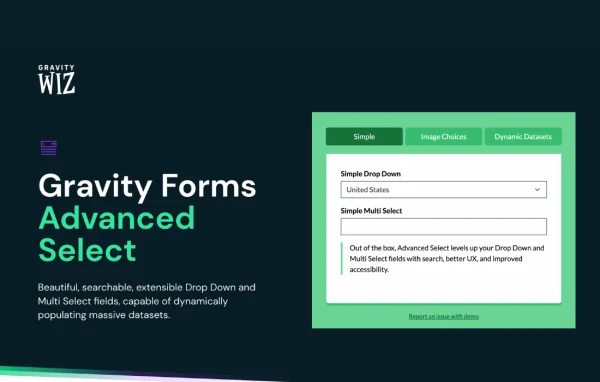
GP Advanced Select by Gravity Wiz is a Gravity Forms add-on from the Gravity Perks collection. It turns Drop Down, Multi Select and Address fields into searchable fields, so visitors can type to find an option instead of scrolling through a long list.
- Version
- 1.1.21
- Released
- Jul 22, 2026
- Developer
- Gravity Perks
- Type
- WordPress plugin
- Licence
- GPL
- Included in
- Every plan, or $5.59 a year on its own
What’s new in GP Advanced Select 1.1.21
Version 1.1.21 · Jul 22, 2026
Latest
- ImprovedImproved accessibility by ensuring the original <select> retains an associated label after Advanced Select initializes.
What it does
Standard dropdowns get hard to use once a list grows past a few dozen entries. Visitors scroll, miss the option they want and give up. This plugin replaces that experience with a searchable field for Drop Down, Multi Select and Address fields in Gravity Forms. People type a few letters, the list narrows, and they pick the right choice. It works for product order forms, company signups, address inputs and application forms where the list of options is long.
The plugin also pairs with GP Populate Anything for forms that pull choices from large data sources. In that setup, options can lazy load when someone interacts with the field, infinite scroll moves past default query limits, and search input filters which choices get loaded. It can display choice images through JetSloth's Image Choices plugin and support searchable filtering in Gravity Flow user fields. Fields work on mobile devices, respond to keyboard navigation and are compatible with screen readers.
Best for
- Gravity Forms sites with long dropdown lists
- Order forms and signup forms with many choices
- Developers building data-driven forms with GP Populate Anything
Features
Searchable select fields
Adds a searchable interface to Gravity Forms Drop Down, Multi Select and Address fields, letting visitors type to narrow a long list of choices.
Dynamic choices from large datasets
Works with GP Populate Anything to fill select options from large data sources, so choices can come from your existing site data.
Lazy loading and infinite scroll
Loads choices only when a visitor interacts with the field and lets them keep scrolling past default query limits to reach every available option.
Filtered search results
Combined with GP Populate Anything, the search text filters which choices are loaded, so visitors only see options that match what they typed.
Choice images
Integrates with JetSloth's Image Choices plugin to show images next to choice options, which helps when visitors pick products or visual items.
Searchable address fields
Supports every address field type with searchable dropdowns, making it simpler for visitors to find their country or region.
Accessibility and mobile support
Fields are keyboard navigable, work with screen readers, function on mobile devices and fit with the Gravity Forms Theme Framework.
Gravity Flow user filtering
With GP Populate Anything, Gravity Flow user fields gain searchable, real-time filtering so the correct user can be picked quickly.
GP Advanced Select older versions
- 1.1.20May 281 fix
- 1.1.19Aug 28, 20251 new
- 1.1.18Jul 31, 20252 fixes
- 1.1.17Jul 24, 2025
- 1.1.16Jul 10, 2025
- 1.1.15Jun 5, 2025
- 1.1.14May 21, 2025
- 1.1.13May 15, 2025
- 1.1.12Apr 24, 2025
- 1.1.11Dec 19, 2024
Members and buyers of this product can download older versions.
23 older versions in all. If you need one that is not listed, ask support.
Questions about GP Advanced Select
Which Gravity Forms fields does it work with?
It works with Drop Down, Multi Select and Address fields. Each of these gets a searchable interface, so visitors can type to find an option. Address support covers every address field type.
Do I need GP Populate Anything to use it?
The searchable fields work on their own. GP Populate Anything is needed for the dynamic features: loading choices from large data sources, lazy loading, infinite scroll past query limits, filtered search results and searchable Gravity Flow user fields.
Is it accessible for keyboard and screen reader users?
Yes. The fields can be navigated by keyboard and are compatible with screen readers. The original select element keeps its associated label after the enhanced field loads, and the plugin works with the Gravity Forms Theme Framework.
Can I show images next to the choices?
Yes, when used together with JetSloth's Image Choices plugin. That integration displays images alongside choice options, which is handy for product selections or any list where a picture helps people choose.
Is GP Advanced Select free?
The code of GP Advanced Select is licensed under the GPL, so anyone may use, change and share it. GPL Feast is a paid service: a plan or a single purchase gives you the download and automatic updates. The developer's own support, licence key and online services are not included.
Which version of GP Advanced Select is this?
Version 1.1.21, released Jul 22, 2026. New versions appear here when the developer publishes them, and members get them as automatic updates.
How do I update GP Advanced Select?
Install the free GPL Feast Updater on your site and connect it with your API key. It installs new versions of GP Advanced Select automatically and keeps a backup, so you can roll back.
More from Gravity Perks






