
Plugin
Updated
GP Multi-page Navigation
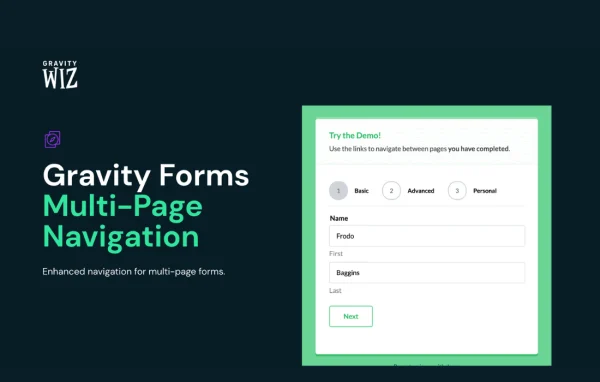
GP Multi-page Navigation by Gravity Wiz is a WordPress plugin that adds clickable page navigation to multi-page Gravity Forms. Instead of relying only on Next and Previous buttons, users can move straight to any page they need, see where they are in the form and go back to edit earlier answers.
- Version
- 1.3.8
- Released
- Aug 27, 2026
- Developer
- Gravity Perks
- Type
- WordPress plugin
- Licence
- GPL
- Included in
- Every plan, or $5.59 a year on its own
What’s new in GP Multi-page Navigation 1.3.8
Version 1.3.8 · Aug 27, 2026
Latest
- ImprovedImproved performance of Steps navigation by avoiding duplicate page validity calculations.
What it does
Gravity Forms gives multi-page forms simple Next and Previous buttons, which works for short forms but gets tedious on long or complex ones. If someone wants to change an answer on page two while sitting on page six, they have to click back through every step. This plugin turns your form's page names into clickable links, so users can jump directly to the page they want and keep track of their progress as they go.
You decide when pages become navigable: from the start, only after a page is completed, or once the user reaches the last page. You can also build custom page links and place them inside the form or elsewhere on the page. The plugin works with Gravity Forms Save and Continue and Preview Submission, and it plays well with GP Page Transitions and Gravity Flow. It suits anything from a basic multi-step contact form to a long application process.
Best for
- Sites running long multi-page Gravity Forms
- Application, registration or onboarding forms with many steps
- Agencies building complex Gravity Forms for clients
Features
Clickable page names
Your Gravity Forms page names become clickable links, letting users move directly to any page of a multi-step form without stepping through each one.
Flexible navigation rules
Choose whether pages can be visited from the start, only after they are completed, or only once the user has reached the last page.
Custom page links
Create your own page links and place them inside the form or anywhere else on the page, so navigation fits your layout.
Save and Continue support
Works with the Gravity Forms Save and Continue feature, so users can save progress, come back later and work through pages in any order.
Preview Submission integration
Pairs with Gravity Forms Preview Submission so users can review their full entry and jump straight to a specific page to correct mistakes.
Back to Last Page button
A Back to Last Page button appears in relevant situations, giving users a quick way to return to the step they most recently visited.
Page validation states
Navigation tells apart valid, invalid and unvisited pages, so users can see which sections still need attention before they submit.
Works with other perks
Compatible with GP Page Transitions and Gravity Flow, so you can combine page navigation with transitions and workflow features in the same form.
GP Multi-page Navigation older versions
- 1.3.7Aug 201 fix
- 1.3.6Feb 61 fix
- 1.3.5Jan 81 fix
- 1.3.4Aug 28, 2025
- 1.3.3Aug 7, 2025
- 1.3.2Jul 24, 2025
- 1.3.1May 23, 2025
- 1.3May 15, 2025
- 1.2.13Feb 28, 2025
- 1.2.11Sep 20, 2024
Members and buyers of this product can download older versions.
21 older versions in all. If you need one that is not listed, ask support.
Questions about GP Multi-page Navigation
Do I need Gravity Forms to use this plugin?
Yes. The plugin adds navigation to multi-page forms built with Gravity Forms. It turns your form's page names into clickable links and adds navigation controls beyond the standard Next and Previous buttons that Gravity Forms includes.
Can I stop users from skipping ahead to pages they have not filled out?
Yes. You can make pages navigable from the start, only after each page is completed, or only once the user reaches the last page. That lets you allow free movement or keep users moving through the form in order.
Will it work with Save and Continue and Preview Submission?
It does. Users can save their progress with Save and Continue and return to any page in any order. With Preview Submission, they can review their whole entry and jump directly to a specific page to fix errors.
Can I put page links outside the form itself?
Yes. You can create custom page links and place them either inside the form or anywhere else on the page, which gives you control over how and where the navigation appears.
Is GP Multi-page Navigation free?
The code of GP Multi-page Navigation is licensed under the GPL, so anyone may use, change and share it. GPL Feast is a paid service: a plan or a single purchase gives you the download and automatic updates. The developer's own support, licence key and online services are not included.
Which version of GP Multi-page Navigation is this?
Version 1.3.8, released Aug 27, 2026. New versions appear here when the developer publishes them, and members get them as automatic updates.
How do I update GP Multi-page Navigation?
Install the free GPL Feast Updater on your site and connect it with your API key. It installs new versions of GP Multi-page Navigation automatically and keeps a backup, so you can roll back.
More from Gravity Perks






