
Plugin
Updated
GP Read Only
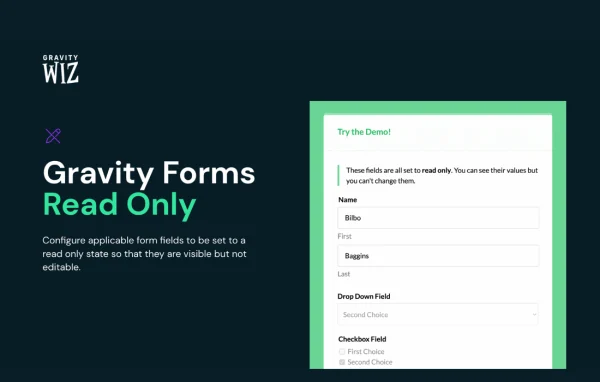
GP Read Only by Gravity Wiz is a plugin for Gravity Forms that lets you set form fields to a read-only state. Visitors can see the value in a field, such as a reference number or pre-approved detail, but they cannot change it.
- Version
- 1.9.30
- Released
- Aug 19, 2026
- Developer
- Gravity Perks
- Type
- WordPress plugin
- Licence
- GPL
- Included in
- Every plan, or $5.59 a year on its own
What’s new in GP Read Only 1.9.30
Version 1.9.30 · Aug 19, 2026
Latest
- FixedFixed issue where read-only radio fields could break Stripe Payment Element submissions.
- FixedFixed an issue where read-only fields could lose their disabled state after being hidden and shown via Gravity Forms conditional logic when the field was re-rendered by GP Populate Anything.
What it does
Many forms carry information the person filling them out should see but never edit. Think of a calculated total, a reference number, agreement terms or details your team has already approved. Leaving those fields open invites accidental changes and messy entries. This plugin adds a read-only option to Gravity Forms fields, so the value stays visible and stays the same. You turn it on per field, with no coding needed, and the form keeps behaving the way your users expect.
The read-only setting is applied in the form markup itself rather than through extra JavaScript added to disable fields after the page loads. It works with most Gravity Forms input types, including text, select, date, number, time, Signature and Consent fields. It also fits well with dynamic population, where values are filled in by Populate Anything or Nested Forms and then need to stay locked. Read-only fields keep their state when conditional logic hides and shows them, and translations such as German are included.
Best for
- Sites built on Gravity Forms with pre-filled form data
- Agencies building order, quote or application forms
- Forms showing calculated totals or reference numbers
Features
Read-only field setting
Mark any supported Gravity Forms field as read-only so visitors can view its contents but cannot type over or change the value.
Applied in form markup
The read-only state is written into the form markup instead of depending on extra JavaScript to disable fields, which helps with compatibility across field types.
Wide field type coverage
Works with nearly all Gravity Forms input types, including text, select, date, number and radio fields, plus advanced fields like Signature and Consent.
Handles time fields
Time fields can be locked too, covering an edge case that comes up in booking, scheduling and appointment style forms.
Locks dynamically populated values
Fields filled by Populate Anything or Nested Forms can be set to read-only, so values pulled in automatically stay exactly as they were loaded.
Works with conditional logic
Read-only fields keep their locked state when Gravity Forms conditional logic hides and then shows them again on the page.
Translations included
The plugin ships with translations such as German, which helps when you build forms for audiences outside English-speaking regions.
GP Read Only older versions
- 1.9.29May 15, 20251 fix
- 1.9.28Apr 24, 20251 fix
- 1.9.27Jan 8, 20251 fix
- 1.9.26Dec 6, 2024
- 1.9.25Nov 8, 2024
- 1.9.24Sep 12, 2024
- 1.9.23Sep 6, 2024
- 1.9.22Jul 10, 2024
- 1.9.21May 30, 2024
- 1.9.20Dec 7, 2023
Members and buyers of this product can download older versions.
15 older versions in all. If you need one that is not listed, ask support.
Questions about GP Read Only
Do I need Gravity Forms to use this?
Yes. GP Read Only is built specifically for Gravity Forms and adds a read-only option to its fields. It does not create forms on its own, so you need Gravity Forms running on your site.
Which field types can be made read-only?
It supports nearly all Gravity Forms input types. That includes text, select, date, number, radio and time fields, along with advanced fields such as Signature and Consent.
Will it work with values filled in by Populate Anything or Nested Forms?
Yes. Locking dynamically populated fields is one of its main uses. Values loaded by Populate Anything or Nested Forms can be set to read-only, and they keep that state even when conditional logic hides and reshows the field.
Does it rely on JavaScript to lock fields?
No. The read-only state is added directly to the form markup rather than relying on additional JavaScript to disable fields, which helps it work consistently across different field types.
Is GP Read Only free?
The code of GP Read Only is licensed under the GPL, so anyone may use, change and share it. GPL Feast is a paid service: a plan or a single purchase gives you the download and automatic updates. The developer's own support, licence key and online services are not included.
Which version of GP Read Only is this?
Version 1.9.30, released Aug 19, 2026. New versions appear here when the developer publishes them, and members get them as automatic updates.
How do I update GP Read Only?
Install the free GPL Feast Updater on your site and connect it with your API key. It installs new versions of GP Read Only automatically and keeps a backup, so you can roll back.
More from Gravity Perks






