
Plugin
Updated
GP Sliders
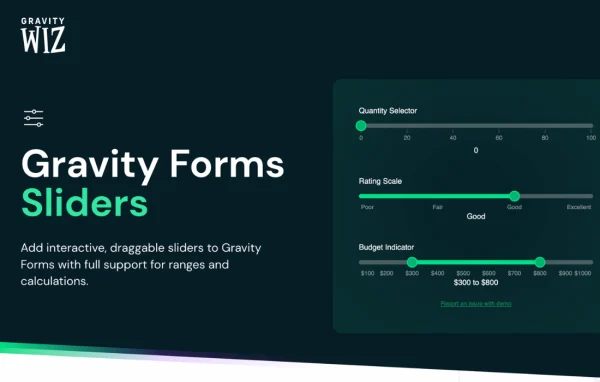
GP Sliders by Gravity Wiz is a Gravity Forms add-on plugin that adds interactive slider fields to your forms. Visitors drag a handle to choose a number instead of typing it, which suits ranges like budgets, ratings, quantities and donation amounts.
- Version
- 1.0.11
- Released
- Oct 7, 2026
- Developer
- Gravity Perks
- Type
- WordPress plugin
- Licence
- GPL
- Included in
- Every plan, or $3.99 a year on its own
What’s new in GP Sliders 1.0.11
Version 1.0.11 · Oct 7, 2026
Latest
- NewAdded Number Format support to slider display values.
What it does
Typed number fields leave room for mistakes. People enter values outside the range you expect, forget the unit, or aren't sure what scale they're working with. A slider solves that by giving them a visible track with a set minimum and maximum, so they can only pick a value that makes sense for the question. You decide the range and the step size, and the slider handles the rest while showing the current value as they drag.
The slider fields plug into the Gravity Forms features you already use. Their values work in calculations, so you can build things like pricing calculators that update totals from a slider choice. They also respond to conditional logic and appear in form exports alongside your other entry data. You can add prefixes and suffixes such as currency signs or units, show tooltips, place tick marks and labels along the track, and apply number formatting to displayed values.
Best for
- Gravity Forms sites building pricing or quote calculators
- Nonprofits collecting donations with flexible amount selection
- Surveys and feedback forms that use rating scales
Features
Draggable slider fields
Visitors select a numeric value by dragging a slider handle, which keeps entries inside the range you set and avoids typed input errors.
Works with calculations
Slider values can feed Gravity Forms calculations, so you can build pricing calculators, quote forms and other forms with totals that depend on user choices.
Conditional logic support
Show or hide slider fields based on earlier answers, so each visitor only sees the sliders that apply to them.
Custom ranges and steps
Set minimum and maximum values plus step increments to match the scale you need, from a one to ten rating to a wide budget range.
Prefixes and suffixes
Attach currency signs, units or other symbols to the displayed value so visitors know exactly what the number represents.
Live value tooltips
A tooltip shows the current value as the visitor drags, giving clear feedback before they submit the form.
Tick marks and labels
Place tick marks and custom labels along the slider track to guide people toward specific points on the scale.
Included in exports
Slider values appear in Gravity Forms exports, so your reports and spreadsheets contain the same data visitors chose on the form.
GP Sliders older versions
- 1.0.10Aug 201 fix
- 1.0.9Aug 51 new, 1 fix
- 1.0.8Jun 251 new, 1 improvement
- 1.0.7Jun 5
- 1.0.6May 22
- 1.0.5Apr 23
- 1.0.4Apr 13
- 1.0.3Apr 11
- 1.0.2Mar 19
- 1.0.1Mar 16
Members and buyers of this product can download older versions.
Questions about GP Sliders
Do I need Gravity Forms to use this plugin?
Yes. This is an add-on for Gravity Forms and adds a slider field type to the Gravity Forms editor. It works inside your existing forms alongside the other fields Gravity Forms provides.
Can slider values be used in form calculations?
Yes. Slider values work with Gravity Forms calculations, so you can use them to compute totals, estimates or other results. That makes the sliders a good fit for pricing calculators and donation forms where the chosen amount drives a final number.
Can I show units or currency next to the slider value?
You can. Each slider supports a prefix and a suffix, so you can display a dollar sign, a percentage symbol or a unit of measurement. Number formatting can also be applied to the displayed value, and tooltips show it while the visitor drags.
Will the sliders work on phones and tablets?
The sliders are responsive and adapt to different screen sizes, including smartphones and tablets, so visitors on mobile devices can drag and select values just as they would on a desktop.
Is GP Sliders free?
The code of GP Sliders is licensed under the GPL, so anyone may use, change and share it. GPL Feast is a paid service: a plan or a single purchase gives you the download and automatic updates. The developer's own support, licence key and online services are not included.
Which version of GP Sliders is this?
Version 1.0.11, released Oct 7, 2026. New versions appear here when the developer publishes them, and members get them as automatic updates.
How do I update GP Sliders?
Install the free GPL Feast Updater on your site and connect it with your API key. It installs new versions of GP Sliders automatically and keeps a backup, so you can roll back.
More from Gravity Perks






