
Plugin
Updated
Gravity Forms File Upload Pro
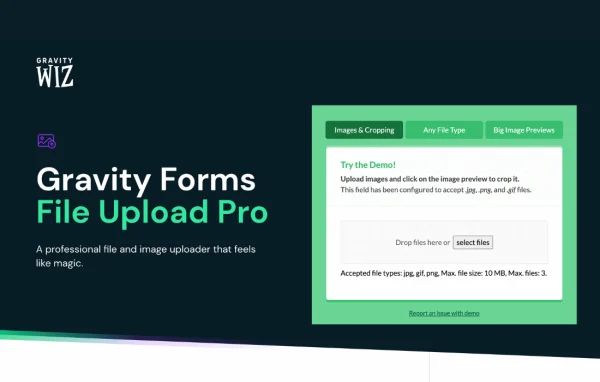
Gravity Forms File Upload Pro by Gravity Wiz is a plugin that upgrades the standard file upload fields in Gravity Forms. It adds drag-and-drop uploading, image previews, cropping tools and live validation, so people filling out your forms can see and adjust what they send.
- Version
- 1.5.15
- Released
- Sep 17, 2026
- Developer
- Gravity Perks
- Type
- WordPress plugin
- Licence
- GPL
- Included in
- Every plan, or $5.59 a year on its own
What’s new in Gravity Forms File Upload Pro 1.5.15
Version 1.5.15 · Sep 17, 2026
Latest
- FixedFixed an issue where some image uploads could fail silently and not be saved to the entry.
What it does
The default upload field in Gravity Forms works, but it gives users little feedback about what they just added. This plugin replaces that experience with a cleaner interface. Images show inline previews, and other file types get clear icons, so users can confirm they picked the right file before submitting. File types, sizes and upload limits are checked as files are added, which catches mistakes early instead of after the form is sent.
It works with the File Upload fields you already have, so there is no need to rebuild forms. Image uploads can be cropped, zoomed and rotated, with options for aspect ratios, exact dimensions and circular stencils for profile photos. Images can also be auto-rotated and compressed based on your settings. If you ever turn the plugin off, your fields go back to the standard Gravity Forms behavior, so your forms keep working.
Best for
- Sites using Gravity Forms to collect documents or photos
- Forms that ask users for profile pictures
- Agencies building upload-heavy forms for clients
Features
Image previews and file icons
Uploaded images appear as inline previews, and non-image files display distinct icons, helping users confirm they attached the correct files before submitting the form.
Image cropping tools
Users can crop, zoom and rotate images, with support for aspect ratios, exact dimensions and circular cropping stencils suited to profile pictures.
Drag-and-drop uploading and sorting
Multiple files can be dragged and dropped into the field, then rearranged into a preferred order by dragging them around.
Real-time file validation
File types, sizes and upload limits are checked as users add files, so problems show up right away rather than after submission.
Works with existing fields
The plugin applies to your current Gravity Forms File Upload fields, so you can keep your existing forms without recreating any of them.
Automatic image optimization
Uploaded images are auto-rotated and compressed according to the settings you choose, keeping images oriented correctly and file sizes manageable.
Configurable size and count limits
Set a maximum file size and a maximum number of files for each upload field to keep submissions within the bounds you want.
Support for HEIC, HEIF and WebP
Images in HEIC, HEIF and WebP formats can be previewed and cropped, which helps when users upload photos straight from modern phones.
Gravity Forms File Upload Pro older versions
- 1.5.14Aug 281 improvement, 2 fixes
- 1.5.13Aug 201 fix
- 1.5.12May 141 fix
- 1.5.11May 8
- 1.5.10Dec 3, 2025
- 1.5.9Oct 30, 2025
- 1.5.8Oct 10, 2025
- 1.5.7Jun 12, 2025
- 1.5.6May 15, 2025
- 1.5.5Mar 20, 2025
Members and buyers of this product can download older versions.
29 older versions in all. If you need one that is not listed, ask support.
Questions about Gravity Forms File Upload Pro
Do I have to rebuild my forms to use it?
No. Gravity Forms File Upload Pro works with the File Upload fields already in your Gravity Forms forms. Your existing fields pick up the new interface, previews and validation without being recreated.
Can users crop their photos before submitting?
Yes. Image uploads include cropping, zooming and rotating controls. You can set aspect ratios or exact dimensions, and there is a circular cropping stencil for round profile images.
What happens to my forms if I turn the plugin off?
Your file upload fields revert to the default Gravity Forms behavior. The forms keep working as standard upload fields, so turning it off does not break anything for your users.
Can I limit how many files people upload?
Yes. Each upload field can have a maximum file size and a maximum number of files. These limits, along with allowed file types, are checked in real time as users add files.
Is Gravity Forms File Upload Pro free?
The code of Gravity Forms File Upload Pro is licensed under the GPL, so anyone may use, change and share it. GPL Feast is a paid service: a plan or a single purchase gives you the download and automatic updates. The developer's own support, licence key and online services are not included.
Which version of Gravity Forms File Upload Pro is this?
Version 1.5.15, released Sep 17, 2026. New versions appear here when the developer publishes them, and members get them as automatic updates.
How do I update Gravity Forms File Upload Pro?
Install the free GPL Feast Updater on your site and connect it with your API key. It installs new versions of Gravity Forms File Upload Pro automatically and keeps a backup, so you can roll back.
More from Gravity Perks






