Plugin
Updated
Jet Compare Wishlist
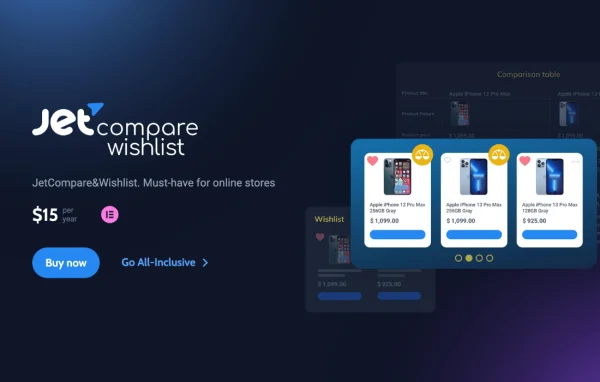
JetCompareWishlist For Elementor is a WordPress plugin by Crocoblock that adds compare and wishlist features to WooCommerce stores built with Elementor. Shoppers can line up products side by side and save items they like, and you control the layout through Elementor widgets.
Install this firstPlease install the Crocoblock Activator Plugin from here to Activate the Jet Plugins
Go to product- Version
- 1.5.13
- Released
- Aug 8, 2026
- Developer
- Jet Plugins
- Type
- WordPress plugin
- Requires
- Elementor
- Licence
- GPL
- Included in
- Every plan, or $3.99 a year on its own
What’s new in Jet Compare Wishlist 1.5.13
Version 1.5.13
Latest
- ImprovedJetDashboard module
- FixedJetCompareWishlist links lacked discernible names, causing an accessibility issue
What it does
Shoppers often bounce between product pages trying to remember which item had which spec, or they lose track of products they meant to come back to. This plugin gives them a side-by-side comparison table and a personal wishlist. You choose which product parameters appear in comparisons, so the table shows details that matter for your catalog instead of a generic list of fields.
Everything is built for the Elementor editor, and the plugin requires Elementor to run. It provides six dedicated widgets, including Compare Button, Compare Count Button, Wishlist Button and Wishlist Count Button, which you place and style like any other Elementor element. Count indicators can show how many times a product has been added to comparison or wishlist lists, giving visitors a sense of what other shoppers are interested in.
Best for
- WooCommerce stores designed with Elementor
- Shops with products that buyers compare by specifications
- Agencies building Elementor ecommerce sites for clients
Features
Customizable comparison tables
Pick the specific product parameters shown in comparisons so customers see the details that are relevant to the products you sell.
Wishlists for shoppers
Visitors get a clean, organized wishlist where they can save products and return to them later, with styling you can adapt to your site design.
Add to compare and wishlist buttons
Simple buttons let customers add products to their comparison or wishlist with a single click from wherever you place them.
Compare and wishlist counts
Display how many times a product has been added to comparison or wishlist lists, offering visitors a form of social proof.
Six dedicated Elementor widgets
Widgets such as Compare Button, Compare Count Button, Wishlist Button and Wishlist Count Button give you flexible placement and styling options.
Works inside the Elementor editor
Built for Elementor, the plugin fits into your normal editing workflow, so you customize compare and wishlist elements visually alongside the rest of the page.
Accessible link labels
Compare and wishlist links carry discernible names, which helps screen reader users understand what each link does.
Jet Compare Wishlist older versions
- 1.5.12.3Apr 81 improvement
- 1.5.12.2Sep 10, 20251 fix
- 1.5.12.1Aug 20, 20251 fix
- 1.5.12Aug 14, 2025
- 1.5.11Jul 31, 2025
- 1.5.10.1Jul 14, 2025
- 1.5.10Mar 18, 2025
- 1.5.9Jan 9, 2025
- 1.5.8.1Nov 15, 2024
- 1.5.8Nov 2, 2024
Members and buyers of this product can download older versions.
16 older versions in all. If you need one that is not listed, ask support.
Questions about Jet Compare Wishlist
Do I need Elementor to use this plugin?
Yes. The plugin requires Elementor and is built specifically for it. Its compare and wishlist elements are delivered as Elementor widgets, so you add and style them inside the Elementor editor.
Can I choose what product details appear in the comparison table?
Yes. You define which product parameters are displayed in comparisons. That lets you keep the table focused on the attributes shoppers care about for your catalog, such as sizes or technical specs, rather than showing every field.
Which widgets come with the plugin?
There are six dedicated Elementor widgets. They include Compare Button, Compare Count Button, Wishlist Button and Wishlist Count Button, among others, so you can place compare and wishlist controls and counters wherever they fit your layout.
Can shoppers see how popular a product is?
Yes. Count indicators show how many times a product has been added to comparison or wishlist lists. Displaying these numbers gives visitors a sense of which items other shoppers are paying attention to.
Is Jet Compare Wishlist free?
The code of Jet Compare Wishlist is licensed under the GPL, so anyone may use, change and share it. GPL Feast is a paid service: a plan or a single purchase gives you the download and automatic updates. The developer's own support, licence key and online services are not included.
Which version of Jet Compare Wishlist is this?
Version 1.5.13, released Aug 8, 2026. New versions appear here when the developer publishes them, and members get them as automatic updates.
How do I update Jet Compare Wishlist?
Install the free GPL Feast Updater on your site and connect it with your API key. It installs new versions of Jet Compare Wishlist automatically and keeps a backup, so you can roll back.
What does Jet Compare Wishlist need?
Jet Compare Wishlist needs Elementor installed and active.
More from Jet Plugins