Plugin
Updated
Jet Tabs For Elementor
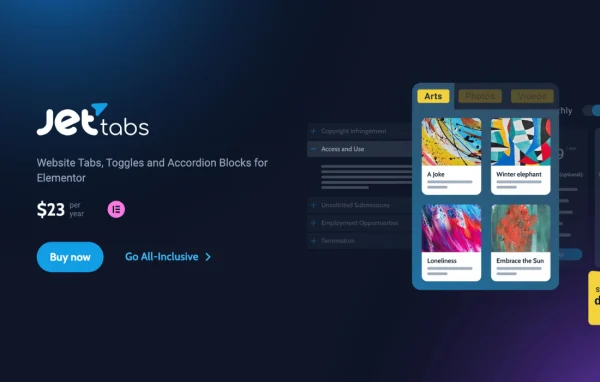
JetTabs by Crocoblock is a WordPress plugin that adds tabs, toggles and accordion blocks to the Elementor page builder. It helps you fit large amounts of content into compact sections that visitors can open as they need them.
Install this firstPlease install the Crocoblock Activator Plugin from here to Activate the Jet Plugins
Go to product- Version
- 2.3.4
- Released
- Sep 25, 2026
- Developer
- Jet Plugins
- Type
- WordPress plugin
- Requires
- Elementor
- Licence
- GPL
- Included in
- Every plan, or $3.99 a year on its own
What’s new in Jet Tabs For Elementor 2.3.4
Version 2.3.4
Latest
- FixedUnwanted scrolling when opening tabs via external anchor links.
- NewCustom styling and disabling options for individual tabs.
- NewOptional URL hash updates when opening Classic Accordion items.
- NewURL linking support for tabs, including nested tabs.
What it does
Long pages full of service details, product specs or FAQs can be hard to scan. This plugin gives you a set of Elementor widgets for packing that content into horizontal tabs, vertical tabs, classic accordions, image accordions and a switcher. You build and style everything inside the Elementor editor with a live preview, so the work happens in an interface you already know. Elementor is required for the plugin to run.
Each tab or accordion item can hold any Elementor template, which means a single panel can contain a full custom layout instead of plain text. If you use JetEngine, tab labels and content can pull in dynamic data, so the same block can show different information across pages or post types. Tabs also support URL linking, including nested tabs, and individual tabs can be styled separately or disabled.
Best for
- Elementor sites with long service or product pages
- Designers building FAQ, pricing or gallery sections
- JetEngine users displaying dynamic content in tabs
Features
Horizontal and vertical tabs
Pick classic horizontal tabs or vertical tabs that stack down the side, depending on how much room your layout has and how your content reads best.
Elementor templates inside tabs
Insert any saved Elementor template into a tab or accordion item, so each panel can hold a complete custom design with consistent styling.
Dynamic content with JetEngine
Combine the plugin with JetEngine to place dynamic data in tab labels and content, letting tabs change based on the page or post type they appear on.
Classic and image accordions
Build collapsible sections for text or images, a good fit for FAQ sections, galleries and detailed content that should stay folded until opened.
Switcher widget
Toggle between two content blocks with a single click, useful for things like comparing pricing options or service plans on the same page.
Linkable tabs and accordion items
Link straight to a specific tab, including nested tabs, and optionally update the URL hash when a Classic Accordion item opens.
Per-tab styling and disabling
Apply custom styles to individual tabs or disable specific tabs without rebuilding the whole block.
Jet Tabs For Elementor older versions
- 2.3.3.2Sep 161 fix
- 2.3.3.1Sep 121 fix
- 2.3.3Aug 131 improvement, 2 fixes
- 2.3.2Jul 2
- 2.3.1May 27
- 2.3.0Mar 27
- 2.2.14Feb 6
- 2.2.13Jan 6
- 2.2.12.1Dec 15, 2025
- 2.2.12Nov 11, 2025
Members and buyers of this product can download older versions.
34 older versions in all. If you need one that is not listed, ask support.
Questions about Jet Tabs For Elementor
Do I need Elementor to use JetTabs?
Yes. The plugin is built for Elementor and adds its tabs, accordion and switcher widgets to the Elementor editor, where you build, customize and preview them in real time.
Can I put more than text inside a tab?
Yes. Any Elementor template can be embedded in a tab or accordion item, so a panel can contain a full layout with images, columns and other elements, styled the same way as the rest of your site.
Can I link directly to a specific tab?
Yes. Tabs support URL linking, including nested tabs. For the Classic Accordion, you can also choose to update the URL hash when an item opens, so visitors can share or bookmark that section.
How does it work with JetEngine?
With JetEngine, you can use dynamic data in tab labels and content. That lets one tab block display different information depending on the page or post type it is placed on.
Is Jet Tabs For Elementor free?
The code of Jet Tabs For Elementor is licensed under the GPL, so anyone may use, change and share it. GPL Feast is a paid service: a plan or a single purchase gives you the download and automatic updates. The developer's own support, licence key and online services are not included.
Which version of Jet Tabs For Elementor is this?
Version 2.3.4, released Sep 25, 2026. New versions appear here when the developer publishes them, and members get them as automatic updates.
How do I update Jet Tabs For Elementor?
Install the free GPL Feast Updater on your site and connect it with your API key. It installs new versions of Jet Tabs For Elementor automatically and keeps a backup, so you can roll back.
What does Jet Tabs For Elementor need?
Jet Tabs For Elementor needs Elementor installed and active.
More from Jet Plugins