Plugin
Updated
JetAppointmentsBooking
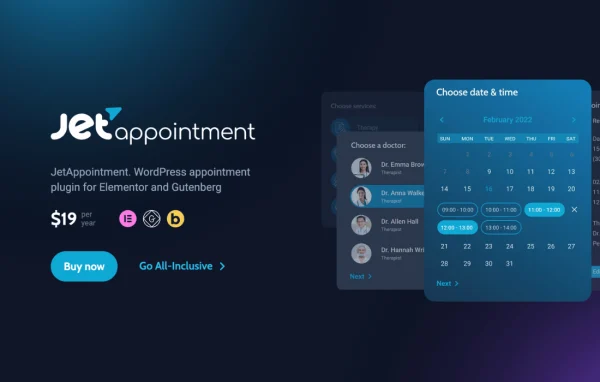
Jet Appointments Booking by Crocoblock is a WordPress plugin for taking and managing appointments on your own site. It handles services, providers, availability calendars, booking forms, payments through WooCommerce and automated notifications, so customers can pick a time slot and you can keep your schedule organized.
Install this firstPlease install the Crocoblock Activator Plugin from here to Activate the Jet Plugins
Go to product- Version
- 2.5.3
- Released
- Sep 23, 2026
- Developer
- Jet Plugins
- Type
- WordPress plugin
- Requires
- Elementor
- Licence
- GPL
- Included in
- Every plan, or $3.99 a year on its own
What’s new in JetAppointmentsBooking 2.5.3
Version 2.5.3
Latest
- FixedFix multi booking capacity error.
- FixedComplete appointments after successful JetFormBuilder Stripe payment.
- FixedCorrect macros rendering after JetFormBuilder Stripe payment.
- FixedChecking date availability after appointment update.
- FixedSanitize appointment timezone display metadata and render appointment metadata as text in the admin popup.
What it does
Service businesses often juggle bookings through phone calls, emails and separate calendar tools. This plugin brings that work into WordPress. You set up services, assign them to providers and define business days, holidays, rest days, buffer times and maximum capacity. Customers then see an availability calendar, choose an open slot and submit a booking form. It suits spas, beauty salons, gyms, healthcare clinics, law consultancies and car rental services, among others.
The plugin works with Elementor, Gutenberg and the Bricks editor, so you can build booking pages in the editor you already use. Elementor is required. Payments run through WooCommerce, with pricing per minute, hour or time slot. For remote sessions, it can schedule Zoom meetings and send the links. A dashboard lets you search, filter, add, edit and delete appointments, while email and webhook automation sends confirmations, reminders and cancellation requests.
Best for
- Salons, spas and gyms taking bookings online
- Clinics and consultancies scheduling client sessions
- Agencies building booking sites with Elementor or Bricks
Features
Service and provider management
Assign multiple services to each provider and manage their schedules, which helps businesses with several staff members or different types of appointments.
Interactive availability calendar
Show customers available time slots in a calendar with filterable views, so they can choose a convenient time when booking.
Recurring and fixed time slots
Let customers book appointments that repeat daily, weekly, monthly or yearly, or offer bookings at specific fixed time slots.
Custom booking forms
Build booking forms with post-submit actions, including multi-page forms and custom templates for presenting providers and services.
WooCommerce payments
Take online payments through WooCommerce and set pricing per minute, per hour or per time slot, with manual time input for complex cases.
Zoom video appointments
Schedule Zoom meetings automatically, send confirmation links and manage virtual appointments from the WordPress dashboard.
Detailed schedule settings
Define business days, holidays, rest days, buffer times, maximum service capacity and custom calendar labels to control when bookings can happen.
Notifications and appointment dashboard
Send automatic email confirmations, reminders and cancellation requests, trigger webhooks, and manage all appointments from a searchable, filterable admin dashboard.
JetAppointmentsBooking older versions
- 2.5.2.1Aug 133 fixes
- 2.5.2Aug 72 new, 4 fixes
- 2.5.1.1Jul 231 fix
- 2.5.1Jun 26
- 2.5.0May 21
- 2.4.2Apr 27
- 2.4.1Apr 8
- 2.4.0Mar 18
- 2.3.2Feb 6
- 2.3.1Jan 9
Members and buyers of this product can download older versions.
36 older versions in all. If you need one that is not listed, ask support.
Questions about JetAppointmentsBooking
Which page builders does Jet Appointments Booking work with?
It works with Elementor, Gutenberg and the Bricks editor, so you can design booking pages with the builder you prefer. Elementor is listed as a required plugin, so plan to have it on your site.
Can customers pay when they book an appointment?
Yes. Payments are handled through WooCommerce, and you can price services per minute, per hour or per time slot. You can also adjust durations and pricing manually for more complex booking scenarios.
Does it support online video appointments?
Yes. The Zoom integration can schedule meetings automatically and send confirmation links to clients, and you can manage those virtual appointments from the WordPress dashboard alongside your in-person bookings.
Can I set holidays and gaps between appointments?
Yes. Schedule settings cover business days, holidays, rest days, buffer times between appointments and maximum service capacity. You can also add custom calendar labels to make availability clearer for customers.
Is JetAppointmentsBooking free?
The code of JetAppointmentsBooking is licensed under the GPL, so anyone may use, change and share it. GPL Feast is a paid service: a plan or a single purchase gives you the download and automatic updates. The developer's own support, licence key and online services are not included.
Which version of JetAppointmentsBooking is this?
Version 2.5.3, released Sep 23, 2026. New versions appear here when the developer publishes them, and members get them as automatic updates.
How do I update JetAppointmentsBooking?
Install the free GPL Feast Updater on your site and connect it with your API key. It installs new versions of JetAppointmentsBooking automatically and keeps a backup, so you can roll back.
What does JetAppointmentsBooking need?
JetAppointmentsBooking needs Elementor installed and active.
More from Jet Plugins