Plugin
Updated
JetBooking
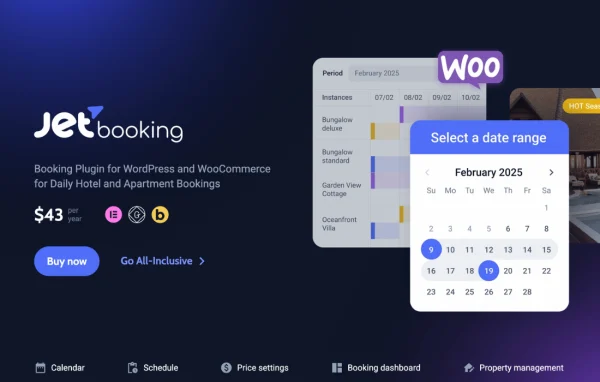
JetBooking by Crocoblock is a WordPress plugin for taking daily and weekly bookings on your own site. It gives guests an availability calendar and booking forms, and it gives hosts control over dates, pricing rules and reservations. It works with Elementor and connects to WooCommerce for payments and checkout.
Install this firstPlease install the Crocoblock Activator Plugin from here to Activate the Jet Plugins
Go to product- Version
- 4.1.3.1
- Released
- Sep 29, 2026
- Developer
- Jet Plugins
- Type
- WordPress plugin
- Requires
- Elementor
- Licence
- GPL
- Included in
- Every plan, or $3.99 a year on its own
What’s new in JetBooking 4.1.3.1
Version 4.1.3.1 · Sep 29, 2026
Latest
- FixedImproved JetFormBuilder compatibility for secure multi-unit booking price calculations.
What it does
Property owners, hotels, vacation rentals and apartment managers need a way to show open dates, collect reservations and charge the right amount without juggling spreadsheets. This plugin handles that inside WordPress. You set which days can be booked, the minimum and maximum stay, and any holidays or weekends to exclude. Guests then pick dates from a calendar on your site, and the booking is recorded alongside its price and status so you can follow it from one place.
The plugin requires Elementor, and it also works with the Gutenberg and Bricks editors for building booking forms and pages. Payments run through WooCommerce with a two-way sync between bookings and orders, so payment methods, taxes and checkout come from your existing store setup. Bookings can sync with Google Calendar, connect to other services through Zapier or Webhooks, and export as CSV or iCal. It also pairs with other Crocoblock plugins such as JetEngine, JetSmartFilters, JetReviews and JetAppointment.
Best for
- Vacation rental and apartment owners taking bookings online
- Small hotels managing several room types
- Agencies building Elementor booking sites for property clients
Features
Availability calendar for guests
Guests choose dates on a calendar while you define bookable days, minimum and maximum durations, and exclude holidays or weekends from booking.
Seasonal and person-based pricing
Set seasonal prices, weekend rates, fixed per-night charges and variable rates based on the number of people to match how you price stays.
Multiple units and properties
Manage several room or unit types from one interface, track booking statuses, and apply custom schedules and booking rules to each property.
Two-way WooCommerce sync
Bookings and WooCommerce orders stay linked in both directions, so you can use WooCommerce payment methods such as Visa, MasterCard and PayPal, plus tax settings and checkout.
Calendar, timeline and list views
Review reservations in calendar, timeline or list layouts with filtering and sorting, then export booking data as CSV or iCal files.
Daily or weekly booking periods
Choose daily or weekly bookings, decide whether the checkout day counts toward the total, and apply duration rules that suit your business.
Guest notification workflows
Create notification workflows that send guests messages about booking confirmations, cancellations and reminders, cutting down on manual follow-up emails.
Google Calendar, Zapier and Webhooks
Sync bookings with Google Calendar and connect to third-party services through Zapier or Webhooks for automated communication between platforms.
JetBooking older versions
- 4.1.3Sep 111 new, 1 improvement, 8 fixes
- 4.1.2.3Aug 131 fix
- 4.1.2.2Jul 231 fix
- 4.1.2.1Jul 13
- 4.1.2Jun 3
- 4.1.1May 21
- 4.1.0May 13
- 4.0.4.2Apr 28
- 4.0.4.1Apr 8
- 4.0.4Mar 12
Members and buyers of this product can download older versions.
52 older versions in all. If you need one that is not listed, ask support.
Questions about JetBooking
Can I take payments for bookings?
Yes. Bookings sync both ways with WooCommerce orders, so guests pay through WooCommerce checkout. That means you can use its payment methods, including Visa, MasterCard and PayPal, along with your WooCommerce tax configuration.
Does it work with editors other than Elementor?
Elementor is required, and the plugin is also built to work with the Gutenberg and Bricks editors. You can design booking forms and booking pages in whichever of these editors fits your workflow.
Is it suitable for hourly appointments?
This plugin focuses on daily and weekly bookings for rentals and accommodation. For hourly services, Crocoblock offers JetAppointment, which can be combined with it on the same site.
Can I manage more than one property or room type?
Yes. You can manage multiple room or unit types from a single interface, monitor the status of each booking, and give each property its own schedule and booking rules.
Is JetBooking free?
The code of JetBooking is licensed under the GPL, so anyone may use, change and share it. GPL Feast is a paid service: a plan or a single purchase gives you the download and automatic updates. The developer's own support, licence key and online services are not included.
Which version of JetBooking is this?
Version 4.1.3.1, released Sep 29, 2026. New versions appear here when the developer publishes them, and members get them as automatic updates.
How do I update JetBooking?
Install the free GPL Feast Updater on your site and connect it with your API key. It installs new versions of JetBooking automatically and keeps a backup, so you can roll back.
What does JetBooking need?
JetBooking needs Elementor installed and active.
More from Jet Plugins