Plugin
Updated
One Accessibility Pro
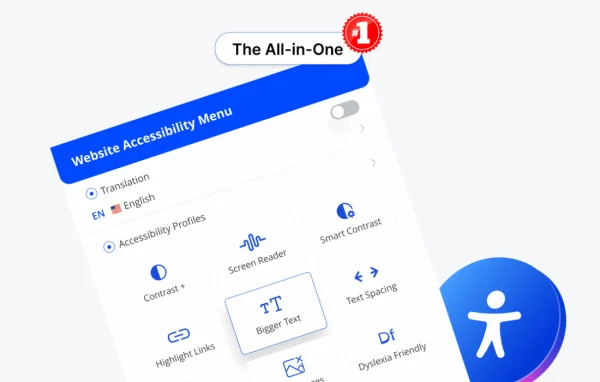
One Accessibility Pro by bdthemes is a WordPress plugin that adds an accessibility toolbar to your site. Visitors can resize text, adjust color contrast, browse by keyboard and use screen readers more comfortably, and you can set it all up without writing code.
- Version
- 1.6.9
- Released
- Oct 5, 2026
- Developer
- BdThemes
- Type
- WordPress plugin
- Licence
- GPL
- Included in
- Every plan, or $5.59 a year on its own
What’s new in One Accessibility Pro 1.6.9
Version 1.6.9 · Oct 5, 2026
Latest
- NewText, Title and Background Color — pick a color from the toolbar or set one in a custom profile.
- FixedTheme button styles no longer break the translation and consent buttons.
What it does
Many visitors find standard websites hard to use. Small text, low contrast and mouse-only menus can shut out people with low vision, color blindness or motor impairments. This plugin gives those visitors a set of tools they can use on the spot. They can make text larger, switch contrast settings, pick text, title and background colors, and move through pages with a keyboard. Screen reader support helps present content in a clear, structured way for visually impaired users.
The tools live in an accessibility toolbar that you can tailor to match your site's branding, so it fits your existing design. Turning the features on takes a few clicks in WordPress, which suits site owners and content creators who do not code. You can also set colors through custom profiles. The plugin is built to help sites work toward guidelines such as WCAG and ADA, and it supports multiple languages for sites with an international audience.
Best for
- Site owners working toward WCAG or ADA guidelines
- Agencies adding accessibility tools to client sites
- Multilingual sites serving visitors with disabilities
Features
Keyboard navigation support
Visitors can move through your pages without a mouse, which makes browsing easier for people with motor impairments or anyone who prefers the keyboard.
Text resizing tool
Visitors can adjust font sizes as they read, improving readability for people with visual impairments or simple reading preferences.
Color contrast adjustment
Customizable contrast settings help content stand out clearly for users with color blindness or low vision.
Text, title and background colors
Visitors can pick text, title and background colors from the toolbar, and you can also define these colors in a custom profile.
Screen reader compatibility
Works with popular screen readers to give visually impaired users clear, structured navigation through your site's content.
Customizable accessibility toolbar
Adjust the accessibility menu to match your site's branding while keeping a clear, easy interface for visitors.
Setup without coding
Turn on the accessibility features in a few clicks from WordPress, with no technical skills or custom code required.
Multilingual support
The plugin works with multiple languages, so the toolbar can serve visitors on sites built for different language audiences.
One Accessibility Pro older versions
- 1.6.8Oct 51 new, 1 improvement
- 1.6.7Oct 21 new, 1 fix, 1 security fix
- 1.6.6Sep 281 improvement
- 1.6.4Sep 26
- 1.6.3Sep 11
- 1.6.2Sep 10
- 1.6.1Sep 7
- 1.6.0Sep 2
- 1.5.0Aug 17
- 1.4.0Aug 11
Members and buyers of this product can download older versions.
21 older versions in all. If you need one that is not listed, ask support.
Questions about One Accessibility Pro
Will this plugin help my site meet WCAG or ADA guidelines?
It is designed to help your site work toward accessibility guidelines such as WCAG and ADA by adding tools like keyboard navigation, text resizing, contrast adjustment and screen reader support. It supports your compliance efforts, though meeting a standard also depends on your own content and design.
Do I need coding skills to set it up?
No. The accessibility features can be turned on in a few clicks from WordPress, and the toolbar can be adjusted without writing code. That makes it a good fit for non-technical site owners and busy content teams.
Can I make the accessibility toolbar match my site's design?
Yes. The toolbar can be customized to fit your branding, so it looks consistent with the rest of your site. You can also set text, title and background colors in a custom profile.
Does it work on sites in languages other than English?
Yes. The plugin offers multilingual support and is compatible with multiple languages, so visitors on sites built for different language audiences can use the accessibility tools.
Is One Accessibility Pro free?
The code of One Accessibility Pro is licensed under the GPL, so anyone may use, change and share it. GPL Feast is a paid service: a plan or a single purchase gives you the download and automatic updates. The developer's own support, licence key and online services are not included.
Which version of One Accessibility Pro is this?
Version 1.6.9, released Oct 5, 2026. New versions appear here when the developer publishes them, and members get them as automatic updates.
How do I update One Accessibility Pro?
Install the free GPL Feast Updater on your site and connect it with your API key. It installs new versions of One Accessibility Pro automatically and keeps a backup, so you can roll back.
More from BdThemes