Plugin
Updated
Sigma Media Manager
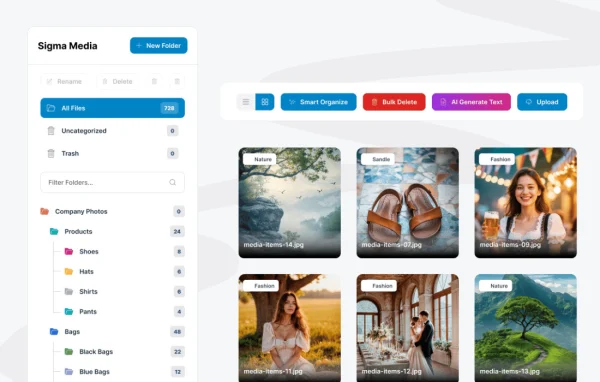
Sigma Media Manager by bdthemes is a WordPress plugin for organizing the media library. It adds filtering, bulk actions and category tags, so you can sort images, videos and files and clear out the clutter that builds up as a site grows.
- Version
- 1.7.4
- Released
- Sep 16, 2026
- Developer
- BdThemes
- Type
- WordPress plugin
- Licence
- GPL
- Included in
- Every plan, or $5.59 a year on its own
What’s new in Sigma Media Manager 1.7.4
Version 1.7.4 · Sep 16, 2026
Latest
- FixedDivi Visual Builder: clicking a folder now filters the media grid, and the media list scrolls correctly.
- FixedMedia grid no longer runs under the Attachment Details panel, which could hide the last images.
What it does
The default WordPress media library works fine on a new site, but after a few hundred uploads it gets hard to scan. Finding one image means scrolling through a long grid, and old or duplicate files pile up. This plugin gives you ways to group and narrow down your media, so the library stays usable on a small blog and on a large business site alike.
You assign custom category tags to media items, then filter the library by file type, upload date or tag. Bulk actions let you edit, delete or categorize many files in one pass instead of one at a time. A cleanup tool helps you spot unused or duplicate files and remove them. The interface is responsive, so you can manage media from a desktop, tablet or phone, and it is built to work with other BdThemes products.
Best for
- Blogs and content sites with large image libraries
- Business websites with many files across projects
- Freelancers and agencies keeping client media libraries tidy
Features
Filtering by type, date and tag
Narrow the media library by file type, upload date or custom tags to find a specific image, video or file without scrolling through everything.
Bulk actions
Edit, delete or categorize multiple media files at once, which cuts down the repetitive work of maintaining a large library.
Custom category tags
Assign your own category tags to media items so assets for different projects or sections of the site are grouped and easy to pull up later.
Unused and duplicate cleanup
Identify media files that are unused or duplicated and remove them, freeing up server space taken by uploads you no longer need.
Clean library interface
Browse your media in an uncluttered layout that keeps folders, filters and files easy to read as the library grows.
Works across devices
The responsive design lets you organize and manage your media library from a desktop, tablet or mobile phone.
Fits with BdThemes products
Built to run alongside your existing WordPress setup and other BdThemes products, so it slots into sites already using that developer's tools.
Sigma Media Manager older versions
- 1.7.2Aug 241 improvement, 5 security fixes
- 1.7.1Aug 111 removal
- 1.7.0Aug 49 new, 2 improvements
- 1.6.4Jul 25
- 1.6.3Jul 17
- 1.6.2Jul 15
- 1.6.1Jul 2
- 1.6.0Jul 1
- 1.5.5Jun 18
- 1.5.2Jun 12
Members and buyers of this product can download older versions.
17 older versions in all. If you need one that is not listed, ask support.
Questions about Sigma Media Manager
Can I sort my media into categories?
Yes. You can assign custom category tags to images, videos and other files, then filter the library by those tags. This makes it simple to keep assets for different projects, pages or clients grouped together.
Will it help me get rid of files I no longer use?
It includes a cleanup feature that identifies unused or duplicate media files so you can remove them. That keeps the library smaller and easier to browse and frees up server space used by old uploads.
Can I change a lot of files at once?
Yes. Bulk actions let you edit, delete or categorize multiple media files in a single step, which is much faster than handling each item individually when you are reorganizing a large library.
Does it work with page builders like Divi?
The plugin's behavior inside the Divi Visual Builder has been addressed, including clicking a folder to filter the media grid. It is also designed to work with your existing WordPress setup and other BdThemes products.
Is Sigma Media Manager free?
The code of Sigma Media Manager is licensed under the GPL, so anyone may use, change and share it. GPL Feast is a paid service: a plan or a single purchase gives you the download and automatic updates. The developer's own support, licence key and online services are not included.
Which version of Sigma Media Manager is this?
Version 1.7.4, released Sep 16, 2026. New versions appear here when the developer publishes them, and members get them as automatic updates.
How do I update Sigma Media Manager?
Install the free GPL Feast Updater on your site and connect it with your API key. It installs new versions of Sigma Media Manager automatically and keeps a backup, so you can roll back.
More from BdThemes