Plugin
Updated
SigmaForms Pro
SigmaForms Pro by bdthemes is a WordPress form builder plugin with a drag and drop interface. It lets you build contact forms, surveys, lead capture forms and event registrations without writing code, with styling and layout controls to match your site.
- Version
- 1.5.0
- Released
- Sep 27, 2026
- Developer
- BdThemes
- Type
- WordPress plugin
- Licence
- GPL
- Included in
- Every plan, or $5.59 a year on its own
What’s new in SigmaForms Pro 1.5.0
Version 1.5.0 · Sep 27, 2026
Latest
- NewShared admin header with a "More" menu, and screen switching without a page reload
- NewSVG icons throughout the admin, replacing Dashicons
- ImprovedAll admin screens and the Dashboard widget redesigned
- ImprovedLicense screen protected from other plugins' CSS
- ImprovedExpired links now show a "Back" link instead of an empty page
- FixedFailed settings saves showed as successful
- FixedDashboard widget links opened a "Link expired" page, and its title ignored the white label brand
- FixedAnalytics listed all 24 hours for forms with no submissions
What it does
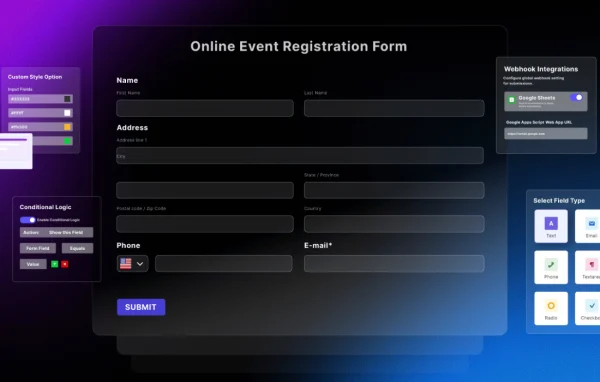
Most sites need forms, and building them by hand or fighting rigid templates takes time. This plugin gives you a visual builder where you place and arrange fields by dragging them into position. You pick from field types such as text, email, dropdowns, checkboxes and file uploads, then set up conditional logic so fields appear or hide based on what visitors enter. Forms adapt to different screen sizes, so the same form works on phones and desktops.
Once a form is live, the plugin handles what happens after someone submits it. Email notifications alert your team, and auto-responders send a reply to the person who filled it in. CAPTCHA and honeypot methods help keep spam and bots out, and submissions can be exported to CSV for follow-up in other tools. The admin area also includes analytics for your forms, which suits small businesses, bloggers and agencies building forms for clients.
Best for
- Small businesses needing contact and lead forms
- Bloggers and creators running surveys or registrations
- Agencies building styled forms for client sites
Features
Drag and drop builder
Add and arrange form fields in a visual interface, so you can put together a working form without touching any code.
Custom field types
Choose from fields including text, email, dropdowns, checkboxes and file uploads, and customize each one to fit the information you need to collect.
Styling controls
Adjust colors, fonts, spacing, borders and backgrounds so each form matches the look of your brand and the rest of your site.
Flexible layouts
Lay out forms in a single column, multiple columns or inline, depending on how much space you have and how long the form is.
Conditional logic
Show or hide fields based on a visitor's earlier answers, so people only see the questions that apply to them.
Spam protection
Built-in CAPTCHA and honeypot techniques help block spam submissions and bots from filling your inbox with junk entries.
Notifications and auto-responders
Send email alerts to your team when a form comes in, and send an automatic reply to the person who submitted it.
CSV export
Export form submissions to a CSV file so you can review entries, share them or bring them into a spreadsheet or other tool.
SigmaForms Pro older versions
- 1.4.12Aug 271 improvement, 2 security fixes
- 1.4.11Aug 242 improvements, 7 security fixes
- 1.4.10Aug 112 removals
- 1.4.9Aug 10
- 1.4.9Aug 10
- 1.4.8Jul 17
- 1.4.7Jul 15
- 1.4.6Jul 7
- 1.4.5Jun 5
- 1.4.4May 25
Members and buyers of this product can download older versions.
14 older versions in all. If you need one that is not listed, ask support.
Questions about SigmaForms Pro
Do I need to know how to code to build forms?
No. Forms are built with a drag and drop interface where you add fields and arrange them visually. Styling options for colors, fonts, spacing, borders and backgrounds are set through controls, so you can match your site's design without writing CSS.
Can the form change based on how someone answers?
Yes. Conditional logic lets you show or hide fields depending on what a visitor enters. This is useful for surveys or registration forms where some questions only apply to certain people, keeping the form shorter for everyone else.
How does it deal with spam submissions?
The plugin includes CAPTCHA and honeypot techniques. CAPTCHA asks visitors to pass a simple check, while a honeypot uses a hidden field that bots tend to fill in, which helps filter out automated junk entries.
What can I do with the submissions I collect?
You can get email notifications when a form is submitted and send automatic replies to the person who filled it in. Submissions can also be exported to CSV for handling in a spreadsheet or another tool.
Is SigmaForms Pro free?
The code of SigmaForms Pro is licensed under the GPL, so anyone may use, change and share it. GPL Feast is a paid service: a plan or a single purchase gives you the download and automatic updates. The developer's own support, licence key and online services are not included.
Which version of SigmaForms Pro is this?
Version 1.5.0, released Sep 27, 2026. New versions appear here when the developer publishes them, and members get them as automatic updates.
How do I update SigmaForms Pro?
Install the free GPL Feast Updater on your site and connect it with your API key. It installs new versions of SigmaForms Pro automatically and keeps a backup, so you can roll back.
More from BdThemes