Plugin
Updated
Sigma Store Locator
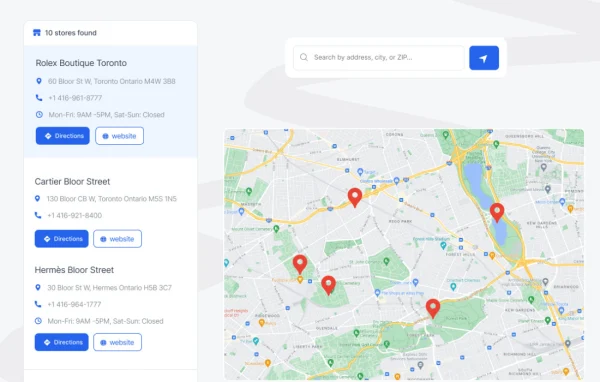
Sigma Store Locator by bdthemes is a WordPress plugin that puts your store locations on an interactive map. Visitors can search by city, ZIP code or address, see the nearest branches first and get driving directions to the one they pick.
- Version
- 1.8.0
- Released
- Sep 7, 2026
- Developer
- BdThemes
- Type
- WordPress plugin
- Licence
- GPL
- Included in
- Every plan, or $5.59 a year on its own
What’s new in Sigma Store Locator 1.8.0
Version 1.8.0 · Sep 7, 2026
Latest
- NewColour settings for the Directions and Website buttons, normal and hover
- NewOption to delete all plugin data on uninstall, off by default
- FixedDeactivating the plugin no longer deletes analytics, the API key or the license key
- FixedStore locator rendered empty when no Google Maps API key was set
- FixedSearching by a full address returned no results
- FixedStore editor map stuck on "Loading map..."
- FixedWebsite Button Title and WhatsApp Number appeared empty in the store editor
- FixedDirections button did nothing when the visitor's location was unavailable
What it does
Businesses with several branches often list addresses on a plain page, which leaves visitors working out which location is closest. This plugin replaces that list with a zoomable map where every store appears as a marker. Visitors type a city, ZIP code or address, and results are sorted by distance so the nearest locations come first. Filters for things like store type, available services or operating hours help narrow the list further.
Each location can carry its address, phone number, business hours and custom notes, and the store editor lets you add, edit or remove stores from the WordPress dashboard without writing code. You can style the map markers to match your brand or tell store categories apart, and set colors for the Directions and Website buttons. The layout works on phones and tablets, and the plugin includes structured data and privacy features aimed at GDPR requirements for location data.
Best for
- Retail chains with several physical stores
- Restaurant franchises listing multiple branches
- Service centers that want visitors to find nearby offices
Features
Interactive zoomable map
All your store locations appear on a zoomable map, so visitors can browse branches visually and spot the ones near them.
Search by city or ZIP
Visitors can search for stores by city, ZIP code or full address to narrow the results to the area they care about.
Distance-based results
Locations nearest to the visitor are listed first, which saves them from scanning a long list of branches to find the closest one.
Custom filters
Add filter options such as store type, services available or operating hours so visitors can find a location that meets their needs.
Detailed store information
Show the address, phone number, business hours and custom notes for each location right alongside the map results.
Driving directions
Visitors get step-by-step route guidance from their current position to the selected store through the Directions button.
Custom marker styles
Change the location pins to reflect your brand or use different styles to separate store categories on the map.
Button color settings
Set normal and hover colors for the Directions and Website buttons so they fit the rest of your site design.
Sigma Store Locator older versions
- 1.5.0Apr 63 new, 4 improvements, 4 fixes
- 1.4.1Mar 32 fixes
- 1.4.0Feb 224 new, 1 fix
Members and buyers of this product can download older versions.
Questions about Sigma Store Locator
Can visitors find the store closest to them?
Yes. Visitors can search by city, ZIP code or address, and the results are ordered by distance so the nearest locations appear first. They can then request driving directions from their position to the store they choose.
What details can I show for each store?
Each location can display its address, phone number, business hours and custom notes. You can also add a website button for each store, and its colors can be adjusted in the settings along with the Directions button.
Do I need coding skills to manage my locations?
No. Stores are added, edited and removed through backend settings in the WordPress dashboard. The store editor includes a map view, so you can manage locations without touching any code.
Does the store locator work on mobile devices?
Yes. The map and store listings use a responsive design that adapts to smartphones and tablets, so visitors on the go can search for locations and get directions from their phone.
Is Sigma Store Locator free?
The code of Sigma Store Locator is licensed under the GPL, so anyone may use, change and share it. GPL Feast is a paid service: a plan or a single purchase gives you the download and automatic updates. The developer's own support, licence key and online services are not included.
Which version of Sigma Store Locator is this?
Version 1.8.0, released Sep 7, 2026. New versions appear here when the developer publishes them, and members get them as automatic updates.
How do I update Sigma Store Locator?
Install the free GPL Feast Updater on your site and connect it with your API key. It installs new versions of Sigma Store Locator automatically and keeps a backup, so you can roll back.
More from BdThemes