Plugin
Updated
Perfect Brands WooCommerce PRO
Perfect Brands WooCommerce PRO by QuadLayers is a WordPress plugin that adds brand management to WooCommerce stores. You can assign brands to products, give each brand a logo, banner and description, and let shoppers browse and filter the catalog by brand.
- Version
- 3.5.7
- Released
- Jun 27, 2026
- Developer
- QuadLayers
- Type
- WordPress plugin
- Requires
- WooCommerce
- Licence
- GPL
- Included in
- Every plan, or $5.59 a year on its own
What’s new in Perfect Brands WooCommerce PRO 3.5.7
Version 3.5.7 · Jun 27, 2026
Latest
- FixedWooCommerce compatibility
What it does
WooCommerce has no built-in way to organize products by manufacturer or label, so stores that carry several brands often fall back on categories or tags. This plugin gives brands their own place in the store. Each brand can have a logo, a banner and a description, and a product can be linked to more than one brand. Shoppers get a clear way to find products from the makers they already know, and you get a tidy structure for a multi-brand catalog.
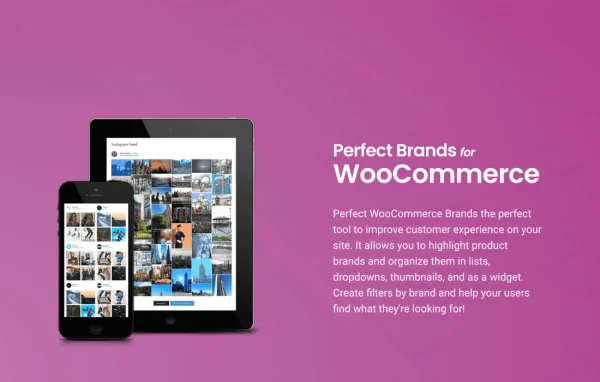
Once brands are set up, you decide where they appear. Brand lists can be shown as a grid, a carousel or a masonry layout, and shortcodes and widgets let you place them on pages, sidebars and other areas of your site. Visual Composer users can work with brand elements inside that page builder. Each brand gets a customizable page, and shoppers can filter products by brand. For larger catalogs, brand data can be imported and exported in bulk. The plugin requires WooCommerce.
Best for
- WooCommerce stores selling products from many brands
- Fashion, electronics or beauty shops organized by manufacturer
- Agencies building multi-brand stores with Visual Composer
Features
Brands with logos and banners
Assign one or more brands to each product and give every brand its own logo, banner and description so shoppers can recognize it at a glance.
Grid, carousel and masonry layouts
Display your brands in a grid, a carousel or a masonry layout, depending on how you want them to look on the page.
Filter products by brand
Shoppers can narrow the product list to a specific brand, which makes it easier to browse a catalog that carries many labels.
Customizable brand pages
Each brand gets its own page that you can customize to present the brand's description and the products linked to it.
Shortcodes and widgets
Place brand lists and other brand elements anywhere on your site using the included shortcodes and widgets.
Visual Composer integration
Add brand elements while building pages in Visual Composer, so brand content fits into your usual page building workflow.
Bulk import and export
Move brand data in and out of your store in bulk, which helps when you manage a long list of brands or set up a new store.
Responsive, retina-ready, multilingual
Brand visuals are responsive and retina ready for different screens, and the plugin supports multiple languages for international stores.
Perfect Brands WooCommerce PRO older versions
- 3.5.4May 231 fix
- 3.5.1Jan 231 fix
- 3.5.0Nov 27, 20252 fixes
- 3.4.8Sep 25, 2025
- 3.4.2May 23, 2025
Members and buyers of this product can download older versions.
Questions about Perfect Brands WooCommerce PRO
Can I assign more than one brand to a single product?
Yes. The plugin lets you assign multiple brands to a product. Each brand keeps its own logo, banner and description, so a product made in partnership or sold under several labels can be linked to all of them.
How can I show brands on my store pages?
You can display brands in a grid, carousel or masonry layout. Shortcodes and widgets let you place those brand displays on pages, posts and sidebars, and Visual Composer users can add brand elements inside the builder.
Will customers be able to filter products by brand?
Yes. Brand filtering lets shoppers narrow the product list to the brands they want, and each brand also has its own customizable page that lists its products.
Do I need WooCommerce to use it?
Yes. This plugin is built for WooCommerce and requires it. Brands are attached to WooCommerce products, and the brand pages and filters work within your WooCommerce catalog.
Is Perfect Brands WooCommerce PRO free?
The code of Perfect Brands WooCommerce PRO is licensed under the GPL, so anyone may use, change and share it. GPL Feast is a paid service: a plan or a single purchase gives you the download and automatic updates. The developer's own support, licence key and online services are not included.
Which version of Perfect Brands WooCommerce PRO is this?
Version 3.5.7, released Jun 27, 2026. New versions appear here when the developer publishes them, and members get them as automatic updates.
How do I update Perfect Brands WooCommerce PRO?
Install the free GPL Feast Updater on your site and connect it with your API key. It installs new versions of Perfect Brands WooCommerce PRO automatically and keeps a backup, so you can roll back.
What does Perfect Brands WooCommerce PRO need?
Perfect Brands WooCommerce PRO needs WooCommerce installed and active.
More from QuadLayers