Plugin
Updated
Social Feed Gallery PRO
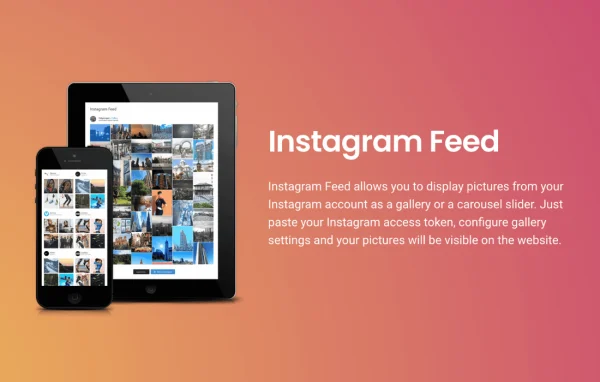
Social Feed Gallery PRO by QuadLayers is a WordPress plugin that pulls your Instagram content onto your site. It shows photos, videos and GIFs in masonry, highlight or carousel layouts, and it can display feeds from several accounts on one page or across the site.
- Version
- 4.4.7
- Released
- Jul 21, 2026
- Developer
- QuadLayers
- Type
- WordPress plugin
- Requires
- Insta Gallery
- Licence
- GPL
- Included in
- Every plan, or $5.59 a year on its own
What’s new in Social Feed Gallery PRO 4.4.7
Version 4.4.7
Latest
- ImprovedWordPress 7.0 compatibility
What it does
Posting on Instagram and keeping your website current are often two separate jobs. This plugin connects them by placing your Instagram gallery right on your WordPress pages. You paste your Instagram access token, choose your gallery settings and the feed appears. It works as an add-on to the Instagram feed gallery plugin from the same developer, so the core plugin needs to be in place first.
The plugin suits personal bloggers as well as agencies handling client profiles, since it supports unlimited user accounts and multiple feeds. You can mix photos, GIFs and videos in one feed, set colors to match your branding and let visitors open items in a pop-up gallery. A load more button lets people see additional posts without leaving the page, and the layouts adapt to desktops, tablets and phones.
Best for
- Bloggers and influencers featuring their Instagram posts
- Businesses displaying brand photos and videos on their site
- Agencies managing Instagram feeds for several clients
Features
Multiple user accounts
Connect unlimited Instagram accounts and display feeds from different users on the same page or on separate pages across your website.
Masonry and highlight layouts
Pick a masonry or highlight layout for your gallery, or present your posts as a carousel slider that fits your site's design.
Mixed media feeds
Combine photos, GIFs and videos into one feed, so your gallery reflects the full range of content you post on Instagram.
Access token setup
Paste your Instagram access token and configure the display settings to get a feed running without writing any code.
Load more button
Add a button that lets visitors bring in more Instagram posts while staying on the same page.
Custom colors
Adjust the feed's colors so the gallery matches your website's branding and sits naturally alongside your other content.
Pop-up galleries
Let visitors click a photo or video to view it in a pop-up gallery box instead of leaving your site.
Responsive display
Feeds adjust to different screen sizes, so galleries display properly on desktops, tablets and smartphones.
Social Feed Gallery PRO older versions
- 4.4.5Mar 311 fix
- 4.4.4Dec 8, 20251 fix
- 4.4.3Nov 30, 20251 fix
- 4.4.1Nov 22, 2025
- 4.4.0Sep 2, 2025
- 4.3.9Aug 13, 2025
- 4.3.8Jul 30, 2025
- 4.3.7May 30, 2025
- 4.3.6May 12, 2025
- 4.3.5May 1, 2025
Members and buyers of this product can download older versions.
22 older versions in all. If you need one that is not listed, ask support.
Questions about Social Feed Gallery PRO
Can I show feeds from more than one Instagram account?
Yes. The plugin supports unlimited user accounts, and you can display multiple feeds from different users either together on one page or spread across different pages of your website.
Does it work on its own?
It is built as an add-on to the Instagram feed gallery plugin by QuadLayers, which needs to be on your site. Once that is in place, this plugin adds features such as multiple accounts, extra layouts, pop-up galleries and custom colors.
Which types of Instagram content can it display?
It can show photos, videos and GIFs. You can blend all three into a single feed and present it in a masonry layout, a highlight layout or a carousel slider.
Will the feed look right on phones?
The feeds are responsive, so they adapt to desktops, tablets and smartphones. Visitors on any of these devices can browse the gallery, open items in the pop-up box and use the load more button.
Is Social Feed Gallery PRO free?
The code of Social Feed Gallery PRO is licensed under the GPL, so anyone may use, change and share it. GPL Feast is a paid service: a plan or a single purchase gives you the download and automatic updates. The developer's own support, licence key and online services are not included.
Which version of Social Feed Gallery PRO is this?
Version 4.4.7, released Jul 21, 2026. New versions appear here when the developer publishes them, and members get them as automatic updates.
How do I update Social Feed Gallery PRO?
Install the free GPL Feast Updater on your site and connect it with your API key. It installs new versions of Social Feed Gallery PRO automatically and keeps a backup, so you can roll back.
What does Social Feed Gallery PRO need?
Social Feed Gallery PRO needs Insta Gallery installed and active.
More from QuadLayers