Plugin
Updated
Powerful Filters for wpDataTables
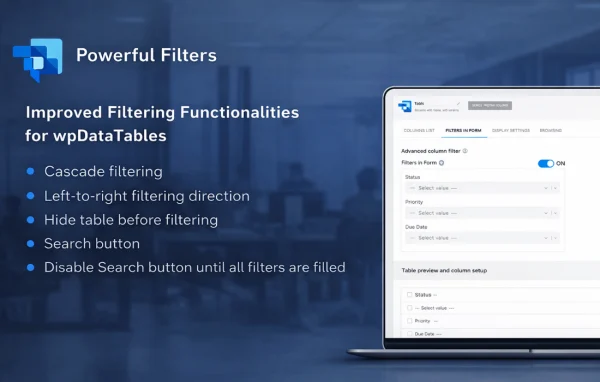
Powerful Filters for wpDataTables by TMS-Plugins is an add-on plugin that extends wpDataTables with cascading filters. Visitors pick a value in one filter and the next filters update to show only matching options, so they can narrow a table down step by step.
- Version
- 1.4.6
- Released
- Jan 22, 2026
- Developer
- TMS-Plugins
- Type
- WordPress plugin
- Licence
- GPL
- Included in
- Every plan, or $5.59 a year on its own
What’s new in Powerful Filters for wpDataTables 1.4.6
Version 1.4.6 · Jan 22, 2026
Latest
What it does
Tables with many rows and columns can be hard to search when every filter shows every possible value. Visitors end up choosing combinations that return nothing, or they scroll through long lists that have no bearing on what they already picked. This add-on handles that by linking filters together. Each choice a visitor makes trims the options in the filters that follow, so only relevant values appear and the table narrows as they go.
The plugin works on top of wpDataTables and fits alongside its existing features, including sorting, pagination and editable tables. Filters are set up through a visual builder with no coding needed, and you can choose dropdowns, checkboxes or ranges depending on the data. Results update without a page reload, the layout adapts to desktop, tablet and mobile screens, and developers get hooks and filters for deeper customization.
Best for
- Sites already using wpDataTables to publish data
- Directories and catalogs with large, multi-column tables
- Developers building custom data-driven WordPress sites
Features
Cascading filters
Each filter updates the options in the filters after it based on what the visitor has already selected, so only values that match the current choices are shown.
Visual filter builder
Set up filters through a visual interface that needs no coding knowledge, which makes it usable for WordPress site owners who do not write code.
Several filter types
Choose from dropdowns, checkboxes and ranges so each column can use the filter style that suits its kind of data, such as categories or numeric values.
Filtering without page reloads
Table results change in real time as visitors make selections, with no page reload between each choice they make in the filters.
Works with wpDataTables features
The filters run alongside existing wpDataTables features such as sorting, pagination and editable tables, so your current table setup keeps working.
Responsive layout
Filters are built to work across desktop, tablet and mobile devices, so visitors on smaller screens can still narrow down table data.
Custom styles and layouts
Adjust filter styles and layouts to match the look of your site, keeping the filter area consistent with the rest of your design.
Hooks for developers
Developers can use the available hooks and filters to customize behavior further or connect the filtering to other code on the site.
Powerful Filters for wpDataTables older versions
- 1.4.5Jun 4, 2024
- 1.4.4Nov 27, 2023
- 1.4.3Aug 25, 2023
- 1.4.2Apr 18, 2023
Members and buyers of this product can download older versions.
Questions about Powerful Filters for wpDataTables
Does this work without wpDataTables?
No. It is an add-on built specifically to extend wpDataTables, so you need wpDataTables running on your site. The plugin adds cascading filters to the tables you create there.
What does cascading filtering actually mean?
The filters are linked. When a visitor picks a value in one filter, the following filters update to show only options that still match. This stops people from choosing combinations that return no rows and keeps long option lists shorter.
Will it handle tables with thousands of rows?
The plugin is described as supporting large datasets, including tables with thousands of records. Filtering also happens in real time without reloading the page, so visitors can keep refining their selections as they go.
Can I still sort and paginate filtered tables?
Yes. The filters are compatible with other wpDataTables features, including sorting, pagination and editable tables, so visitors can filter a table and still sort or page through the results.
Is Powerful Filters for wpDataTables free?
The code of Powerful Filters for wpDataTables is licensed under the GPL, so anyone may use, change and share it. GPL Feast is a paid service: a plan or a single purchase gives you the download and automatic updates. The developer's own support, licence key and online services are not included.
Which version of Powerful Filters for wpDataTables is this?
Version 1.4.6, released Jan 22, 2026. New versions appear here when the developer publishes them, and members get them as automatic updates.
How do I update Powerful Filters for wpDataTables?
Install the free GPL Feast Updater on your site and connect it with your API key. It installs new versions of Powerful Filters for wpDataTables automatically and keeps a backup, so you can roll back.
You might also like