Plugin
Updated
AME Branding
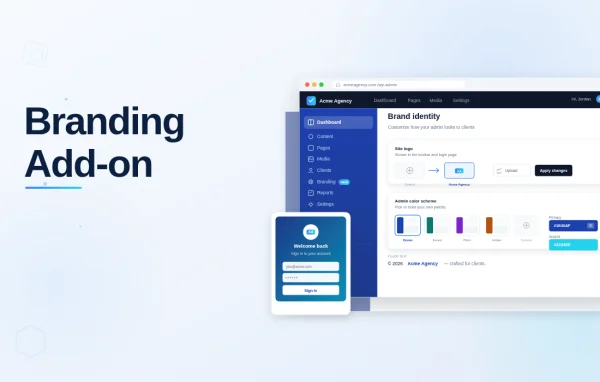
AME Branding by Janis Elsts is an add-on plugin for Admin Menu Editor Pro that lets you rebrand the WordPress backend. You can swap the WordPress logo, set custom admin colors, restyle the login page and adjust the small text details that users see every day.
- Version
- 1.3.13
- Released
- Aug 21, 2026
- Developer
- Janis Elsts
- Type
- WordPress plugin
- Licence
- GPL
- Included in
- Every plan, or $0.79 on its own
What’s new in AME Branding 1.3.13
Version 1.3.13
Latest
- ImprovedAdded the ability to change the size of the custom logo image shown on the login page.
- FixedFixed the color scheme module recomputing the icon color on every request in some configurations.
- ImprovedTested up to WP 7.1-RC4.
What it does
The default WordPress admin looks the same on every site, which can feel generic when you hand a site to a client or run a business with its own visual identity. This add-on gives you control over the parts of the backend that carry branding: the logo, the admin color scheme, the login page, the footer and the greeting in the toolbar. You make these changes through settings, so no coding is needed to get a consistent look from the login screen to the dashboard.
It works as an extension of Admin Menu Editor Pro, so it fits sites that already use that plugin to organize the admin menu. Beyond visual changes, it handles a few practical details. You can remove the WordPress version number from the admin footer, hide core update notifications where updates are managed manually, rename admin page titles and set the sender name and address for emails WordPress sends. Agencies can use it to give client sites a tidy, branded backend.
Best for
- Agencies delivering branded client sites
- Developers who use Admin Menu Editor Pro
- Businesses wanting a consistent branded admin area
Features
Custom admin logo
Replace the WordPress logo in the admin area with your own logo, or remove the WordPress logo entirely for a cleaner, branded backend.
Admin color schemes
Build custom admin color schemes that match your brand colors, so the dashboard has a consistent look for everyone who logs in.
Login page styling
Customize the login page with your own logo, background and styles, and change the size of the custom logo image shown there.
Personalized greeting
Change the default "Howdy, user" greeting in the admin toolbar to a message of your choosing that suits your brand or your client.
Renamed admin page titles
Modify admin page titles to use your brand or project terminology, which can make the backend clearer for the people using it.
Footer text and version removal
Add custom text or HTML to the admin footer, such as contact details or a legal disclaimer, and remove the WordPress version number shown there.
Hidden update notifications
Hide core update notifications so users are not confused or alarmed on sites where updates are handled manually by an administrator.
Custom email sender details
Set the sender name and email address used for emails generated by WordPress, keeping outgoing messages in line with your branding.
AME Branding older versions
- 1.3.12May 191 improvement, 1 fix
- 1.3.11Apr 17, 20251 fix
- 1.3.10Nov 27, 20241 fix
- 1.3.9Nov 18, 2024
- 1.3.8Nov 15, 2024
- 1.3.7Mar 19, 2024
Members and buyers of this product can download older versions.
Questions about AME Branding
Does this work on its own?
No. It is an add-on for Admin Menu Editor Pro, so you need that plugin on your site. The branding settings extend what Admin Menu Editor Pro already does for the admin menu, adding logo, color, login page and text customization.
Can I change how the login page looks?
Yes. You can set your own logo, background and styles on the login page, and you can adjust the size of the custom logo image. This helps the first screen users see match the rest of your branding.
Do I need to write code to use it?
No coding is needed for the branding options. Changes like the logo, colors, greeting and page titles are made through settings. The admin footer does accept custom HTML if you want to add formatted content there.
Can I control which WordPress notices and details users see?
You can hide core update notifications, remove the WordPress version number from the admin footer and remove the WordPress logo. These options are useful on client sites where you manage updates yourself and want a cleaner backend.
Is AME Branding free?
The code of AME Branding is licensed under the GPL, so anyone may use, change and share it. GPL Feast is a paid service: a plan or a single purchase gives you the download and automatic updates. The developer's own support, licence key and online services are not included.
Which version of AME Branding is this?
Version 1.3.13, released Aug 21, 2026. New versions appear here when the developer publishes them, and members get them as automatic updates.
How do I update AME Branding?
Install the free GPL Feast Updater on your site and connect it with your API key. It installs new versions of AME Branding automatically and keeps a backup, so you can roll back.
You might also like