Plugin
Updated
AME Toolbar Editor
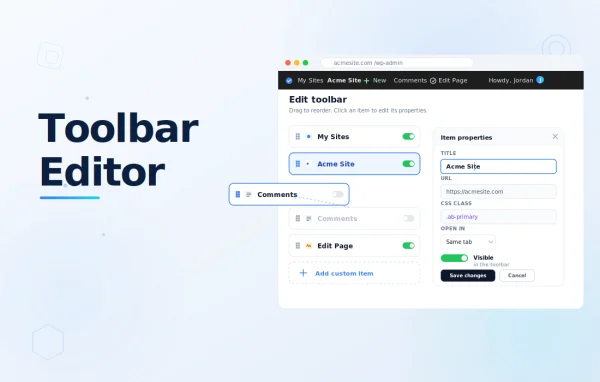
AME Toolbar Editor by Janis Elsts is a WordPress plugin that works as an add-on to Admin Menu Editor Pro. It gives administrators control over the WordPress Toolbar, also called the Admin Bar, so they can hide, reorder, edit and create items to match how they work.
- Version
- 1.5.2
- Released
- Aug 11, 2026
- Developer
- Janis Elsts
- Type
- WordPress plugin
- Licence
- GPL
- Included in
- Every plan, or $0.79 on its own
What’s new in AME Toolbar Editor 1.5.2
Version 1.5.2
Latest
- ImprovedUpdated the internal plugin update checker.
- ImprovedTested up to WP 7.0.3.
What it does
The default WordPress Toolbar comes with a fixed set of items, and many of them go unused on a typical site. This add-on, built to work with Admin Menu Editor Pro, lets you clean that up. You can hide single items or whole groups, drag the rest into the order you prefer and change titles, URLs and CSS classes. You can also add your own items that point to pages, links or actions you open often, which keeps the Toolbar focused on the tasks you actually do.
The plugin handles both single sites and multisite networks, so you can shape the Toolbar for one install or manage settings across a whole network. Export and import tools let you move a finished configuration to another site or network, which helps agencies and admins keep the same layout everywhere. It has been tested in Chrome, Firefox and Internet Explorer, with partial support for Opera and Safari, and it suits anyone who wants a tidier admin area without editing code.
Best for
- Administrators who want a cleaner, more focused admin Toolbar
- Agencies keeping Toolbar layouts consistent across client sites
- Multisite network owners managing admin settings centrally
Features
Hide items or groups
Remove any Toolbar item or an entire group of items so distracting or unused links no longer clutter the admin interface.
Drag and drop reordering
Rearrange Toolbar items by dragging them into place, so the links you use most sit where you expect to find them.
Edit item properties
Change an item's title, URL, CSS classes and other properties to adjust how each Toolbar entry looks and where it leads.
Create custom Toolbar items
Add new entries to the Toolbar that give quick access to frequently used pages, links or actions on your site.
Export and import settings
Save a Toolbar configuration and bring it into another site or multisite network to keep the layout consistent across installs.
Single site and multisite
Manage Toolbar settings for an individual WordPress site or across an entire multisite network from the same set of tools.
Works with Admin Menu Editor Pro
Runs as an add-on to Admin Menu Editor Pro, extending its admin customization options to the WordPress Toolbar.
AME Toolbar Editor older versions
- 1.5.1May 27, 20241 improvement, 2 fixes
- 1.5Apr 16, 20241 new, 2 improvements
- 1.4.3Mar 19, 20243 improvements, 1 fix
Members and buyers of this product can download older versions.
Questions about AME Toolbar Editor
Do I need Admin Menu Editor Pro to use this?
Yes. AME Toolbar Editor is designed as an add-on that integrates with Admin Menu Editor Pro, so it extends that plugin with tools for customizing the WordPress Toolbar rather than working on its own.
Can I add my own links to the Toolbar?
You can create new Toolbar items from scratch and point them to pages, links or actions you use often. You can also edit the title, URL and CSS classes of existing items.
Will it work on a multisite network?
It supports both single sites and multisite networks. You can manage Toolbar settings for one site or across a network, and export and import configurations to copy a layout between sites or networks.
Which browsers does the editor support?
It has been tested in Chrome, Firefox and Internet Explorer, with partial support for Opera and Safari. Most admins using a current mainstream browser should be able to work with the editor without trouble.
Is AME Toolbar Editor free?
The code of AME Toolbar Editor is licensed under the GPL, so anyone may use, change and share it. GPL Feast is a paid service: a plan or a single purchase gives you the download and automatic updates. The developer's own support, licence key and online services are not included.
Which version of AME Toolbar Editor is this?
Version 1.5.2, released Aug 11, 2026. New versions appear here when the developer publishes them, and members get them as automatic updates.
How do I update AME Toolbar Editor?
Install the free GPL Feast Updater on your site and connect it with your API key. It installs new versions of AME Toolbar Editor automatically and keeps a backup, so you can roll back.
You might also like