Plugin
Updated
Community Events
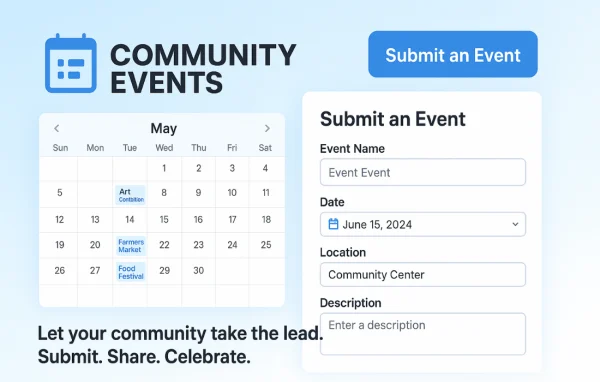
Community Events by Modern Tribe is an add-on plugin for The Events Calendar. It adds a front-end form so visitors and members can submit their own events, while you decide what gets published and how submissions are handled.
- Version
- 5.1.0
- Released
- Sep 30, 2026
- Developer
- The Events Calendar
- Type
- WordPress plugin
- Requires
- The Events Calendar
- Licence
- GPL
- Included in
- Every plan, or $7.99 a year on its own
What’s new in Community Events 5.1.0
Version 5.1.0 · Sep 30, 2026
Latest
- NewFeature - Changed where RSVPs are stored to agree with Tickets. This will happen after you manually start a migration and only if you are using RSVPs already.
- ImprovedLanguage - 0 new strings added, 5 updated, 0 fuzzied, and 0 obsoleted.
- ImprovedChanged views: `community-tickets/modules/tickets`
- ImprovedSwitched changelog tooling from jetpack-changelogger to @stellarwp/changelogger.
- ImprovedVersion - Events Community 5.0.16 is only compatible with Event Tickets 5.30.0 and higher.
What it does
Keeping an event calendar full usually means someone has to enter every listing by hand. This plugin hands that job to your community. Visitors fill out a submission form on the front end of your site, adding event details and images, and the events land in The Events Calendar. You choose whether new events go live right away or wait for your review, and you get an email notification when something new comes in.
It suits local community portals, organization websites and membership sites that want a shared calendar without losing editorial control. You can accept anonymous submissions or limit posting to registered users, protect the form with reCAPTCHA, and restrict venues and organizers to an approved list. With Event Tickets Plus and WooCommerce, organizers can sell tickets on your site while you collect fees or split payments with them.
Best for
- Local community portals with shared event calendars
- Organization websites collecting events from members
- Membership sites letting organizers sell event tickets
Features
Front-end submission form
Visitors submit events with details and images through a form on your site, so you no longer have to enter every listing yourself.
Publishing control and moderation
Decide whether submitted events publish immediately or need review first, keeping the calendar accurate and relevant to your audience.
Registered or anonymous submissions
Allow anyone to submit events, or limit posting to registered users depending on how open you want your community calendar to be.
Spam protection with reCAPTCHA
The submission form works with reCAPTCHA to help block spam and automated bots from filling your calendar with junk entries.
Ticket sales and fee collection
With Event Tickets Plus and WooCommerce, organizers sell tickets on your site. Fees can be set per ticket, per event or per sale, shown separately or included.
Split payments
Ticket sale proceeds can be divided automatically between you and the event organizer at the moment of purchase.
Saved venues and organizers
Restrict submissions to pre-approved venues and organizers, or let your community add new ones when they submit an event.
Flexible form placement
Use the automatically generated submission page, or place the event form anywhere on your site with a shortcode.
Community Events older versions
- 5.0.15Mar 292 improvements, 1 fix
- 5.0.14Mar 13 improvements, 1 fix
- 5.0.13Jan 143 improvements
- 5.0.12Sep 25, 2025
- 5.0.11Sep 17, 2025
- 5.0.10Sep 2, 2025
- 5.0.9Aug 27, 2025
- 5.0.8Jul 17, 2025
- 5.0.7.1Jun 20, 2025
- 5.0.7May 21, 2025
Members and buyers of this product can download older versions.
32 older versions in all. If you need one that is not listed, ask support.
Questions about Community Events
Do I need The Events Calendar for this to work?
Yes. Community Events is an add-on for The Events Calendar plugin, and submitted events are added to that calendar. Ticket selling features also rely on Event Tickets Plus and WooCommerce.
Can I review events before they appear on my calendar?
Yes. You can set submitted events to publish immediately or to wait for your review. Email notifications let you know when a new event has been submitted, so you can check it promptly.
Can community organizers sell tickets and can I take a cut?
With Event Tickets Plus and WooCommerce, organizers can create and sell tickets on your site. You can charge fees per ticket, per event or per sale, and split payments automatically between you and the organizer.
How do I keep spam out of the submission form?
The form integrates with reCAPTCHA to block bots. You can also require users to be registered before they can submit events, and limit venues and organizers to an approved list.
Is Community Events free?
The code of Community Events is licensed under the GPL, so anyone may use, change and share it. GPL Feast is a paid service: a plan or a single purchase gives you the download and automatic updates. The developer's own support, licence key and online services are not included.
Which version of Community Events is this?
Version 5.1.0, released Sep 30, 2026. New versions appear here when the developer publishes them, and members get them as automatic updates.
How do I update Community Events?
Install the free GPL Feast Updater on your site and connect it with your API key. It installs new versions of Community Events automatically and keeps a backup, so you can roll back.
What does Community Events need?
Community Events needs The Events Calendar installed and active.
More from The Events Calendar