Plugin
Updated
Divi Image Accordion
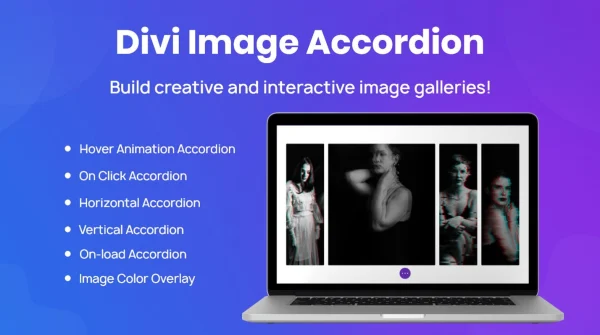
Divi Image Accordion is a WordPress plugin built for Divi users who want to display several images in a compact, interactive accordion. It works inside the Divi Builder and lets you adjust transitions, colors, sizing and hover or click behavior so the accordion matches the rest of your design.
- Version
- 1.4
- Released
- Nov 5, 2025
- Developer
- Divi Next
- Type
- WordPress plugin
- Licence
- GPL
- Included in
- Every plan, or $3.99 on its own
What’s new in Divi Image Accordion 1.4
Version 1.4 · Nov 5, 2025
Latest
What it does
Placing a row of large images on a page can take up a lot of room and push other content far down the screen. An image accordion solves this by stacking images into panels that expand as visitors interact with them. This plugin brings that layout to Divi, so you can present a portfolio, a product gallery or a set of features in a smaller space while still letting people explore each image.
You build the accordion inside the Divi Builder, the same place you edit the rest of your layout. From there you can pick transition effects, set colors, borders and backgrounds, and adjust image dimensions and layout proportions. Hover and click effects control how panels respond to visitors, and the layout is responsive, so it adapts from desktop screens to phones. The markup is clean and semantic, and the code is kept lightweight.
Best for
- Divi sites that need a compact image gallery
- Portfolio sites for designers and photographers
- Business pages presenting products or features visually
Features
Interactive accordion layout
Display multiple images as accordion panels that visitors can interact with, giving a gallery or feature set a compact, space-saving presentation on the page.
Selectable transition effects
Choose from a variety of transition effects to control how panels open and close as visitors move through the images in the accordion.
Color and style controls
Customize colors, borders and backgrounds so the accordion fits your site's branding and the design of the surrounding Divi layout.
Flexible image sizing
Adjust image dimensions and layout proportions to get the display you want while keeping the overall layout intact.
Hover and click effects
Set interactive effects that respond to visitor actions, so panels can react when someone hovers over or clicks on an image.
Responsive design
The accordion adapts its layout across devices, from desktop monitors down to smartphones, so it remains usable on smaller screens.
Works inside Divi Builder
Set up and customize the accordion directly in the Divi Builder alongside your other modules, without switching to a separate editor.
Lightweight, semantic markup
The plugin is built with lightweight code and clean, semantic markup, keeping the accordion's output tidy on the front end.
Questions about Divi Image Accordion
Do I need Divi to use this plugin?
Yes. The plugin is designed specifically for Divi users and works within the Divi Builder. You add and customize the image accordion there, alongside the other modules in your page layout.
Can I change how the accordion looks?
You can. There are controls for colors, borders and backgrounds, plus options for image dimensions and layout proportions. You can also choose from several transition effects to set how the panels open and close.
Will the accordion work on phones and tablets?
The accordion uses a responsive design that adapts across devices, from desktops to smartphones. That means visitors on smaller screens can still browse the images in the layout.
What kinds of content suit an image accordion?
It works well for portfolios, product galleries and sections that present a set of features. Any page where you want several images visible without taking up a lot of vertical space is a good fit.
Is Divi Image Accordion free?
The code of Divi Image Accordion is licensed under the GPL, so anyone may use, change and share it. GPL Feast is a paid service: a plan or a single purchase gives you the download and automatic updates. The developer's own support, licence key and online services are not included.
Which version of Divi Image Accordion is this?
Version 1.4, released Nov 5, 2025. New versions appear here when the developer publishes them, and members get them as automatic updates.
How do I update Divi Image Accordion?
Install the free GPL Feast Updater on your site and connect it with your API key. It installs new versions of Divi Image Accordion automatically and keeps a backup, so you can roll back.
More from Divi Next