Plugin
Updated
Divi Next Blurb
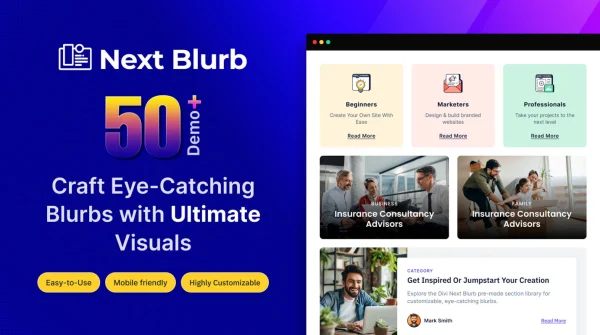
Divi Next Blurb is a WordPress plugin that adds a more flexible blurb element to the Divi Builder. It lets you build blurbs with your own fonts, colors, icons, layouts and animations, all without writing code.
- Version
- 1.3.7
- Released
- Nov 5, 2025
- Developer
- Divi Next
- Type
- WordPress plugin
- Licence
- GPL
- Included in
- Every plan, or $3.99 on its own
What’s new in Divi Next Blurb 1.3.7
Version 1.3.7 · Nov 5, 2025
Latest
What it does
Blurbs are the small blocks of icon or image, heading and text that Divi sites use to present features, services and short messages. The standard options can feel limited when you want blurbs that match a brand closely or stand apart on a page. This plugin gives you more control over how each blurb looks and behaves, so you can shape these blocks to fit your design instead of working around fixed settings.
The plugin works inside the Divi Builder, so you add and edit blurbs with the same drag and drop workflow you already use. You can start from a pre-built layout or arrange your own, then adjust typography, colors, icons, spacing and borders. Entrance animations and hover effects add movement, and blurbs adapt to desktops, tablets and phones. It suits anyone building service pages, feature sections or landing pages in Divi.
Best for
- Web designers building client sites with Divi
- Business sites presenting services or product features
- Divi users who want more blurb styling options
Features
Detailed style controls
Adjust fonts, colors, icons, spacing and borders on each blurb so it matches your site's branding and the rest of your page design.
Multiple layout variations
Pick from several pre-built blurb layouts or put together your own arrangement to present features, services or messages the way you want.
Entrance and hover animations
Add entrance animations and hover effects to blurbs, giving visitors a visual response as they scroll through or interact with your content.
Works in the Divi Builder
Blurbs are added and edited with Divi Builder drag and drop, keeping your usual design workflow intact while you build pages.
Icon and image support
Place icons or images inside your blurbs to give each message a visual anchor alongside its heading and text.
Responsive across devices
Blurbs adapt to desktops, tablets and smartphones, so the layouts you create display properly on different screen sizes.
No coding needed
Clear settings and controls let designers of different skill levels build finished blurbs without touching code or custom CSS.
Questions about Divi Next Blurb
Does this work with the Divi Builder I already use?
Yes. The plugin is built to work inside the Divi Builder, so you add and edit blurbs using the familiar drag and drop interface. Your existing design workflow stays the same, with extra blurb options available as you build.
Can I use images instead of icons in my blurbs?
You can. The plugin supports both icons and images inside blurbs, so you can choose whichever fits the message. You can also style the surrounding elements, such as fonts, colors, spacing and borders, to match your site.
Will the blurbs look right on phones and tablets?
The blurbs are designed to be responsive, adapting to desktops, tablets and smartphones. That means the layouts you create in the builder should display properly across different screen sizes without separate versions for each device.
Do I need coding skills to customize the blurbs?
No coding is required. You work through settings and controls in the builder, choosing layouts, adjusting styles and adding entrance animations or hover effects. The interface is meant to suit beginners as well as experienced designers.
Is Divi Next Blurb free?
The code of Divi Next Blurb is licensed under the GPL, so anyone may use, change and share it. GPL Feast is a paid service: a plan or a single purchase gives you the download and automatic updates. The developer's own support, licence key and online services are not included.
Which version of Divi Next Blurb is this?
Version 1.3.7, released Nov 5, 2025. New versions appear here when the developer publishes them, and members get them as automatic updates.
How do I update Divi Next Blurb?
Install the free GPL Feast Updater on your site and connect it with your API key. It installs new versions of Divi Next Blurb automatically and keeps a backup, so you can roll back.
More from Divi Next