Plugin
Updated
Divi Next Texts
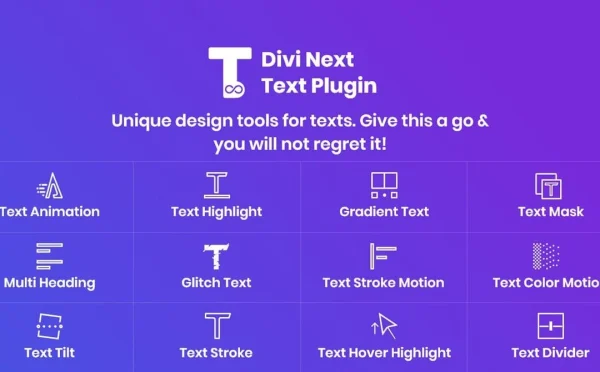
Divi Next Texts is a WordPress plugin for sites built with Divi. It extends text modules with extra styling options, animated text effects and responsive settings, all handled inside the Divi Builder without writing code.
- Version
- 2.3
- Released
- Nov 5, 2025
- Developer
- Divi Next
- Type
- WordPress plugin
- Licence
- GPL
- Included in
- Every plan, or $3.99 on its own
What’s new in Divi Next Texts 2.3
Version 2.3 · Nov 5, 2025
Latest
What it does
The standard text module in Divi covers the basics, but getting headlines and copy to match a brand often means custom CSS or workarounds. This plugin adds detailed typography controls for fonts, sizes, colors, spacing and shadows, plus animations and transitions you can apply to text. It suits business sites, portfolios and blogs where text plays a large part in how a page looks and reads.
Everything happens within the Divi Builder, so you keep the same workflow you already use for layouts. You can start from preset text module styles or build your own looks for different sections of a site. Responsive settings let you adjust how text appears from desktop down to mobile, and the effects are built to display consistently across modern browsers.
Best for
- Divi users who want more control over text modules
- Business, portfolio and blog sites built with Divi
- Designers adding animated headlines without custom code
Features
Detailed typography controls
Adjust fonts, sizes, colors, letter and line spacing, and text shadows so headings and body copy match your brand style.
Animated text effects
Apply animations and transitions to text elements to add movement to headlines, taglines and other parts of a page.
Responsive text settings
Set how text looks on desktop, tablet and mobile so sizing and spacing stay readable on every screen.
Works inside the Divi Builder
All options sit within the Divi Builder, so you style and animate text in the same place you build the rest of the layout.
Preset module styles
Pick from a range of preset text module variations or create your own custom looks for different site sections.
No coding needed
Text effects and styling are set through visual controls, so you can build polished typography without writing CSS or JavaScript.
Cross-browser display
Text effects are built to display consistently across modern browsers, giving visitors a uniform experience.
Questions about Divi Next Texts
Does this work with Divi?
Yes. It is made for Divi users and works directly inside the Divi Builder, so you style and animate text using the same visual workflow you already use to build pages.
Can I animate text without writing code?
Yes. Animations and transitions are applied through the plugin's visual controls in the builder. You choose the effect and adjust settings without touching CSS or JavaScript.
Will my styled text look right on phones?
The plugin includes responsive design controls, so you can adjust text settings for different screen sizes and keep sizing and spacing readable from desktop down to mobile.
Do I have to design every text style from scratch?
No. You can start with one of the preset text module styles and tweak it, or build your own custom looks and use different ones across different sections of your site.
Is Divi Next Texts free?
The code of Divi Next Texts is licensed under the GPL, so anyone may use, change and share it. GPL Feast is a paid service: a plan or a single purchase gives you the download and automatic updates. The developer's own support, licence key and online services are not included.
Which version of Divi Next Texts is this?
Version 2.3, released Nov 5, 2025. New versions appear here when the developer publishes them, and members get them as automatic updates.
How do I update Divi Next Texts?
Install the free GPL Feast Updater on your site and connect it with your API key. It installs new versions of Divi Next Texts automatically and keeps a backup, so you can roll back.
More from Divi Next