Plugin
Updated
Hotel Booking Multi Currency
Hotel Booking Multi-Currency by MotoPress is an addon plugin for the MotoPress Hotel Booking plugin. It adds a currency switcher so travelers can see property rates and booking totals in their preferred currency, while you set the exchange rates yourself from the WordPress dashboard.
- Version
- 1.3.0
- Released
- Feb 6, 2026
- Developer
- Hotel Booking
- Type
- WordPress plugin
- Licence
- GPL
- Included in
- Every plan, or $4.79 a year on its own
What’s new in Hotel Booking Multi Currency 1.3.0
Version 1.3.0 · Feb 6, 2026
Latest
- ImprovedAdded support for transaction fees for PayPal, Stripe, 2Checkout, Braintree, and Beanstream/Bambora payment gateways.
What it does
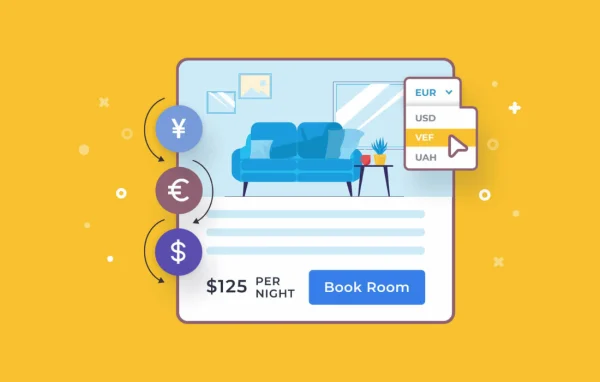
International guests often hesitate when every price on a booking site is in a currency they don't use. They open a converter in another tab, guess at the total and wonder what they will actually pay. This addon handles that step on your site. Visitors pick a currency from a switcher, and rates and totals are recalculated in that currency, so they can compare options and understand the cost of a stay without leaving the page.
The switcher works as a widget you can place in navigation menus or widget areas, and it picks up your theme's styling. You add as many currencies as you need, choose decimal places and set where currency symbols appear. Exchange rates are entered manually in the dashboard, which keeps pricing under your control. Payment is still completed in your default currency, and guests see a clear notice about this at checkout. It suits hotels, guesthouses and rental properties already running MotoPress Hotel Booking.
Best for
- Hotels welcoming guests from many different countries
- Vacation rental sites running MotoPress Hotel Booking
- Guesthouses and B&Bs with an international audience
Features
Unlimited currencies
Add as many currencies as you want to the converter widget so guests from different countries can view prices in the currency they know.
Manual exchange rate control
Update exchange rates directly from the WordPress dashboard, so the converted prices match the rates you choose to apply.
Flexible switcher placement
Place the currency switcher in navigation menus or widget zones, keeping it easy for visitors to find while they browse rooms.
Custom currency formatting
Set the number of decimal points and choose the position of currency symbols so converted prices display the way you prefer.
Matches your theme
The converter widget inherits your site's existing styling, so it fits in with the rest of your design without extra styling work.
Clear checkout notices
Guests browse in their chosen currency, then pay in your default currency, with a notification at checkout explaining this to avoid confusion.
Transaction fee support
Works with transaction fees for the PayPal, Stripe, 2Checkout, Braintree and Beanstream/Bambora payment gateways used by the booking plugin.
Hotel Booking Multi Currency older versions
- 1.2.8Sep 3, 20251 improvement
- 1.2.7May 6, 20251 fix
- 1.2.6May 15, 20241 fix
- 1.2.5Nov 26, 2023
Members and buyers of this product can download older versions.
Questions about Hotel Booking Multi Currency
Does this work on its own, or do I need another plugin?
It is an addon, so it needs the MotoPress Hotel Booking plugin. It adds a currency switcher and conversion to the rates and totals that the booking plugin displays, and it is designed exclusively for that plugin.
Are exchange rates updated automatically?
Rates are controlled manually. You enter and update exchange rates from the WordPress dashboard, which lets you decide exactly which rates apply to converted prices and adjust them whenever you see fit.
Will guests be charged in the currency they select?
No. Guests can view prices in their chosen currency, but payment is completed in your site's default currency. A clear notification at checkout tells them this so there are no surprises when they pay.
Can I control how the currency switcher looks?
Yes. The widget inherits your theme's styling, and you can set the number of decimal points and the position of currency symbols. You can also place the switcher in navigation menus or in widget zones.
Is Hotel Booking Multi Currency free?
The code of Hotel Booking Multi Currency is licensed under the GPL, so anyone may use, change and share it. GPL Feast is a paid service: a plan or a single purchase gives you the download and automatic updates. The developer's own support, licence key and online services are not included.
Which version of Hotel Booking Multi Currency is this?
Version 1.3.0, released Feb 6, 2026. New versions appear here when the developer publishes them, and members get them as automatic updates.
How do I update Hotel Booking Multi Currency?
Install the free GPL Feast Updater on your site and connect it with your API key. It installs new versions of Hotel Booking Multi Currency automatically and keeps a backup, so you can roll back.
More from Hotel Booking