Plugin
Updated
Hotel Booking PDF Invoices
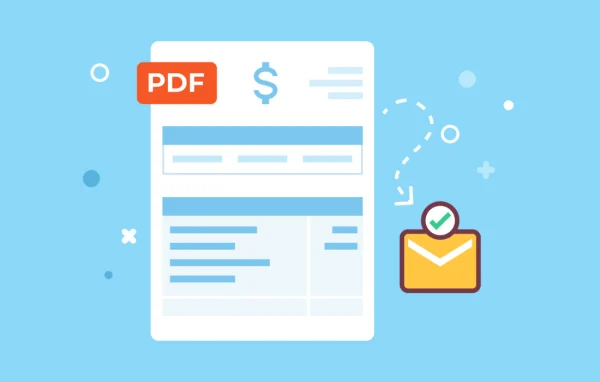
Hotel Booking PDF Invoices by MotoPress is an add-on plugin for WordPress sites that use the Hotel Booking plugin. It generates a PDF invoice for each reservation and attaches it to the booking confirmation email, so guests get a clear billing document without you preparing one by hand.
- Version
- 1.5.4
- Released
- Jun 15, 2026
- Developer
- Hotel Booking
- Type
- WordPress plugin
- Licence
- GPL
- Included in
- Every plan, or $4.79 a year on its own
What’s new in Hotel Booking PDF Invoices 1.5.4
Version 1.5.4 · Jun 15, 2026
Latest
- FixedFixed invoice PDF translations when generating invoices in a selected WPML language.
- ImprovedMoved Dompdf font cache files out of the plugin vendor directory.
What it does
Writing invoices manually for every reservation takes time and invites mistakes, especially when a stay includes extra services, taxes and partial payments. This extension handles that work inside your existing booking setup. When a booking is confirmed, it builds a PDF invoice listing property costs, additional services, taxes, fees and payments, then sends it to the guest with the confirmation email. If a booking or payment status changes later, such as when a final balance arrives, the invoice is regenerated to match.
You can brand the invoice template with your company name, logo and contact details, and set sequential invoice numbering. In the WordPress admin dashboard, you can view, download or print any invoice when you need it for your records. Guests can also be given a download link on the booking confirmation page. The plugin works with sites running WPML, and invoices can be generated in a selected language. It suits hotels, guest houses and rental properties of any size that take reservations through Hotel Booking.
Best for
- Hotels and guest houses taking bookings with Hotel Booking
- Vacation rental sites that need branded guest invoices
- Agencies building reservation sites for hospitality clients
Features
Customizable invoice templates
Add your company name, logo and contact details to the invoice template so every PDF carries your property's branding and information.
Sequential invoice numbering
Invoices are numbered in sequence, which keeps your billing records orderly and makes it easier to find and reference a specific guest invoice.
Automatic email attachments
PDF invoices are attached to booking confirmation emails automatically, so guests receive their billing document without any manual step from your staff.
Full booking charge details
Each invoice lists property costs, additional services, taxes, fees and payments, giving guests a clear breakdown of what they are paying for.
Invoice regeneration on status changes
When a booking or payment status changes, such as receiving a final balance, the invoice updates so it reflects the current state of the reservation.
Admin invoice management
View, download or print any invoice directly from the WordPress admin dashboard to keep your accounting records organized and within reach.
Guest download link
Guests can be offered a link to download their PDF invoice right on the booking confirmation page after they complete a reservation.
Multilingual invoices with WPML
On sites using WPML, invoices can be generated in a selected language, with translations applied to the PDF content.
Hotel Booking PDF Invoices older versions
- 1.5.3Jan 151 improvement, 1 fix
- 1.5.2Sep 3, 20251 improvement
- 1.5.1Jun 13, 20251 fix
- 1.5.0May 27, 2025
- 1.4.2Sep 17, 2024
- 1.4.0Jul 2, 2024
- 1.3.0Nov 26, 2023
Members and buyers of this product can download older versions.
Questions about Hotel Booking PDF Invoices
Does this work on its own or do I need another plugin?
It is an add-on for the MotoPress Hotel Booking plugin and works within that reservation system. It adds PDF invoicing to the bookings Hotel Booking already manages, so you need Hotel Booking running on your site.
Can I put my own logo and business details on the invoices?
Yes. The invoice template lets you add your company name, logo and contact details, and invoices use sequential numbering. This gives every PDF a consistent, branded look that matches your property.
What happens to the invoice if a guest pays the remaining balance later?
The plugin regenerates invoices when a booking or payment status changes. If a final balance is received after the original booking, the invoice updates to show the current payment details, so the document stays accurate.
Can guests get their invoice without waiting for an email?
Yes. Along with attaching the PDF to the confirmation email, you can give guests a download link on the booking confirmation page so they can save their invoice right after booking.
Is Hotel Booking PDF Invoices free?
The code of Hotel Booking PDF Invoices is licensed under the GPL, so anyone may use, change and share it. GPL Feast is a paid service: a plan or a single purchase gives you the download and automatic updates. The developer's own support, licence key and online services are not included.
Which version of Hotel Booking PDF Invoices is this?
Version 1.5.4, released Jun 15, 2026. New versions appear here when the developer publishes them, and members get them as automatic updates.
How do I update Hotel Booking PDF Invoices?
Install the free GPL Feast Updater on your site and connect it with your API key. It installs new versions of Hotel Booking PDF Invoices automatically and keeps a backup, so you can roll back.
More from Hotel Booking