Plugin
Updated
Next Content Toggle
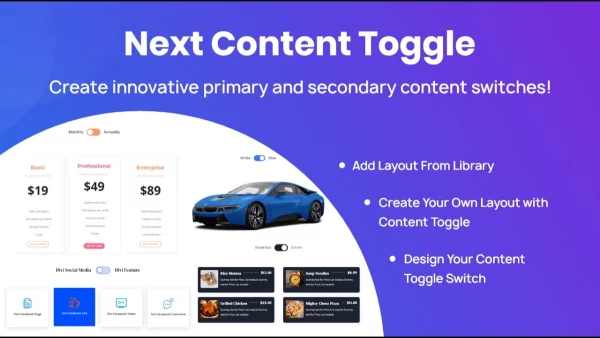
Next Content Toggle is a WordPress plugin built for sites that use Divi Next. It lets you place two or more content sections in the same spot and give visitors a toggle to switch between them, which keeps pages organized without stacking every block on top of each other.
- Version
- 1.0
- Released
- Nov 5, 2025
- Developer
- Divi Next
- Type
- WordPress plugin
- Licence
- GPL
- Included in
- Every plan, or $3.99 on its own
What’s new in Next Content Toggle 1.0
Version 1.0 · Nov 5, 2025
Latest
What it does
Long pages can get cluttered when you need to present related content side by side, such as two versions of a description or different sets of details for different audiences. Next Content Toggle handles this by letting visitors flip between content sections in one area of the page. Only the selected section shows at a time, so the layout stays tidy and readers choose what they want to see.
The plugin is designed to work inside Divi Next layouts, so toggles fit in with the rest of your design. You set them up through an interface that needs no coding, pick a toggle button design and an animation effect, and match the look to your branding. You can run several independent toggle groups on a single page, and the toggles respond to phones and tablets as well as desktops.
Best for
- Divi Next sites that need compact, switchable content areas
- Designers building tidy, interactive page layouts in Divi Next
- Site owners who want toggles without writing code
Features
Switch between content sections
Visitors can move between multiple content sections in the same area of a page using a toggle, with smooth transitions between each section.
Built for Divi Next
The plugin is made for Divi Next layouts, so the toggles sit within your existing designs without extra adjustments.
Customizable toggle styles
Choose from various toggle button designs and animation effects so the switcher matches your site's branding and style.
Multiple toggle groups
Place several toggle areas on one page and manage each of them independently for more freedom in how you arrange content.
Mobile responsive toggles
Content toggling is designed to work across devices, including smartphones and tablets, so mobile visitors can switch sections too.
No coding required
A user-friendly interface lets you create toggles in a few clicks, so site owners can add them without writing code.
Accessibility in mind
The plugin is built with accessibility standards in mind, aiming to keep toggled content usable for visitors who rely on assistive technologies.
Clean HTML markup
Toggles use clean HTML markup, and the toggled content stays in the page structure where search engines can crawl it.
Questions about Next Content Toggle
Does this plugin work with page builders other than Divi Next?
The plugin is described as tailored specifically for Divi Next users and designed to integrate with Divi Next layouts. Compatibility with other builders is not stated, so it is best suited to sites built with Divi Next.
Can I have more than one toggle on the same page?
Yes. The plugin supports multiple toggle groups on a single page, and each toggle area can be managed independently. That lets you use toggles in different sections of a page for different kinds of content.
Can I change how the toggle looks?
You can pick from various toggle button designs and animation effects. This helps the toggle match your brand colors and the overall style of your Divi Next layout rather than looking out of place.
Will the toggles work on mobile devices?
The plugin is built with a mobile responsive design, so content toggling is meant to work on smartphones and tablets as well as desktop screens.
Is Next Content Toggle free?
The code of Next Content Toggle is licensed under the GPL, so anyone may use, change and share it. GPL Feast is a paid service: a plan or a single purchase gives you the download and automatic updates. The developer's own support, licence key and online services are not included.
Which version of Next Content Toggle is this?
Version 1.0, released Nov 5, 2025. New versions appear here when the developer publishes them, and members get them as automatic updates.
How do I update Next Content Toggle?
Install the free GPL Feast Updater on your site and connect it with your API key. It installs new versions of Next Content Toggle automatically and keeps a backup, so you can roll back.
More from Divi Next