Plugin
Updated
Delivery Slots
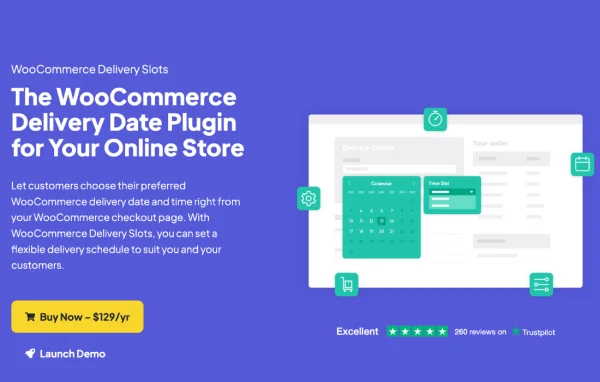
WooCommerce Delivery Slots by Iconic is a WordPress plugin that adds delivery and pickup scheduling to a WooCommerce store. Customers choose their preferred date and time from a calendar at checkout, and you control which slots are offered, how many orders each one takes and what extra fees apply.
- Version
- 2.13.0
- Released
- Apr 20, 2026
- Developer
- IconicWP
- Type
- WordPress plugin
- Requires
- WooCommerce
- Licence
- GPL
- Included in
- Every plan, or $6.39 a year on its own
What’s new in Delivery Slots 2.13.0
Version 2.13.0 · Apr 20, 2026
Latest
- FixedIssue where the reservation table wouldn't save the date when the cart is empty
- FixedFix bug with subscription product where the date would appear incorrect after selecting in the time slot picker for certain timeslots
- FixedAdd defensive check to prevent PHP warnings in get_chosen_shipping_method()
- FixedValidation error for Stripe Express Checkout
What it does
Stores that deliver locally or offer in-store pickup often end up sorting out timing by phone or email after the order is placed. This plugin moves that step into checkout. You define delivery and pickup time slots, and shoppers pick a date and time from a calendar before they pay. You can also offer an as soon as possible option for customers who would rather skip choosing a fixed slot, and set cutoff times so slots close a set number of minutes before they start.
The plugin requires WooCommerce and works with its shipping, local delivery and pickup setups. Slots can be tied to specific shipping methods, locations or ZIP codes, and delivery dates can be restricted by product or category. Order limits per slot keep you from overbooking, while holiday and closed dates block days you cannot fulfill. A reservation system lets shoppers hold a slot before they shop, with an expiry that frees it if the order is not completed, and an upcoming orders view helps you plan each day.
Best for
- Grocery and meal delivery stores with local routes
- Shops offering in-store or curbside pickup
- WooCommerce stores with limited daily delivery capacity
Features
Custom delivery and pickup slots
Set up your own delivery and pickup time slots to match your opening hours, staff availability and the way your business fulfills orders.
Checkout calendar for customers
Shoppers pick their preferred delivery or pickup date and time from a calendar at checkout, with multiple calendar designs and adjustable date formats to choose from.
Order limits per slot
Cap the number of orders each time slot can accept so you never take on more deliveries than your team can handle in that window.
Extra fees by date or time
Charge additional fees for same-day or next-day delivery, for specific time slots or for particular weekdays, so pricing reflects the cost of each option.
Holiday and closed dates
Disable delivery or pickup on holidays and any custom closed dates so customers cannot book a day when your store is not fulfilling orders.
Shipping method and zone rules
Assign slots to specific shipping methods, locations or ZIP codes, which lets you run different schedules for different regions or services.
Slot reservations with expiry
Customers can reserve a delivery slot before they start shopping, and the reservation expires after a time you set if the order is not completed.
Upcoming orders view
See all scheduled deliveries in one place and edit the delivery slot on individual orders directly from the WooCommerce order screens.
Delivery Slots older versions
- 2.12.0Jan 153 fixes
- 2.11.0Nov 19, 20251 improvement, 3 fixes
- 2.10.0Oct 29, 20251 new, 4 fixes
- 2.9.0Oct 3, 2025
- 2.8.0Aug 29, 2025
- 2.7.2Jul 28, 2025
- 2.7.1Apr 29, 2025
- 2.7.0Feb 27, 2025
- 2.6.0Nov 20, 2024
- 2.5.0Sep 26, 2024
Members and buyers of this product can download older versions.
19 older versions in all. If you need one that is not listed, ask support.
Questions about Delivery Slots
Can customers choose pickup instead of delivery?
Yes. You can create separate delivery and pickup time slots, and customers select their preferred date and time for either option from the calendar at checkout. Holiday and closed dates can be applied to pickup as well as delivery.
Can I offer different time slots for different areas?
Yes. Delivery slots can be assigned to specific shipping methods, locations or ZIP codes. This lets you run one schedule for a nearby zone and another for a farther region, or separate schedules for different services.
How do I stop too many orders landing in one time slot?
You can set a maximum number of orders for each slot. Once a slot reaches its limit, it is no longer available. Cutoff times also close slots a set number of minutes before they begin, giving you time to prepare orders.
What happens if a customer reserves a slot but never checks out?
Reservations come with an expiration time that you configure. If the customer does not complete the order before it runs out, the slot is released automatically so other shoppers can book it.
Is Delivery Slots free?
The code of Delivery Slots is licensed under the GPL, so anyone may use, change and share it. GPL Feast is a paid service: a plan or a single purchase gives you the download and automatic updates. The developer's own support, licence key and online services are not included.
Which version of Delivery Slots is this?
Version 2.13.0, released Apr 20, 2026. New versions appear here when the developer publishes them, and members get them as automatic updates.
How do I update Delivery Slots?
Install the free GPL Feast Updater on your site and connect it with your API key. It installs new versions of Delivery Slots automatically and keeps a backup, so you can roll back.
What does Delivery Slots need?
Delivery Slots needs WooCommerce installed and active.
More from IconicWP