Plugin
Updated
Iconic Sales Booster
Iconic Sales Booster for WooCommerce is a cross-sell plugin by Iconic. It places product suggestions at several points in the shopping journey, from the product page to the add-to-cart moment, checkout and after the order is placed. It requires WooCommerce.
- Version
- 1.26.0
- Released
- Nov 17, 2025
- Developer
- IconicWP
- Type
- WordPress plugin
- Requires
- WooCommerce
- Licence
- GPL
- Included in
- Every plan, or $7.99 a year on its own
What’s new in Iconic Sales Booster 1.26.0
Version 1.26.0 · Nov 17, 2025
Latest
- FixedCompatibility issue in Appearance > Editor > Styles > Blocks
What it does
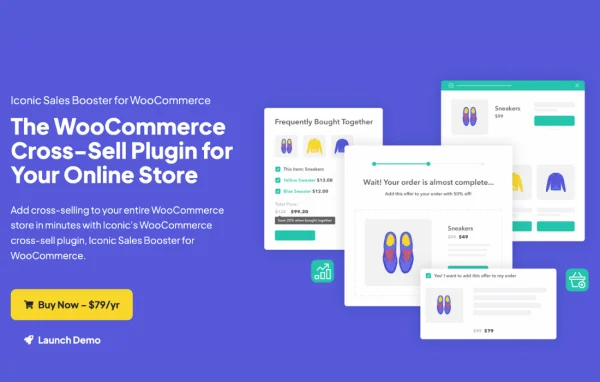
Most stores sell items that go well together, but customers rarely find those pairings on their own. This plugin puts complementary products in front of shoppers at the moments they are already deciding to buy. It covers a Frequently Bought Together section on product pages, a Customers Also Bought popup after an item is added to the cart, an order bump during checkout, and a one-click offer after purchase. Setup does not call for coding.
You control where offers appear and how they read. There are 20 product page placements plus style options, so the sections can match your layout and branding. Titles, sales copy, discounts and product benefits are editable across every touchpoint. Variable products work inside cross-sell sections, post-purchase offers work with WooCommerce-supported payment methods, and WPML lets you show recommendations in more than one language. It suits small shops and larger catalogs alike.
Best for
- WooCommerce stores selling products that pair well together
- Shop owners wanting checkout and post-purchase offers
- Multilingual stores running WPML
Features
Frequently bought together section
Add a customizable Frequently Bought Together block to product pages that suggests related items while shoppers are looking at what they plan to buy.
After add-to-cart popup
Show a Customers Also Bought popup right after someone adds an item to the cart, offering extra products without sending them away from the page.
Checkout order bumps
Present one-time offers during checkout, with discounts and product selections you can set to match the contents of the customer's cart.
One-click post-purchase offers
After checkout, a popup lets customers add products to their existing order with one click, without entering their payment details again.
Placement and style options
Choose from 20 product page placements and a set of style options so cross-sell sections fit your existing layout and branding.
Variable product support
Cross-sell offers can include variable products, and customers can pick the variation they want directly inside the cross-sell section.
Editable sales messaging
Change titles, sales copy, discount offers and product benefits across all cross-sell touchpoints to suit your store's tone and promotions.
WPML multilingual support
Display cross-sell recommendations in multiple languages through WPML, which helps stores that serve customers in different countries.
Iconic Sales Booster older versions
- 1.25.2Jul 28, 20251 fix
- 1.25.1Apr 29, 20251 improvement
- 1.25.0Feb 27, 20251 improvement
- 1.24.0Sep 11, 2024
- 1.23.0Jul 20, 2024
- 1.22.0Jun 19, 2024
- 1.21.0Apr 30, 2024
- 1.20.0Apr 13, 2024
- 1.19.0Mar 19, 2024
- 1.18.1Feb 29, 2024
Members and buyers of this product can download older versions.
20 older versions in all. If you need one that is not listed, ask support.
Questions about Iconic Sales Booster
Where in my store do the cross-sell offers appear?
Offers can appear on product pages as a Frequently Bought Together section, in a popup after an item is added to the cart, as an order bump at checkout, and in a one-click popup after the purchase is completed. Product page sections can use any of 20 placements.
Do customers have to re-enter payment details for post-purchase offers?
No. The post-purchase popup lets customers add products to the order they just placed with one click, with no extra payment data required. These offers work with WooCommerce-supported payment methods.
Can I offer variable products as cross-sells?
Yes. Variable products can be included in cross-sell offers, and shoppers can choose the variation they want, such as a size or color, directly within the cross-sell section.
Can I change the wording and discounts on the offers?
Yes. You can edit titles, sales copy, discount offers and product benefits across every cross-sell touchpoint. Checkout order bumps also let you set the discount and pick products that match what is in the cart.
Is Iconic Sales Booster free?
The code of Iconic Sales Booster is licensed under the GPL, so anyone may use, change and share it. GPL Feast is a paid service: a plan or a single purchase gives you the download and automatic updates. The developer's own support, licence key and online services are not included.
Which version of Iconic Sales Booster is this?
Version 1.26.0, released Nov 17, 2025. New versions appear here when the developer publishes them, and members get them as automatic updates.
How do I update Iconic Sales Booster?
Install the free GPL Feast Updater on your site and connect it with your API key. It installs new versions of Iconic Sales Booster automatically and keeps a backup, so you can roll back.
What does Iconic Sales Booster need?
Iconic Sales Booster needs WooCommerce installed and active.
More from IconicWP