Plugin
Updated
Product Configurator
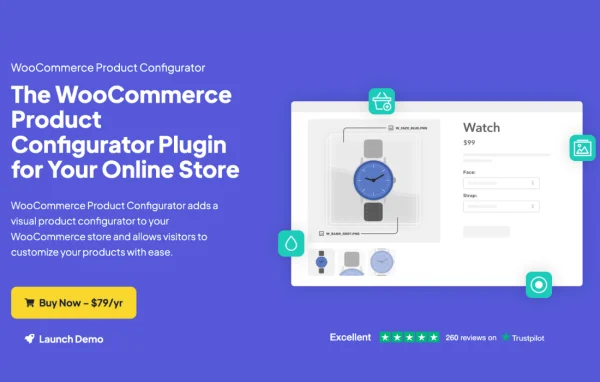
Product Configurator by Iconic is a WooCommerce plugin that lets shoppers customize products visually on the product page. As customers pick options like colors or materials, matching image layers stack over the base product image, so they see a preview of exactly what they are ordering.
- Version
- 1.27.2
- Released
- Apr 21, 2026
- Developer
- IconicWP
- Type
- WordPress plugin
- Requires
- WooCommerce
- Licence
- GPL
- Included in
- Every plan, or $6.39 a year on its own
What’s new in Product Configurator 1.27.2
Version 1.27.2 · Apr 21, 2026
Latest
- FixedImproved compatibility with WooCommerce Attribute Swatches by Iconic
- FixedFatal error regarding invalid type in Imagick->newImage function
What it does
Selling products with many options can be hard when customers only see a single photo and a list of dropdowns. They have to imagine how a color, fabric or finish will look together. This plugin solves that by building the preview from layered images. Each attribute choice adds or swaps a PNG or WebP layer on top of the base image, and the picture updates in real time as the shopper makes selections.
Everything is managed from the standard WordPress product edit screen, where you assign image layers, set defaults and track stock for each attribute option. Conditional logic lets you show specific layers only for certain attribute combinations, which helps with complex products. The customized thumbnail carries through to the mini cart and WooCommerce order screens, so you can see what was ordered. It suits stores selling things like clothing or furniture, and it works with themes and builders such as Elementor and Divi.
Best for
- WooCommerce stores selling customizable clothing or apparel
- Furniture shops offering colors, fabrics and finishes
- Stores with complex products that have many attribute combinations
Features
Live layered image preview
Each option a shopper selects adds an image layer over the base product photo, updating the preview in real time on the product page.
PNG and WebP layers
Build your configurator from layered image assets in PNG or WebP format, so transparent layers stack cleanly on the base image.
Conditional layer logic
Show specific image layers only when certain attribute combinations are chosen, which keeps complex multi-option products accurate and clear.
Stock per attribute option
Track and manage stock levels for each product option directly from the product edit screen, with levels updating automatically as orders come in.
Cart and order thumbnails
A thumbnail of the customized product appears in the mini cart and on WooCommerce order screens, making it easier to process orders correctly.
Default layer options
Set default attribute images so shoppers land on a complete, preconfigured product before they start choosing their own options.
Mobile dropdown selectors
The configurator is responsive and uses dropdown selectors on smaller screens so customers can build products comfortably on phones.
Image caching and preloading
Turn on image caching and layer preloading so the configurator can switch between options without waiting on each image to load.
Product Configurator older versions
- 1.27.1Apr 29, 20251 improvement
- 1.27.0Feb 27, 20251 improvement
- 1.26.0Nov 20, 20242 improvements, 2 fixes
- 1.25.0Aug 22, 2024
- 1.23.0Jun 20, 2024
- 1.22.0Apr 13, 2024
- 1.21.2Dec 15, 2023
- 1.21.1Dec 1, 2023
- 1.20.1Oct 30, 2023
- 1.20.0Aug 29, 2023
Members and buyers of this product can download older versions.
13 older versions in all. If you need one that is not listed, ask support.
Questions about Product Configurator
Does this plugin need WooCommerce?
Yes. It is built for WooCommerce and works with your product attributes. You configure the image layers, defaults and option stock from the regular WooCommerce product edit screen, so it fits into the store workflow you already use.
What image formats can I use for the layers?
You can use PNG and WebP images for your layers. Each layer sits on top of the base product image, so transparent images let options like colors or components stack together into one complete preview.
Will it work with my page builder?
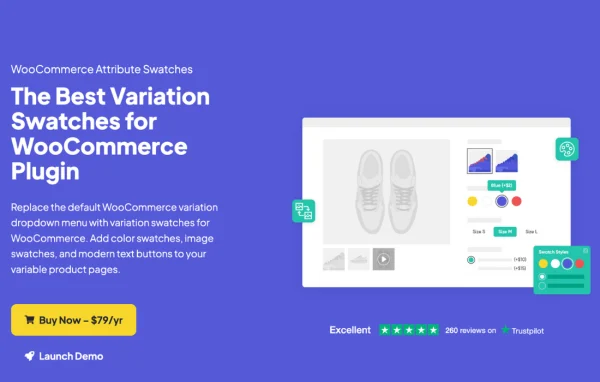
It is designed to work with popular WordPress themes and page builders, including Elementor and Divi. It also works with plugins such as Variation Swatches for WooCommerce and WooCommerce Attribute Swatches by Iconic.
Can I see what a customer configured when the order comes in?
Yes. A thumbnail of the customized product shows in the mini cart and on the WooCommerce order screens. That gives you a visual record of the chosen options, which helps reduce mistakes when fulfilling orders.
Is Product Configurator free?
The code of Product Configurator is licensed under the GPL, so anyone may use, change and share it. GPL Feast is a paid service: a plan or a single purchase gives you the download and automatic updates. The developer's own support, licence key and online services are not included.
Which version of Product Configurator is this?
Version 1.27.2, released Apr 21, 2026. New versions appear here when the developer publishes them, and members get them as automatic updates.
How do I update Product Configurator?
Install the free GPL Feast Updater on your site and connect it with your API key. It installs new versions of Product Configurator automatically and keeps a backup, so you can roll back.
What does Product Configurator need?
Product Configurator needs WooCommerce installed and active.
More from IconicWP