Plugin
Updated
Export Order Items Pro
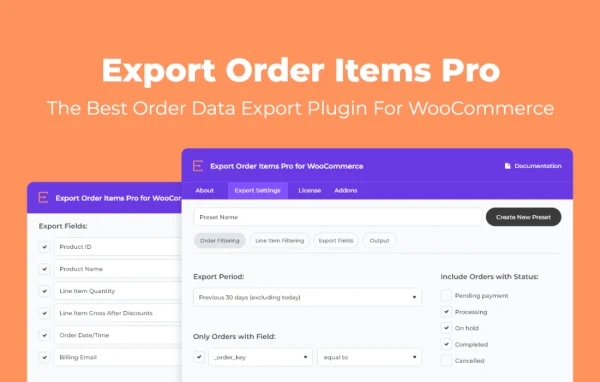
Export Order Items Pro by Aspen Grove Studios is a WooCommerce plugin for exporting order and line item data into custom reports. You choose which orders and products to include, arrange the fields you need and save the file in formats like CSV, XLSX or HTML.
- Version
- 2.1.37
- Released
- Jan 19, 2026
- Developer
- BerryPress
- Type
- WordPress plugin
- Requires
- WooCommerce
- Licence
- GPL
- Included in
- Every plan, or $3.99 a year on its own
What’s new in Export Order Items Pro 2.1.37
Version 2.1.37 · Jan 19, 2026
Latest
- ImprovedRedesigned UI
- ImprovedImplemented BerryPress Updater
What it does
WooCommerce stores collect a lot of order data, but pulling out the exact details needed for bookkeeping, stock counts or sales reviews can mean hours of copying and cleanup. This plugin lets you filter orders by date range, order status, user role, product category, tag and product ID, then export only the items, quantities, prices and customer information that matter for the task at hand. Line item filters go a step further, so you can include or exclude shipping fees, refunds and free items inside each order.
Reports are put together with a drag and drop builder where you pick and order fields, including custom fields, line items and product variations. You can rename headers, add empty rows between groups, show totals and sort ascending or descending so the output is easy to read. Configurations can be saved as presets for recurring exports. With the included add-ons, reports can be scheduled and emailed as attachments, and reports or download links can be embedded in WordPress posts and pages. It requires WooCommerce.
Best for
- WooCommerce store owners handling their own accounting
- Shops tracking inventory and product sales by category
- Agencies producing recurring order reports for client stores
Features
Detailed order filtering
Narrow exports by date range, order status, user role, product category, tag or product ID so each report holds only the orders you need.
Drag and drop report builder
Select and arrange report fields, including custom fields, line items and product variations, to shape the exact layout of each export.
Reusable export presets
Save an export configuration as a preset and run it again later, which keeps recurring reports consistent from one period to the next.
Multiple file formats
Export order data as CSV, CSV-ASCII, XLS, XLSX, HTML or HTML Enhanced to suit spreadsheets, accounting software or web publishing.
Line item and conditional filters
Include or exclude free items, refunds and shipping details, and filter products within orders by tag, category or product ID.
Readable report formatting
Customize headers, insert empty rows between groups, display totals and sort data in ascending or descending order for clearer reports.
Scheduled email reports
Using the included add-ons, schedule reports to generate automatically and arrive by email as attachments for your team.
Frontend report embedding
Place reports or download links inside any WordPress post or page to share order data with team members or customers.
Export Order Items Pro older versions
- 2.1.36Oct 15, 20251 fix
- 2.1.35Sep 17, 20251 new
- 2.1.34Dec 16, 20241 new, 1 fix
- 2.1.33Aug 3, 2024
- 2.1.31May 7, 2024
- 2.1.30Mar 23, 2024
- 2.1.29Mar 13, 2024
- 2.1.28Jan 3, 2024
- 2.1.27Oct 31, 2023
- 2.1.26Oct 21, 2023
Members and buyers of this product can download older versions.
13 older versions in all. If you need one that is not listed, ask support.
Questions about Export Order Items Pro
Can I export only certain products from each order?
Yes. Line item filtering lets you include products by tag, category or product ID, and you can choose to include or exclude shipping fees and refunded items, so the report reflects only the products you care about.
Which file formats can I export to?
Reports can be saved as CSV, CSV-ASCII, XLS, XLSX, HTML or HTML Enhanced. That covers spreadsheet work, imports into accounting software and HTML output for presentations or publishing on your site.
Is it possible to get reports sent automatically?
With the included add-ons, you can schedule reports to be generated on their own and emailed as attachments. Paired with saved presets, this suits recurring weekly or monthly reporting without rebuilding the export each time.
Does it work without WooCommerce?
No. The plugin exports WooCommerce order data, so WooCommerce needs to be active on your site. It can also work with WooCommerce Extra Product Options for stores that use that extension.
Is Export Order Items Pro free?
The code of Export Order Items Pro is licensed under the GPL, so anyone may use, change and share it. GPL Feast is a paid service: a plan or a single purchase gives you the download and automatic updates. The developer's own support, licence key and online services are not included.
Which version of Export Order Items Pro is this?
Version 2.1.37, released Jan 19, 2026. New versions appear here when the developer publishes them, and members get them as automatic updates.
How do I update Export Order Items Pro?
Install the free GPL Feast Updater on your site and connect it with your API key. It installs new versions of Export Order Items Pro automatically and keeps a backup, so you can roll back.
What does Export Order Items Pro need?
Export Order Items Pro needs WooCommerce installed and active.
More from BerryPress