Plugin
Updated
Product Sales Report Pro for WooCommerce
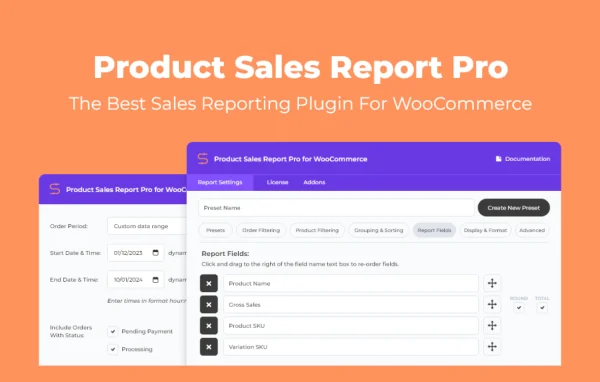
Product Sales Report Pro for WooCommerce is a reporting plugin by Aspen Grove Studios. It builds detailed sales reports from your WooCommerce store data, with filters, grouping and saved presets, so you can see how individual products sell and share the results as files or by email.
- Version
- 2.2.53
- Released
- Jan 19, 2026
- Developer
- BerryPress
- Type
- WordPress plugin
- Requires
- WooCommerce
- Licence
- GPL
- Included in
- Every plan, or $3.99 a year on its own
What’s new in Product Sales Report Pro for WooCommerce 2.2.53
Version 2.2.53 · Jan 19, 2026
Latest
- NewRedesigned UI
- ImprovedImplemented BerryPress Updater
What it does
WooCommerce records every order, but turning that data into a clear view of which products sell, over what period and to whom takes work. This plugin gives you a report builder inside your store. You pick a date range, choose order statuses such as completed, refunded or cancelled, and narrow results by product category, SKU, tag, customer fields or user role. Then you group and sort the data to spot trends and top sellers. It requires WooCommerce and works with the order and product data already in your store.
Once a report looks right, you can save its settings as a preset and run it again with one click, which helps with recurring tasks like monthly accounting or inventory reviews. There is no limit on how many presets you keep, and presets can be exported and imported between WooCommerce sites, so a group of stores can share the same report formats. Reports export as CSV, XLSX, XLS, HTML or Enhanced HTML, or go straight to colleagues by email. Layout options and custom CSS let you match your branding.
Best for
- WooCommerce store owners tracking product sales
- Agencies managing reports for several WooCommerce stores
- Accountants and teams who need regular sales exports
Features
Unlimited saved report presets
Save any combination of report settings as a preset and reuse it later, so recurring reports stay consistent and take one click to generate.
Date and order status filters
Limit reports to specific periods and to order statuses such as completed, refunded or cancelled to focus on the sales data you need.
Product and customer filtering
Build reports around product categories, SKUs or tags, or filter by customer fields and user roles for a targeted look at performance.
Grouping and sorting controls
Group report data by different parameters and set the sort order to make sales trends and best-selling products easier to spot.
Custom report layout
Add dynamic titles, header and total rows, choose which fields appear, and reorder columns with drag and drop to shape the final report.
Multiple export formats
Download reports as CSV, XLSX, XLS, HTML or Enhanced HTML files, or email them directly to colleagues or stakeholders.
Conditional field filters
Apply conditional filters using standard and custom WordPress and WooCommerce fields to build more detailed, specific reports.
Preset sharing across sites
Export report presets from one WooCommerce site and import them on another to keep reporting the same across several stores.
Product Sales Report Pro for WooCommerce older versions
- 2.2.52Jan 15, 20251 fix
- 2.2.51Dec 24, 20242 new, 1 improvement
- 2.2.50Sep 13, 20241 new, 1 improvement
- 2.2.49Aug 13, 2024
- 2.2.48Aug 2, 2024
- 2.2.47May 7, 2024
- 2.2.46Mar 23, 2024
- 2.2.45Mar 13, 2024
- 2.2.44Jan 18, 2024
- 2.2.43Jan 11, 2024
Members and buyers of this product can download older versions.
20 older versions in all. If you need one that is not listed, ask support.
Questions about Product Sales Report Pro for WooCommerce
Does this plugin work without WooCommerce?
No. It is built for WooCommerce and requires it, since all reports come from your store's orders, products and customer data.
Can I open the reports in Excel or another spreadsheet tool?
Yes. Reports export as CSV, XLSX and XLS files, which open in common spreadsheet programs. HTML and Enhanced HTML exports are also available, and you can email reports directly instead of downloading them.
Can I exclude refunded or cancelled orders from a report?
Yes. You can filter by order status, choosing statuses such as completed, refunded or cancelled, and combine that with a date range to get the exact set of orders you want.
I run more than one store. Can I reuse my report setups?
Yes. Report presets can be exported from one WooCommerce site and imported into another, so several stores can share the same report settings without rebuilding them by hand.
Is Product Sales Report Pro for WooCommerce free?
The code of Product Sales Report Pro for WooCommerce is licensed under the GPL, so anyone may use, change and share it. GPL Feast is a paid service: a plan or a single purchase gives you the download and automatic updates. The developer's own support, licence key and online services are not included.
Which version of Product Sales Report Pro for WooCommerce is this?
Version 2.2.53, released Jan 19, 2026. New versions appear here when the developer publishes them, and members get them as automatic updates.
How do I update Product Sales Report Pro for WooCommerce?
Install the free GPL Feast Updater on your site and connect it with your API key. It installs new versions of Product Sales Report Pro for WooCommerce automatically and keeps a backup, so you can roll back.
What does Product Sales Report Pro for WooCommerce need?
Product Sales Report Pro for WooCommerce needs WooCommerce installed and active.
More from BerryPress