Plugin
Updated
Gravity Forms Color Picker
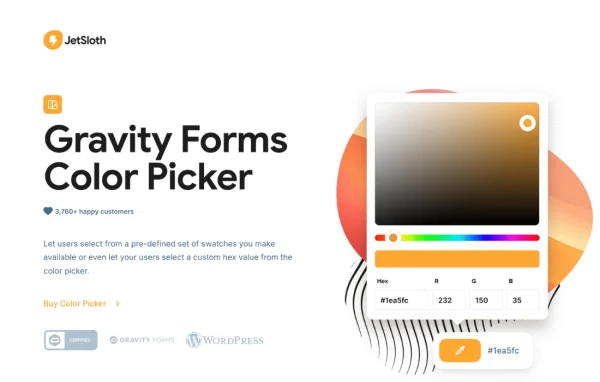
Gravity Forms Color Picker by JetSloth is an add-on plugin for Gravity Forms that lets visitors choose colors inside your forms. They can pick from swatches you define or select any custom hex value, and the chosen colors show up in entries and notifications.
- Version
- 1.4.3
- Released
- Oct 2, 2026
- Developer
- JetSloth
- Type
- WordPress plugin
- Licence
- GPL
- Included in
- Every plan, or $3.19 a year on its own
What’s new in Gravity Forms Color Picker 1.4.3
Version 1.4.3 · Oct 2, 2026
Latest
- ImprovedImproved license activation and update reliability.
What it does
Many forms need a color choice, from a custom print order to a product with several finishes. A plain dropdown of color names leaves people guessing what they will get. This add-on turns radio buttons and checkboxes into visual color swatches, and turns single-line text fields into a popup color picker for any hex value. It suits online stores selling artwork, physical goods or digital products where color matters, along with any form where a visual choice is clearer than a written one.
Setup happens inside the Gravity Forms editor, and you can add color options to new forms or to forms you already use. Six display themes control how swatches look, so you can match your form design without writing CSS. The editor shows a preview of your color choices while you build. After submission, selected colors appear as swatches in the admin entries and in email notifications, which makes reviewing orders easier. The add-on works alongside other Gravity Forms add-ons such as Image Choices and Collapsible Sections.
Best for
- Online stores selling products in custom colors
- Artists and print shops taking personalized orders
- Sites already built around Gravity Forms
Features
Swatches for choice fields
Radio button and checkbox fields can display custom color swatches, so visitors pick a color by clicking it instead of reading a list of names.
Hex color picker popup
Single-line text fields can become a color picker popup, letting visitors choose any custom color by hex value for detailed personalization.
Six display themes
Pick from Pantone, Shadow Box, Circle, Horizontal Bar, Compact and Lozenge styles to fit your form design without writing your own CSS.
Swatches in entries and emails
Selected colors appear as swatches in the Gravity Forms admin entries and in email notifications, which makes reviewing submitted orders quicker.
Apply chosen colors live
Colors a visitor selects can be applied right away to site elements, product visuals or text, giving them an instant view of their choice.
Form editor previews
While editing a form, you see a clean, standardized preview of the color choices, so you know how options will appear before publishing.
Works with other add-ons
The plugin is compatible with popular Gravity Forms add-ons such as Image Choices and Collapsible Sections, so it fits into existing form setups.
New or existing forms
Color options can be added to any Gravity Form, either when building a fresh form or when updating one already on your site.
Gravity Forms Color Picker older versions
- 1.4.0Aug 111 improvement
- 1.3.12Oct 26, 20251 fix
- 1.3.11Oct 22, 20251 improvement
- 1.3.10Oct 20, 2025
- 1.3.9Aug 22, 2025
- 1.3.8Aug 3, 2025
- 1.3.7Jun 18, 2025
- 1.3.6Jun 14, 2025
- 1.3.5May 17, 2025
- 1.3.4Apr 30, 2025
Members and buyers of this product can download older versions.
33 older versions in all. If you need one that is not listed, ask support.
Questions about Gravity Forms Color Picker
Do I need Gravity Forms to use this plugin?
Yes. This is an add-on for Gravity Forms, so it adds color fields and swatch displays to forms built with Gravity Forms. It does not work as a standalone form builder.
Can customers pick any color or only colors I set?
Both options are available. You can offer your own predefined swatches on radio and checkbox fields, or turn a single-line text field into a popup picker where customers choose any custom hex color.
Will I see the selected colors when reviewing orders?
Yes. Chosen colors display as swatches in the Gravity Forms admin entries and in email notifications, so you and your team can see the exact color a customer selected without decoding a hex value.
Can I add color options to forms I have already built?
Yes. The add-on works with new forms and existing ones, so you can add swatches or a color picker to a current form. It is also compatible with add-ons like Image Choices and Collapsible Sections.
Is Gravity Forms Color Picker free?
The code of Gravity Forms Color Picker is licensed under the GPL, so anyone may use, change and share it. GPL Feast is a paid service: a plan or a single purchase gives you the download and automatic updates. The developer's own support, licence key and online services are not included.
Which version of Gravity Forms Color Picker is this?
Version 1.4.3, released Oct 2, 2026. New versions appear here when the developer publishes them, and members get them as automatic updates.
How do I update Gravity Forms Color Picker?
Install the free GPL Feast Updater on your site and connect it with your API key. It installs new versions of Gravity Forms Color Picker automatically and keeps a backup, so you can roll back.
More from JetSloth