Plugin
Updated
Gravity Forms Fetcher
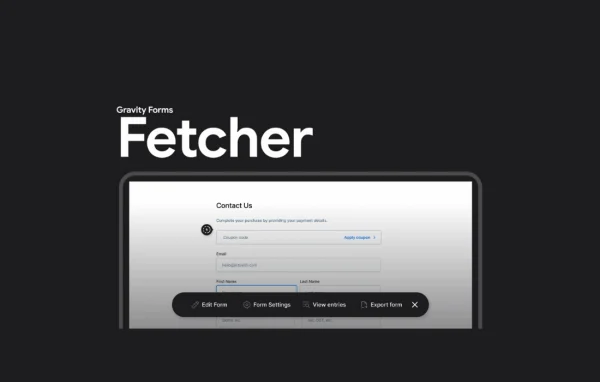
Gravity Forms Fetcher by JetSloth is a WordPress plugin that makes everyday Gravity Forms admin work quicker. It puts common form actions like editing, viewing entries and exporting data a click away, and adds a Spotlight search for jumping straight to any form.
- Version
- 1.3.15
- Released
- Oct 2, 2026
- Developer
- JetSloth
- Type
- WordPress plugin
- Licence
- GPL
- Included in
- Every plan, or $3.19 a year on its own
What’s new in Gravity Forms Fetcher 1.3.15
Version 1.3.15 · Oct 2, 2026
Latest
- ImprovedImproved license activation and update reliability.
What it does
Sites that run a lot of Gravity Forms can make the default WordPress admin feel slow to move around in. Finding one form, opening its entries, then heading back to export data often means clicking through several backend pages. This plugin cuts down that back and forth by placing inline quick links next to each form, so the actions you use most often sit right where you are already working.
The Spotlight search is the other main piece. Press Ctrl (Cmd on a Mac) plus Shift plus F, type part of a form name, then use the arrow keys and Enter to open it. Spotlight works in the WordPress admin and on the front end of your site. You can also choose a vertical, inline or docked layout for the navigation menu, and it ties in with JetSloth's Bulk Actions Pro add-on for bulk editing.
Best for
- Sites running many Gravity Forms that need frequent edits
- Agencies and freelancers managing forms on client sites
- Developers who prefer keyboard shortcuts in the admin
Features
Inline quick links
Edit a form, view its entries or export its data using links placed directly next to each form, without hunting through separate admin screens.
Spotlight form search
Search for any form by name from a single Spotlight box, which is available both in the WordPress admin area and on the front end of your site.
Keyboard shortcut access
Open Spotlight at any time with Ctrl (or Cmd) plus Shift plus F, so finding a form takes a quick key press instead of menu clicks.
Arrow key navigation
Move through Spotlight results with the arrow keys and press Enter to open a form, letting you work through forms without reaching for the mouse.
Flexible menu layouts
Choose a vertical, inline or docked layout for the inline navigation menu so it sits where it suits the way you work.
Bulk Actions Pro integration
When used with JetSloth's Bulk Actions Pro add-on, bulk editing options become available straight from the inline menu.
Gravity Forms Fetcher older versions
- 1.3.14May 41 new
- 1.3.13Oct 26, 20252 fixes
- 1.3.7Aug 31, 20251 improvement
- 1.3.4Aug 29, 2025
- 1.3.3Aug 22, 2025
- 1.3.0Aug 5, 2025
- 1.2.6Jul 24, 2025
- 1.2.5Jun 20, 2025
- 1.2.3Jun 12, 2025
- 1.2.2Jun 3, 2025
Members and buyers of this product can download older versions.
18 older versions in all. If you need one that is not listed, ask support.
Questions about Gravity Forms Fetcher
Does this plugin replace Gravity Forms?
No. It works alongside Gravity Forms and adds faster ways to reach your existing forms. You still build and manage forms in Gravity Forms, while this plugin adds inline quick links and a Spotlight search on top of it.
Can I search for forms from the front end of my site?
Yes. The Spotlight search is available on the front end as well as in the WordPress admin. Press Ctrl or Cmd plus Shift plus F to open it, type a form name, then use the arrow keys and Enter to open the one you want.
Can I change where the quick links menu appears?
Yes. The inline navigation menu offers vertical, inline and docked layouts, so you can pick the placement that fits your workflow and keeps the links handy without getting in the way.
Does it work with Bulk Actions Pro?
It does. When JetSloth's Bulk Actions Pro add-on is also in use, its bulk editing options can be reached right from the inline menu, which saves trips to separate screens when changing several fields or forms.
Is Gravity Forms Fetcher free?
The code of Gravity Forms Fetcher is licensed under the GPL, so anyone may use, change and share it. GPL Feast is a paid service: a plan or a single purchase gives you the download and automatic updates. The developer's own support, licence key and online services are not included.
Which version of Gravity Forms Fetcher is this?
Version 1.3.15, released Oct 2, 2026. New versions appear here when the developer publishes them, and members get them as automatic updates.
How do I update Gravity Forms Fetcher?
Install the free GPL Feast Updater on your site and connect it with your API key. It installs new versions of Gravity Forms Fetcher automatically and keeps a backup, so you can roll back.
More from JetSloth