Plugin
Updated
Gravity Forms Tooltips
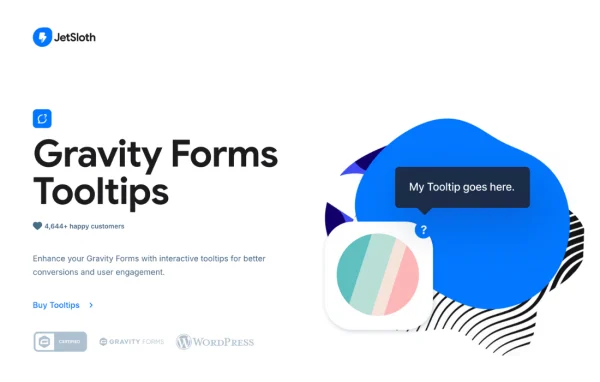
Gravity Forms Tooltips by JetSloth is a WordPress plugin that adds tooltips to your Gravity Forms fields. Visitors hover over a question mark icon and see a short message explaining what a field needs, so they can fill in your forms with fewer mistakes.
- Version
- 1.2.16
- Released
- Oct 2, 2026
- Developer
- JetSloth
- Type
- WordPress plugin
- Licence
- GPL
- Included in
- Every plan, or $3.99 a year on its own
What’s new in Gravity Forms Tooltips 1.2.16
Version 1.2.16 · Oct 2, 2026
Latest
- ImprovedImproved license activation and update reliability.
What it does
Forms often confuse people. A field label can be too short to explain what format you expect, why you need certain information or what each option means. This add-on lets you attach a helpful message to any field, which appears when a visitor hovers over a question mark icon. It works for registrations, customer data, feedback and other forms built with Gravity Forms, and you can add tooltips to forms you already have without rebuilding them.
Tooltips are managed from a settings panel, so you can add, edit and style them without writing code. You can set the look globally, then override it for individual forms by adjusting the icon, font size and font color. The tooltip content accepts HTML, which means you can include images, GIFs, links and iframe embeds. It works with all core Gravity Forms field types and with other JetSloth add-ons, including Collapsible Sections, Image Choices and Gravity Forms Color Picker.
Best for
- WordPress sites that collect data with Gravity Forms
- Agencies building detailed client registration or application forms
- Site owners using other JetSloth Gravity Forms add-ons
Features
Tooltips on every field type
Add tooltips to all core Gravity Forms field types, including text fields, dropdowns, radio buttons and checkboxes, so help is available wherever visitors need it.
Tooltips for individual choices
Attach a separate tooltip to each option in radio button and checkbox fields, giving visitors a clear explanation of every choice they can select.
HTML content in tooltips
Write tooltip content with HTML markup, including images, GIFs, clickable links and iframe embeds, for richer help messages than plain text allows.
Global and per-form styling
Set tooltip appearance once for the whole site, then override it on specific forms with controls for the icon, font size, font color and more.
Works with existing forms
Apply tooltips to forms you have already built as well as new ones, without needing to recreate fields or rebuild your forms from scratch.
Compatible with JetSloth add-ons
Use tooltips alongside JetSloth add-ons such as Collapsible Sections, Image Choices and Gravity Forms Color Picker in the same form.
No-code settings panel
Add, edit and style tooltips from a straightforward settings interface, so you can manage form hints without touching any code.
Gravity Forms Tooltips older versions
- 1.2.14Nov 21, 20251 improvement
- 1.2.13Oct 26, 20251 fix
- 1.2.11Oct 20, 20251 improvement
- 1.2.10Aug 23, 2025
- 1.2.9Aug 22, 2025
- 1.2.8Aug 9, 2025
- 1.2.7Aug 3, 2025
- 1.2.6Jun 14, 2025
- 1.2.4May 17, 2025
- 1.2.3Apr 1, 2025
Members and buyers of this product can download older versions.
39 older versions in all. If you need one that is not listed, ask support.
Questions about Gravity Forms Tooltips
Which form fields can I add tooltips to?
You can add tooltips to all core Gravity Forms field types, including text fields, dropdowns, radio buttons and checkboxes. For radio buttons and checkboxes, you can also attach a tooltip to each individual option, which helps explain choices that might otherwise be unclear.
Do I need to rebuild my current forms to use it?
No. The plugin works with both new and existing Gravity Forms, so you can open a form you already use and add tooltips to its fields. Your existing fields and settings stay in place.
Can tooltips include images or links?
Yes. Tooltip content supports HTML markup, so you can include images, GIFs, clickable links and even iframe embeds. This is useful when a field needs a visual example, such as showing where to find a number on a document.
Can I match the tooltips to my site's design?
You can control tooltip appearance globally and override it on a per-form basis. Options include the icon, font size and font color, so the tooltips can follow your branding across different forms.
Is Gravity Forms Tooltips free?
The code of Gravity Forms Tooltips is licensed under the GPL, so anyone may use, change and share it. GPL Feast is a paid service: a plan or a single purchase gives you the download and automatic updates. The developer's own support, licence key and online services are not included.
Which version of Gravity Forms Tooltips is this?
Version 1.2.16, released Oct 2, 2026. New versions appear here when the developer publishes them, and members get them as automatic updates.
How do I update Gravity Forms Tooltips?
Install the free GPL Feast Updater on your site and connect it with your API key. It installs new versions of Gravity Forms Tooltips automatically and keeps a backup, so you can roll back.
More from JetSloth